Popp
Z-Weather
SKU: POPE005206
Quickstart
This is a Sensor for Europe. Please make sure the internal battery is fully charged. Push the button 3 times within 1.5 seconds. If the LED is not blinking after
releasing the button, Z-Weather has not enough energy and must be charged for several hours in bright sunlight.
Important safety information
Please read this manual carefully. Failure to follow the recommendations in this manual may be dangerous or may violate the law. The manufacturer, importer,
distributor and seller shall not be liable for any loss or damage resulting from failure to comply with the instructions in this manual or any other material. Use this
equipment only for its intended purpose. Follow the disposal instructions. Do not dispose of electronic equipment or batteries in a fire or near open heat sources.
What is Z-Wave?
Z-Wave is the international wireless protocol for communication in the Smart Home. This device is suited for use in the region mentioned in the Quickstart section.
Z-Wave ensures a reliable communication by reconfirming every message (two-way communication) and
every mains powered node can act as a repeater for other nodes (meshed network) in case the receiver is not
in direct wireless range of the transmitter.
This device and every other certified Z-Wave device can be used together with any other certified Z-Wave
device regardless of brand and origin as long as both are suited for the same frequency range.
If a device supports secure communication it will communicate with other devices secure as long as this
device provides the same or a higher level of security. Otherwise it will automatically turn into a lower level of
security to maintain backward compatibility.
For more information about Z-Wave technology, devices, white papers etc. please refer to www.z-wave.info.
Product Description
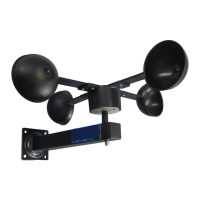
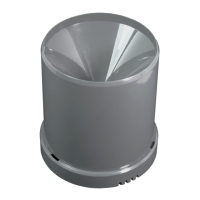
Z-Weather is a cup anemometer for Z-Wave installations. It continually measures the wind speed and can, for example, trigger closing of the awnings and blinds if it is
too windy. It also measures the amount of rotation, enabling calculation of the wind yield per day or per year. In addition, Z-Weather includes sensors for humidity,
temperature, air pressure and dew point, essentially providing the core sensors of a weather station. Z-Weather is powered by a solar cell and stores energy on an
internal capacitor, enabling continuous operation, even with few sun for a couple of days. It does not use any batteries and is completely maintenance free. Using the
built-in solar cell it also measures the ambient light and the solar yield. This information can be used to turn on the outdoor light at dusk time and turn the light off in the
morning. Z-Weather!s wind yield and solar yield metering can be used as a calculation base for planning a wind generator or a solar panel on the roof of a house.
During normal operation, Z-Weather is limiting continuous measurement to wind speed and solar radiation, other sensors are operating only on demand. This
conservative energy management ensures continuous operation with the limited energy harvested from the solar cell powering Z-Weather. The Z-Wave radio
frequency transmitter is turned off most of the time and is turned on if there is too much wind, at twilight time and on a continuous base, depending on the energy
budget. The wake up interval is between five minutes at noon in summer and five hours in the second half of the night in winter. Z-Weather also wakes up on pushing
the button.
Prepare for Installation / Reset
Please read the user manual before installing the product.
In order to include (add) a Z-Wave device to a network it must be in factory default state. Please make sure to reset the device into factory default. You can do this
by performing an Exclusion operation as described below in the manual. Every Z-Wave controller is able to perform this operation however it is recommended to use
the primary controller of the previous network to make sure the very device is excluded properly from this network.
Reset to factory default
This device also allows to be reset without any involvement of a Z-Wave controller. This procedure should only be used when the primary controller is inoperable.


 To Next Page
 Need help?
 General