03
2 Control Panel
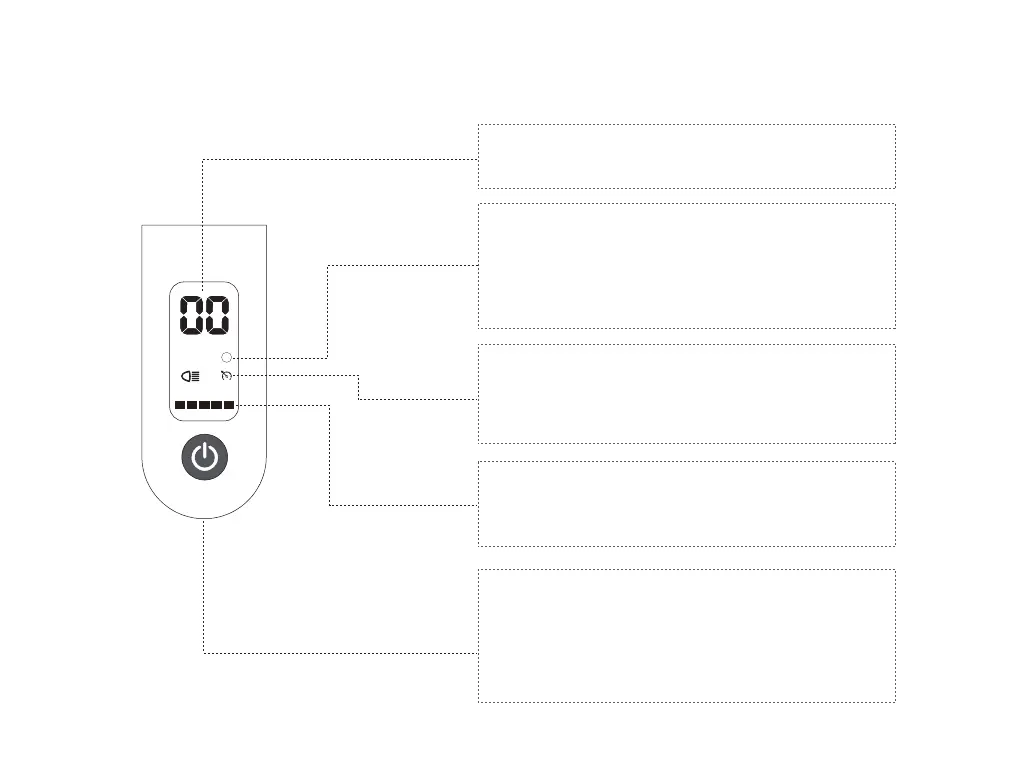
Mode Display
Cruise control
The scooter has 3 speed modes which can be selected.
To change modes, press the power button twice.
ECO - Approx. 6 mi/h speed
D - Approx. 9 mi/h speed
S - Top speed of 15 mi/h
Speed Display
When the scooter is ridden, the riding speed will be
displayed on the control panel.
Battery Level Display
The battery charging level is indicated by 5 bars on the
control panel. As the battery charging is consumed, less
bars will be displayed.
Power Button
The power button is used to power and configure the
scooter.
Turn On - Press the power button & hold for 2 seconds
Turn O - Press the power button & hold for 2 seconds
Headlight - Turn On, press the power button once
Change Speed - Press the power button twice
NOTE: The scooter will beep and flash over 15mph as speed warning.
Cruise control will be activated when the throttle is
engaged for more than 3 seconds.
Press down the throttle completely or apply the brake
to deactivate the cruise control.
mph
ECO D
S


 To Next Page