UNPACK AND SET-UP
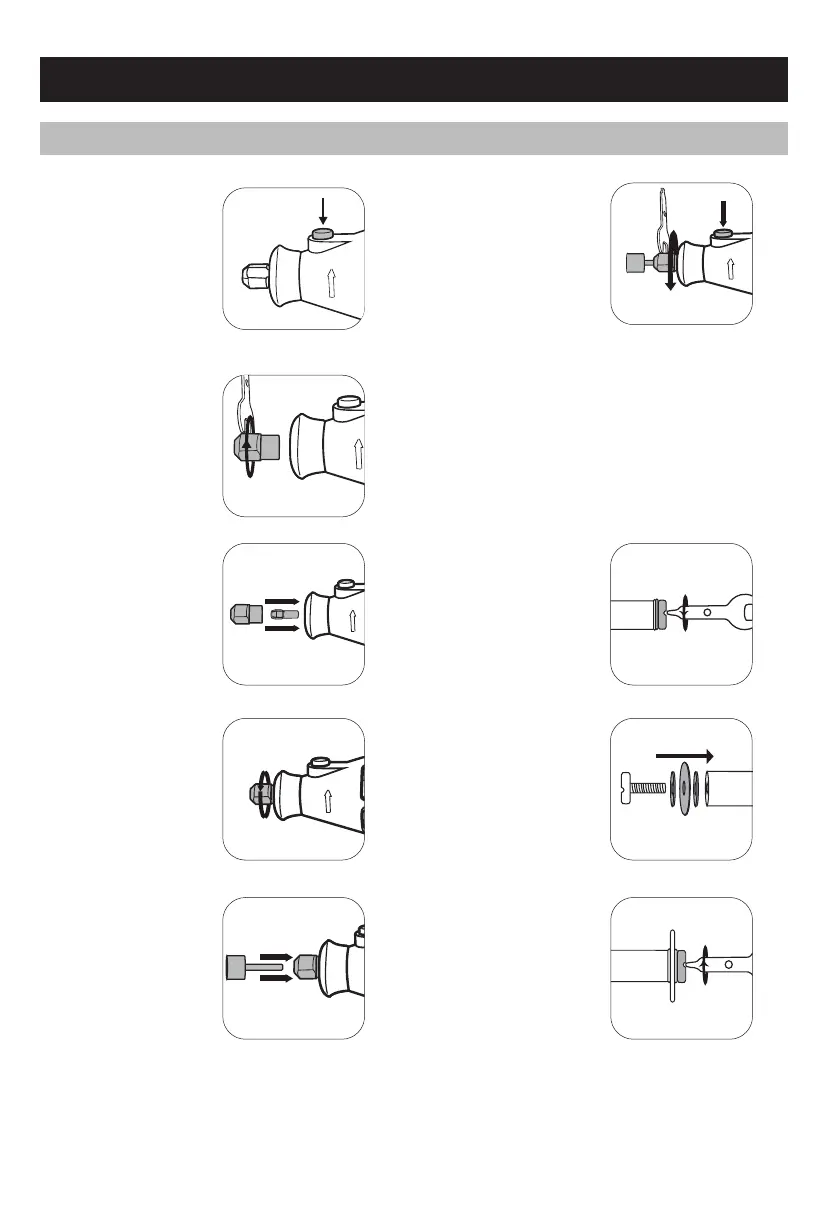
CHANGING ACCESSORIES
1
Press and hold the
spindle
lock button.
3 Select a suitable collet
for the accessory to be
used and insert, then
cover with collet nut.
(Note: The shipped
machine is already
fitted with a collet of
1/8”)
4 Lightly tighten the
collet nut so that it
stays in place.
2 Unscrew the collet
nut and remove
completely with the
supplied wrench.
Locating a cutting/sanding disc
3 Tighten the cutting/
sanding disc onto
the cutting/sanding
mandrel with the wrench.
1 Remove the screw
from the end of the
mandrel with the wrench.
NOTE: DO NOT over tighten the screw as it could result in
damage to the cutting disc.
6 Tighten collet nut
using spindle lock
and wrench.
2 Fit the fibre flange
on either side of the
cutting/sanding
disc, then insert
the screw.
5 Insert shank of
accessory into
the collet.
CAUTION: It is recommended that no accessory larger than
35mm (1.37”) in diameter should be fitted to the rotary tool.


 To Next Page