72 Seats, Mirrors and Steering Wheel
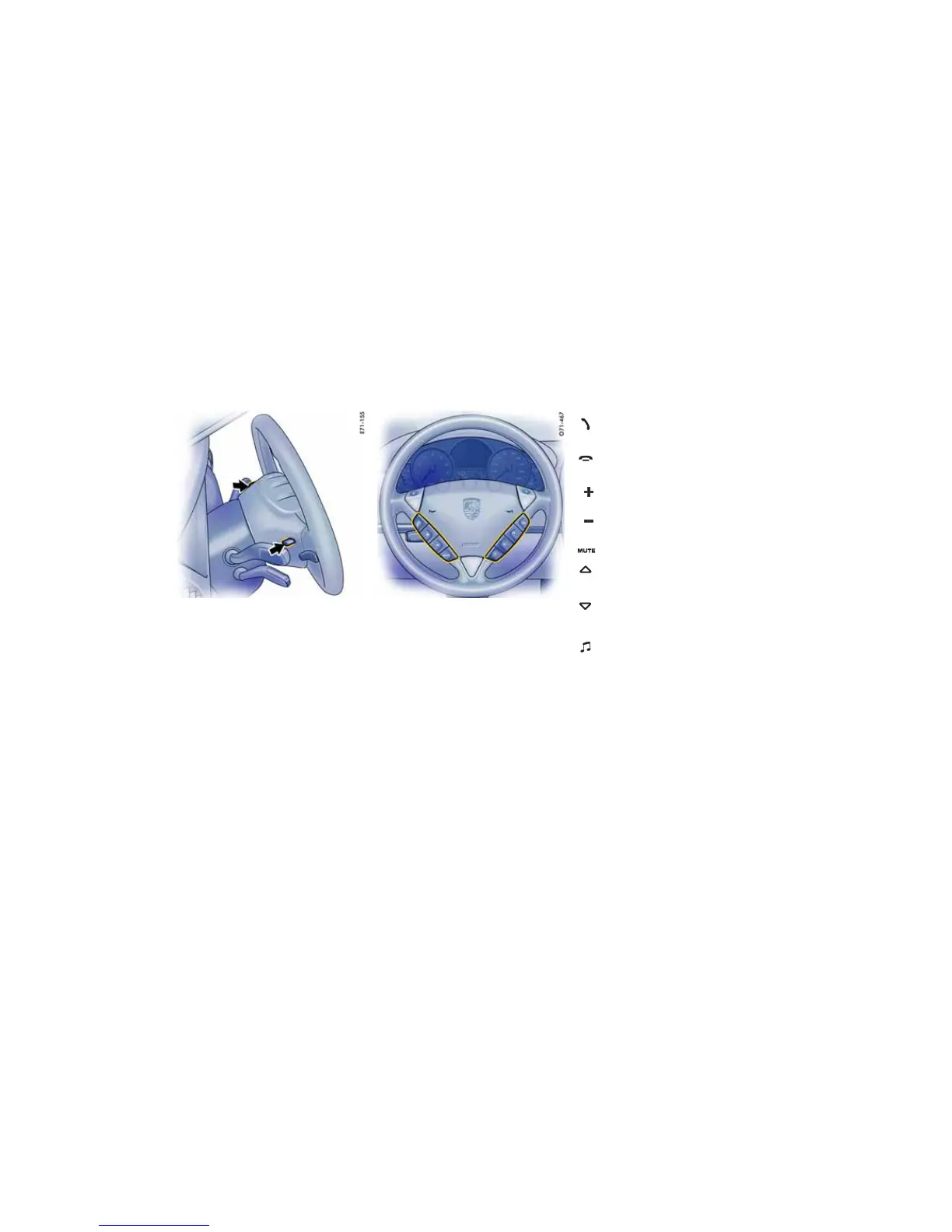
Steering wheel buttons – lighting
When the light switch is operated, the light switch-
es on automatically.
Using the buttons on the back of the steering
wheel (arrow), the lighting for the function keys
and the rocker switches can be switched on and
off.
Switching lighting off
f Press button.
Switching lighting on
f Press button again.
Multi-functional steering wheel with
telephone function
f Please observe the operating instructions sup-
plied for the Porsche communication systems
before operating the function keys.
Answer the telephone
– Take calls.
Hang up the telephone
– End or reject the call.
Increase the volume of the relevant
communication system
Decrease the volume of the relevant
communication system
Switch off the sound
Next radio station/title
– Select the next radio station or title.
Last radio station/title
– Select the previous radio station or
title.
Source selection
– Select available audio source.
Depending on the equipment in your
vehicle, the following sources are
available:
radio, CDS (single CD player), CDC
(CD changer).








 To Next Page