Air Conditioning, Parking Heater and Heated Rear Window 85
Brief Overview – Automatically
Controlled 4-Zone Air-Conditioning
System, Front Control Panel
This brief overview does not replace the informa-
tion provided in the chapter ”Automatically
Controlled 4-Zone Air-Conditioning“. In particular,
warnings are not replaced by this brief overview.
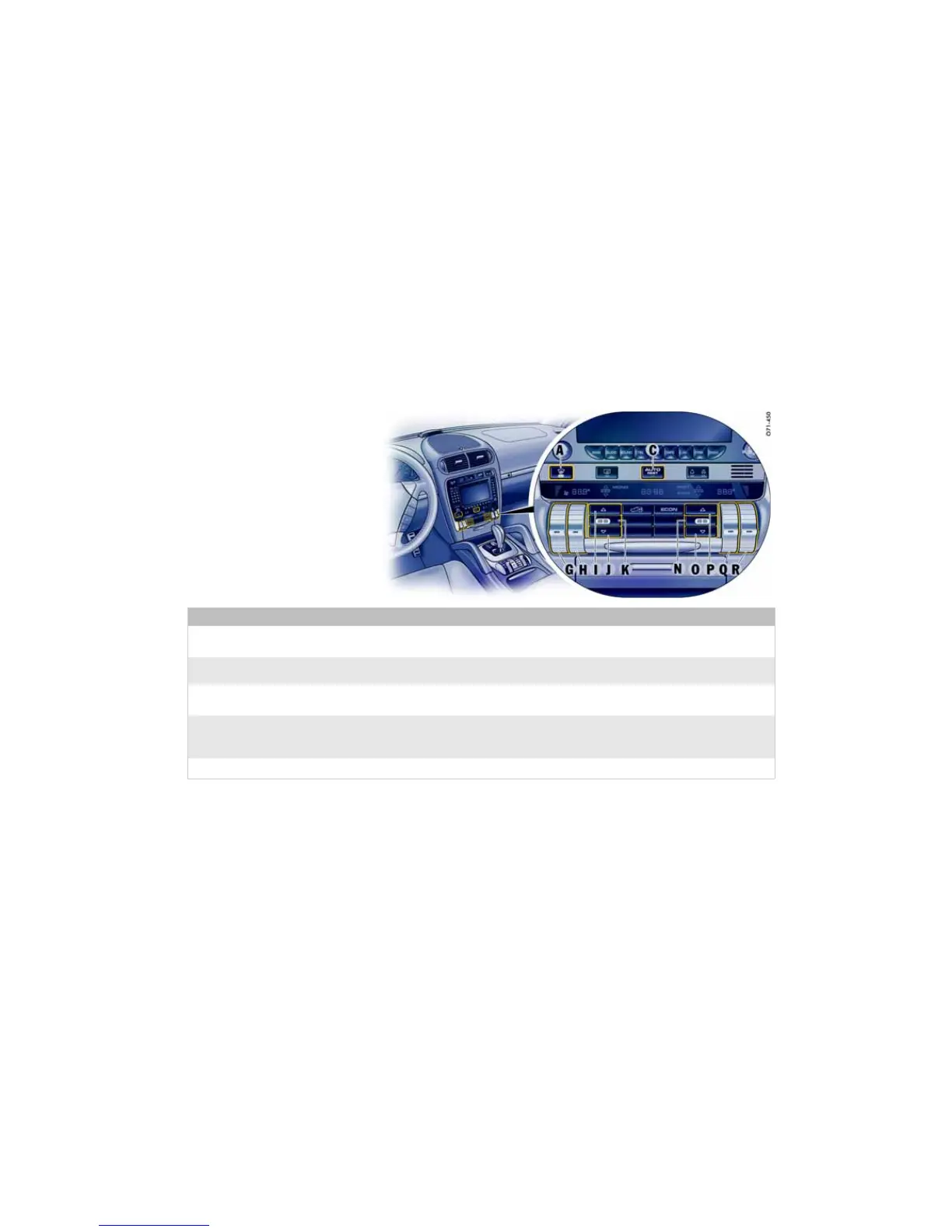
What do I want to do? What do I have to do?
Switching on automatic air-conditioning
system at front
Press button C.
Setting temperature at front
Left side: Push button H up (warmer) or down (colder).
Right side: Push button Q up (warmer) or down (colder).
Setting air quantity at front
Left side: Push button G up (more) or down (less).
Right side: Push button R up (more) or down (less).
Setting air distribution at front
Air to windshield, left or right side: Press button I or P.
Air to central and side vents, left or right side: Press button K or N.
Air to footwell, left or right side: Press button J or O.
Defrosting windshield
Press button A.




 To Next Page