12
CONNECTING TO POWER SOURCE
Confirm that the switch is "OFF" and the power circuit
voltage is the same as the voltage shown on the
specification plate. Connect the machine to a power circuit.
STARTING AND STOPPING THE MOTOR
Before starting the router, make sure bit is clear of workpiece
and foreign objects. Also keep a firm grip on the router to resist
starting torque.
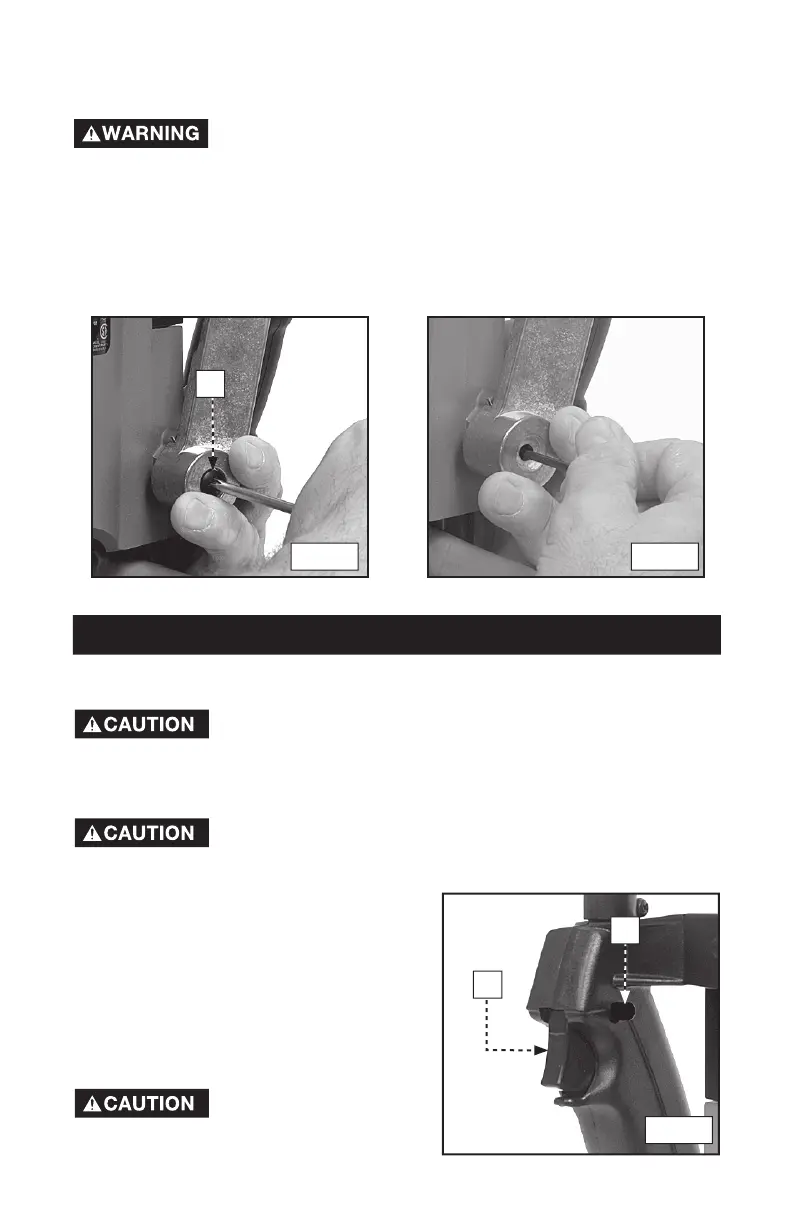
1. Squeeze the trigger switch (A) Fig. 9
to start the motor. Release the trigger
switch to stop the motor.
2. To allow the motor to run continuously,
press the trigger switch (A), push the
lock button (B) Fig. 9, and release the
trigger switch.
3. To release the lock button, squeeze the
trigger switch and release.
To avoid injury or damage
to finished work, allow
the motor to come to a COMPLETE STOP
before putting it down.
OPERATION
ADJUSTING PLUNGE LOCKING LEVER
You can adjust the plunge locking mechanism to compensate for wear or to
reposition lever (in locked position). To adjust:
Disconnect tool from power source.
1. Hold the lever in the upright position (see Fig. 7). Use a phillips screwdriver
to remove retaining screw (V) Fig. 7. Continue to hold the lever through the
remaining steps.
2. Insert a 1/8" hex wrench (not furnished) into the adjusting screw (see Fig. 8)
and turn counter-clockwise approximately 1/2 turn.
3. Move the lever to the desired position and tighten the adjusting screw.
4. Remove the hex wrench and replace the retaining screw.
V
Fig. 7 Fig. 8
Fig. 9
A
B





 To Next Page