12
8931 PLUNGE BASE
INSTALLING AND REMOVING THE BIT
1. Stand the router upside down on its motor cap (Fig. 8B).
2. Clean and insert the shank of the bit into the collet until the shank
bottoms. Then back it out approximately 1/16".
3. Press the spindle lock button (A) Fig. 8B, and place a wrench on collet
nut (Fig. 8B). Tighten firmly.
NOTE: See “Installing and Removing Bits Using Spindle Lock Actuator
When Router is Table Mounted” on next page for more direction
on using the spindle lock.
4. To remove the bit, reverse the procedure.
Fig. 8B
A
Fig. 9
A
B
C
Disconnect tool from power source.
Do not allow the wrenches to contact the columns (A) Fig. 9.
Columns could be damaged, restricting the plunge action.
Avoid possible damage to collet. Never tighten collet without a
bit.
If you remove the springs from the posts (E) Fig. 11 to use
the plunge base in a router table, remove the post plugs
carefully. They are spring-loaded and should be removed
only when the base housing is in the up position (Fig. 8B).
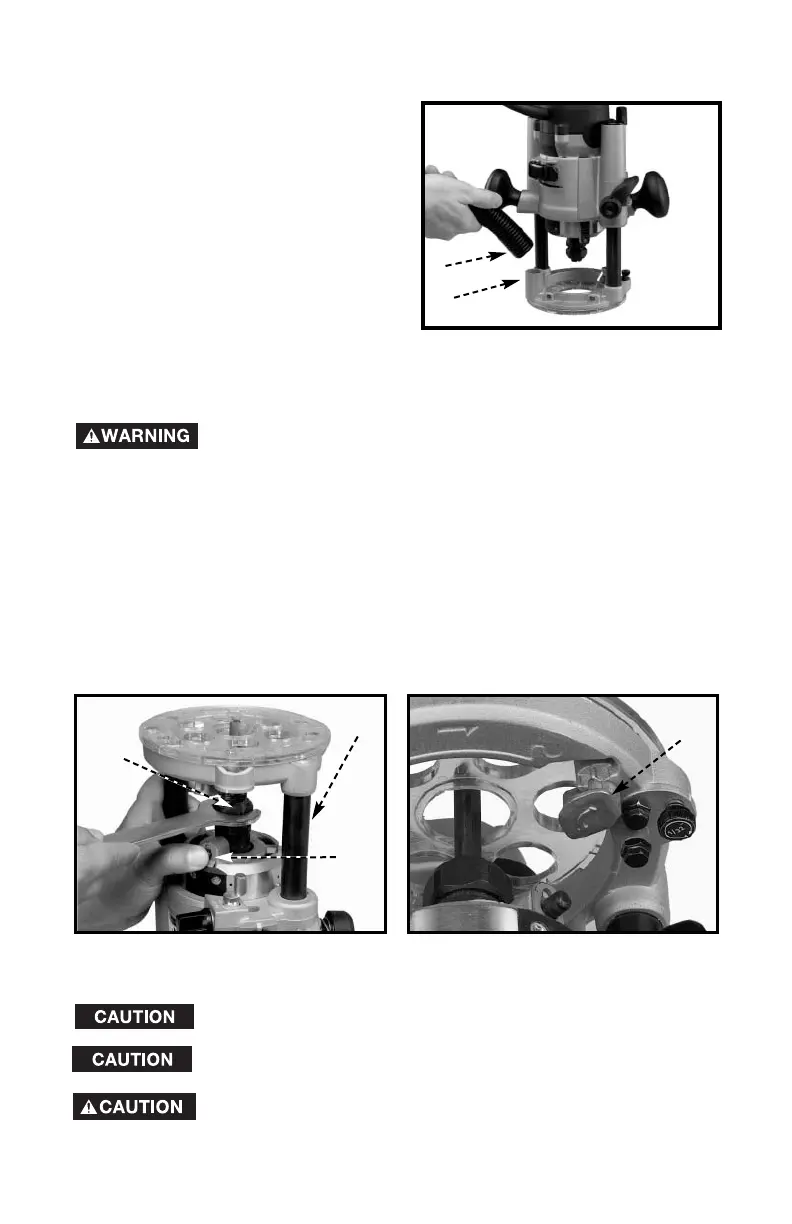
VACUUM HOSE
A standard 1" vacuum hose (A) Fig.
8A can be attached to the dust port
(B) Fig. 8A to connect the tool to a
vacuum cleaner or dust collection
system.
A
B
Fig. 8A


 To Next Page