16
STARTING AND STOPPING THE MOTOR
Before starting the tool, clear the work area of all foreign
objects. Also keep a firm grip on the tool to resist starting
torque.
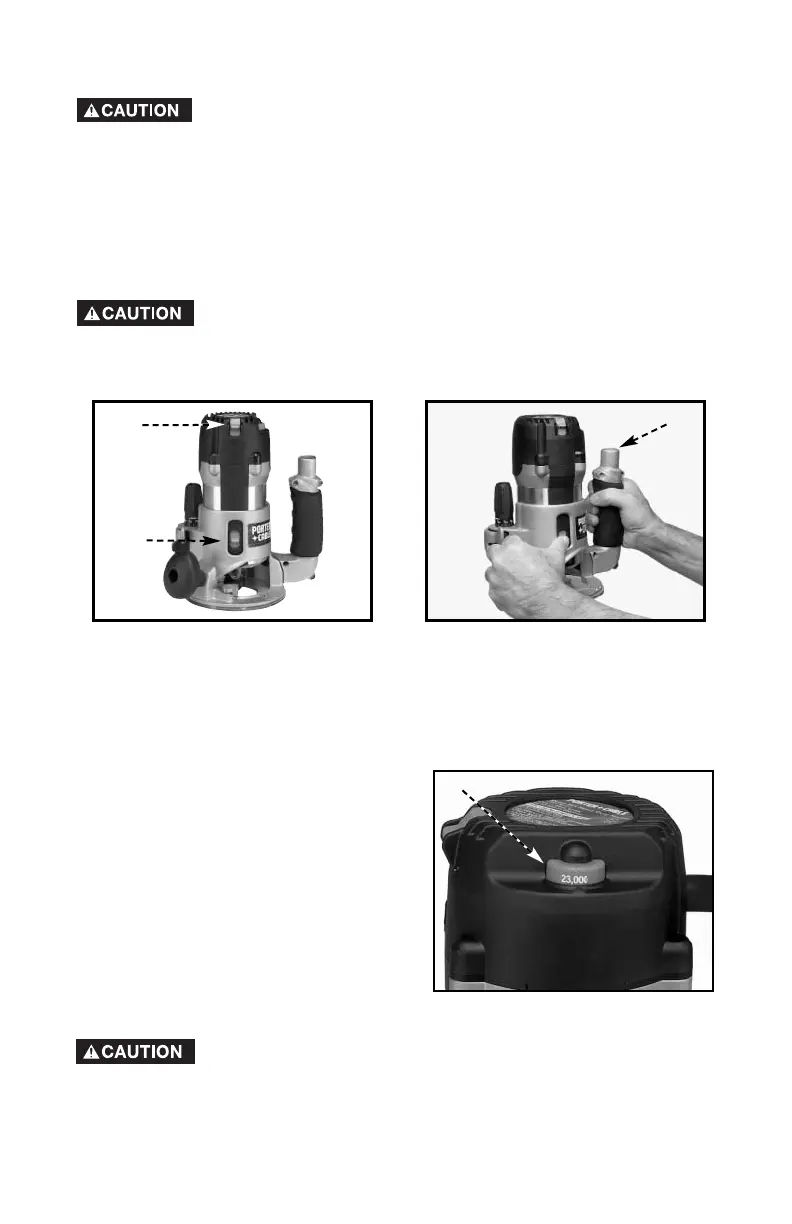
Two switches (A and B) Fig. 19 turn this tool “ON” and “OFF”. Additionally,
the upper switch (A) will automatically turn the tool “OFF” if the tool is placed
upside down on a surface.
The lower switch (B) Fig. 19 is convenient for the operator to turn the tool
“ON” or “OFF” with the thumb of the left hand while holding the tool (Fig.
16).
To avoid injury and/or damage to finished work, always allow
the motor to come to a COMPLETE STOP before putting the
tool down.
A
Fig. 19
Fig. 20
B
VARIABLE SPEED CONTROL
This router is equipped with a variable
speed control (A) Fig. 21 with an
infinite number of speeds between
10,000 and 23,000 RPM.
The speed is adjusted by turning the
speed control knob (A).
Fig. 21
A
For convenient dust and chip collection, you can attach your shop vac to
the GripVac
™
unit by placing the hose on the GripVac handle (A) Fig. 20.
See “ACCESSORIES”.
In low and medium speed operation, the speed control
prevents the motor speed from decreasing. If you expect
to hear a speed change, and continue to load the motor,
you could damage the motor by overheating. Reduce the
depth of cut and/or slow the feed rate to prevent tool
damage.
A


 To Next Page