12
*IMPORTANT: There is no need
to pair any other tags. They
are automatically paired as
unassigned tags.
To pair multiple tags for use
with this PortionPro Rx:
● Before completing Step 4
above, bring another tag next
to the PortionPro Rx LCD
screen and keep it there. The
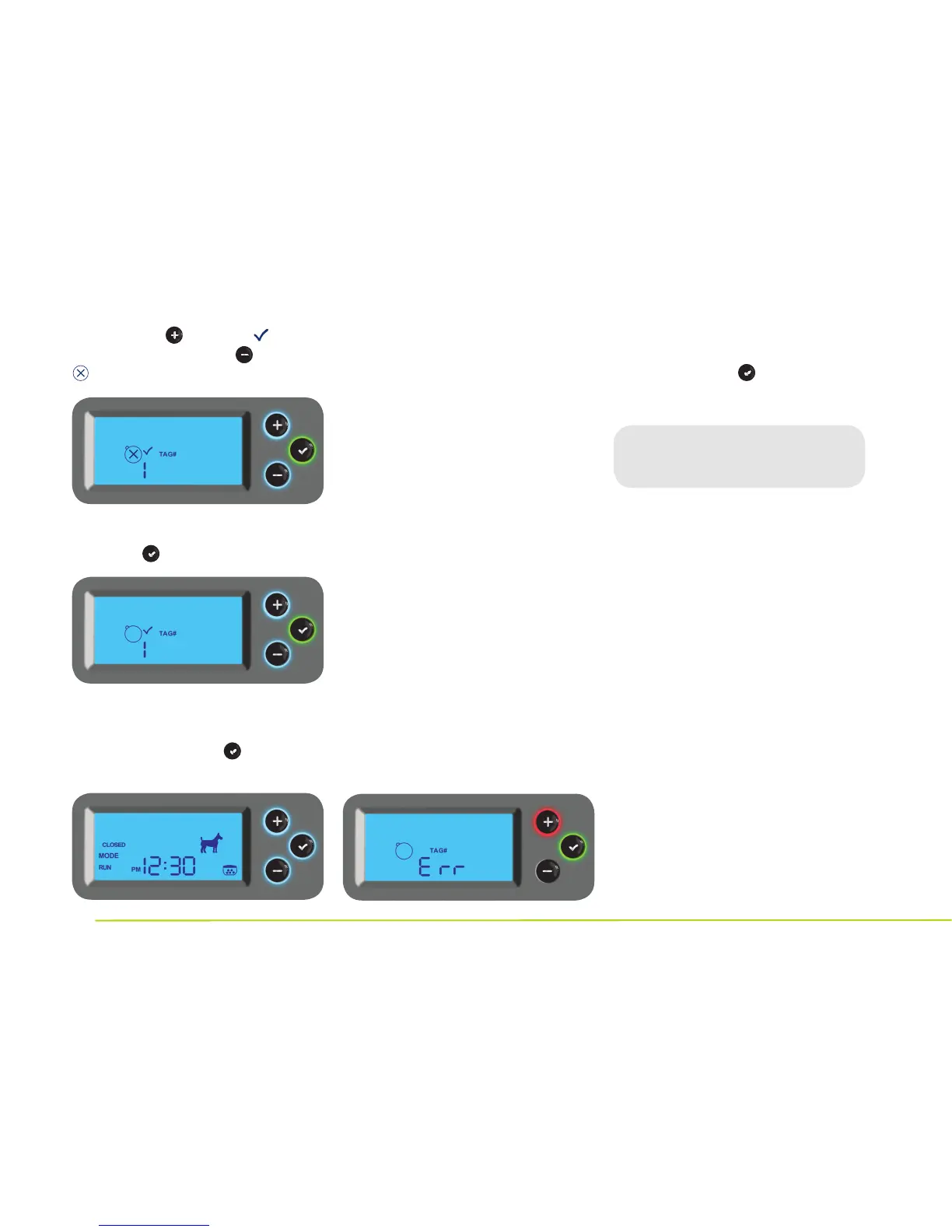
screen will show the tag icon
and “2.” While holding the
tag in this position, repeat
the steps to pair the tag as
assigned or unassigned.
● If you would like to pair more
tags to this PortionPro Rx,
simply repeat these steps
for one tag at a time.
● If more than 1 unpaired tag is in
range, the LCD screen will read ERR.
● When you are finished
assigning or unassigning
all tags, press again to
complete programming.
You’re finished
programming your PPRx!
The LCD screen will now display
CLOSED MODE RUN or OPEN
MODE RUN based on your
selection, along with the current
time, your selection of dog or cat
setting, and a food bowl icon in
the lower right corner.
Step 3 To confirm your selection,
press the button.
Step 4 If this is the only tag you
want to assign for use with this
PortionPro Rx, press again to
complete setup.
If you select then the icon
will flash. If you select then the
icon will flash.


 To Next Page