- 2 -
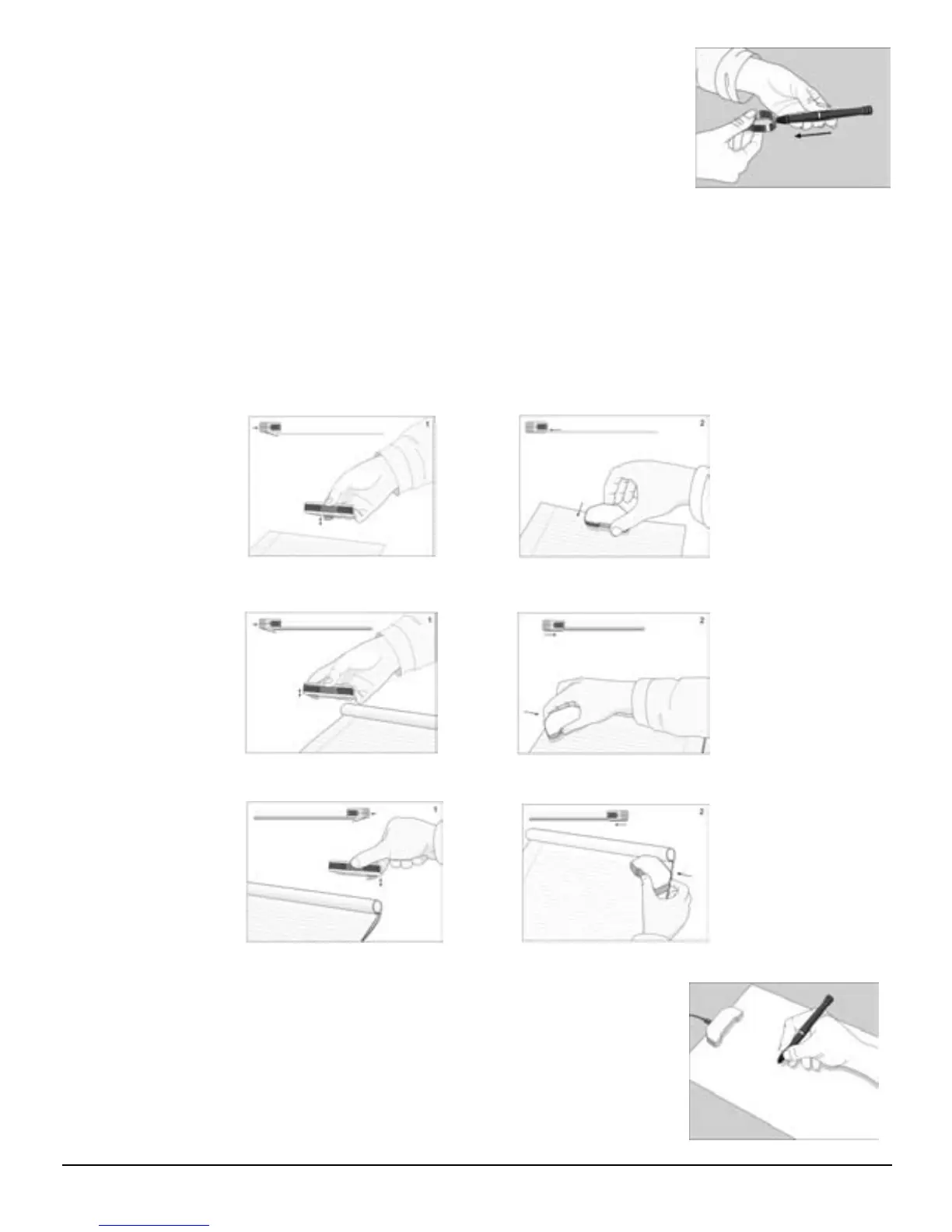
To replace the ink refill,
1.Detach the cap from the digital pen.
2.Clamp the ink refill with the refill extractor. Hold the pen firmly,
and apply pressure with the extractor against it.
3.Pull the used refill out.
Step4 Turn On the Base Unit
Press and hold the Power button on the base unit.
Step5 Clip your Base unit on a Paper
Your base unit can be mounted in 3 positions on top of the paper.
The following images illustrate the way you can mount your base unit, according to the
recommended positioning.
A. Mounting your base unit at the top center of the paper is recommended for a single
paper usage:
B. Mounting your base unit at the top left corner of a paper block is recommended for
right hand Users.
C. Mounting your base unit at the top right corner of a paper block is recommended
for left hand Users.
Step6 Start writing
When you pick up the pen, find a position that is comfortable for
you. Be careful to hold the pen in a way that does not block the
signals sent from the tip of the pen to the memory unit receivers.
When you are writing with the pen, make sure its inclination to the
paper surface is between 45°and 90°.
Hold the pen firmly and write normally.


 To Next Page