- 3 -
Note: Make sure the pen point is 1.5cm away from the unit. Otherwise, the unit sensor may
not work.
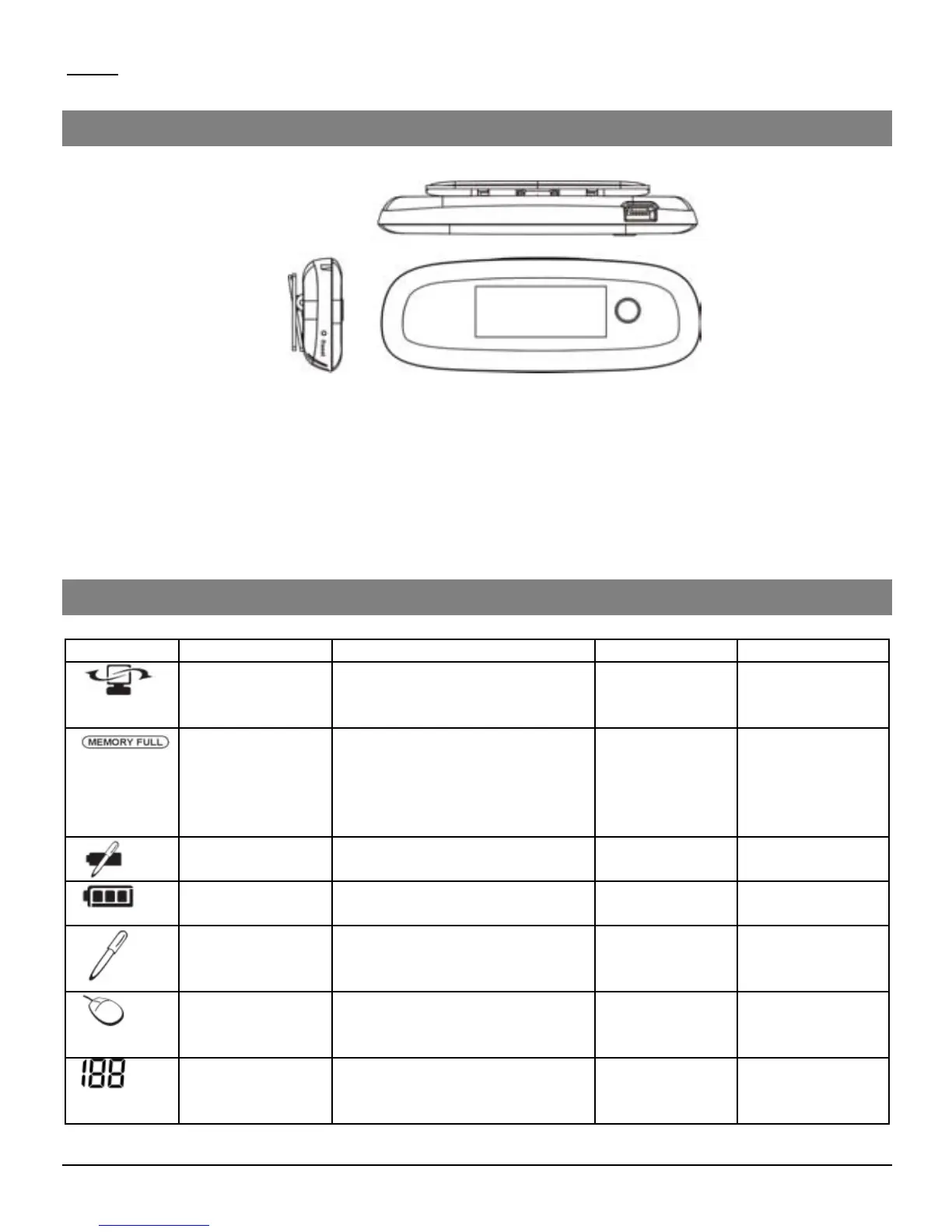
Buttons & Ports
Memory Unit LCD
Use the LCD to view status indications.
Name On when Off When Blinks When
The Digital
Pen is
Connected
Unit is connected to PC Unit is NOT
connected to
PC
Data is
uploaded to
PC
Memory FULL The base unit memory is
90% full. It is highly
recommended to upload
your files to your PC and
delete them from memory!
Less than
90% capacity
used
Never
Pen Low
Battery
Low Pen battery Pen Battery
good
Low Pen
battery
Base unit Low
battery
Full Unit is Off Charging
Note Mode Pen down/Pen move Mouse Mode Pen
down/Pen
move
Mouse Mode Pen down/Pen move Pen Mode Pen
down/Pen
move
Number of
saved notes in
memory
Always Unit is Off Memory full
Or Error
a. USB port –connect to computer through the USB cable
b. Paper Clipper –clip the unit to paper
c. LCD display
d. Power button –Press and hold for about 5 seconds to turn on the unit. Press
shortly to create a new note.
e. Reset hole –When the unit does not respond, stab into this hole to reset it and


 To Next Page