- 6 -
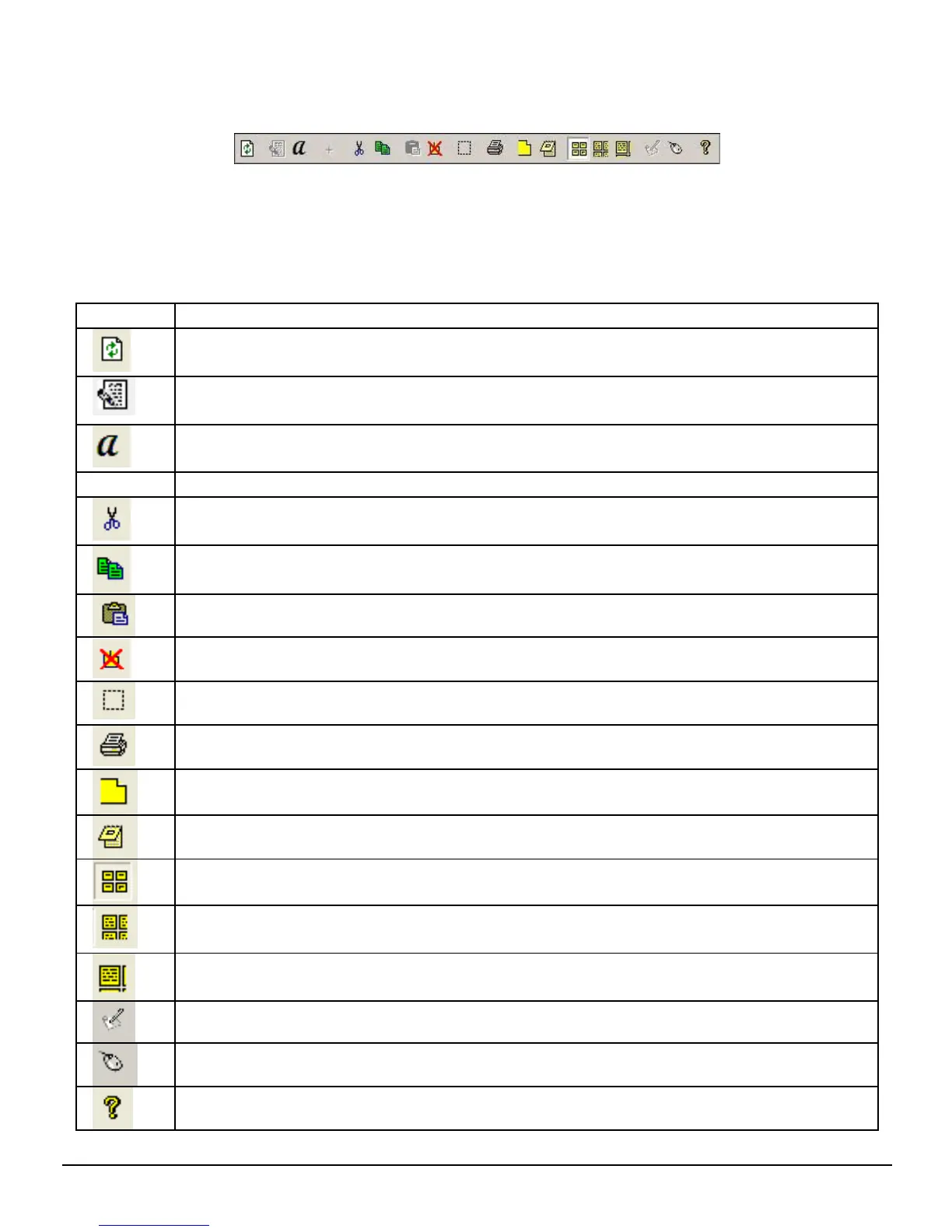
The Note Manager contains buttons that give you access to the most commonly used menu
commands.
The following table contains a list of each button in the toolbox together with a description
of its function.
Button Description
UPLOAD –When in Connected Mode, you can upload all your notes from
the mobile unit to your PC using the Digital Pen application
Note To Text - Convert handwritten note to texts. (only available in
Windows Vista or 7)
Convert your note to text using MyScript® Notes. (Only available if the
recognition software is installed.)
+
Joint multiple notes into one.
CUT –Cuts the selected note and saves it to the clipboard
COPY –Copies the selected note and saves it to the clipboard
PASTE –Pastes whatever was last copied or cut to the clipboard
DELETE –Deletes the selected note/notes
EDIT NOTE –Allows you to edit a selected note
PRINT -- Prints the selected note/notes
SHOW AS STICKY NOTE –Make your Note as Sticky Note
SHOW AS PAPER HOLDER –Make your Note as a paper holder
SMALL THUMB –Displays small thumbnails in the Note Manager view
MEDIUM THUMB - Displays medium sized of thumbnails in the Note
Manager view
LARGE THUMB - Displays large thumbnails in the Note Manager view
NOTE MODE
MOUSE MODE –TURNS YOUR PEN INTO A MOUSE
ABOUT –Provides you with your Digital Pen software version information


 To Next Page