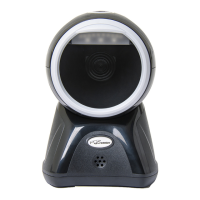
This document serves as a comprehensive user manual for Poscenter barcode scanners, specifically models SG-100, SQ-100C, and SQ-90C. It provides detailed instructions for setup, configuration, usage, and maintenance of these devices.
Function Description
The Poscenter barcode scanners are designed to read various types of barcodes, including linear (1D) and 2D matrix symbols. They offer multiple connectivity options and extensive configuration capabilities to suit different operational environments and data processing needs. The primary function is to accurately capture barcode data and transmit it to a host system.
Important Technical Specifications
The manual outlines several technical specifications and configurable parameters for the scanners:
- Connectivity:
- USB: Supports USB PC Keyboard emulation and USB Serial (COM Port emulation). No additional configuration (e.g., baud rate) is required for USB Serial.
- RS232: Configurable serial port settings. The default RS232 configuration is 115,200 baud rate, 8 data bits, no parity, and 1 stop bit, with carriage return and line feed added by default.
- RS232 Baud Rate: Configurable rates include 300, 600, 1200, 2400, 4800, 9600, 19200, 38400, 57600, and 115200 (default).
- RS232 Word Length (Data Bits, Stop Bits, Parity):
- Data Bits: 7 or 8 bits (default 8).
- Stop Bits: 1 or 2 (default 1).
- Parity: None (default), Even, or Odd.
- Message Length: Configurable minimum and maximum message lengths for various symbologies. Defaults vary by symbology (e.g., Codabar: Min 4, Max 60; Code 39: Min 0, Max 48; UPC-A: fixed length; PDF417: Min 1, Max 2750; QR Code: Min 1, Max 7089; Data Matrix: Min 1, Max 3116; Aztec Code: Min 1, Max 3832).
- Check Digit: Configurable for various symbologies to either transmit, validate but not transmit, or not transmit the check character/digit (e.g., Codabar, Interleaved 2 of 5, NEC 2 of 5, Code 39, Code 11, UPC-A, EAN/JAN-13, EAN/JAN-8, MSI, Korea Post).
- Addenda: Supports 2-digit and 5-digit addenda for UPC-A, UPC-E, EAN/JAN-13, and EAN/JAN-8. Also includes an "Addenda Required" setting to only read barcodes with addenda, and an "Addenda Separator" to insert a space between barcode data and addenda.
- Function Code Transmit: Enables or disables the transmission of function codes contained within scanned data (default: Enable).
- Intermessage Delay: Configurable delay between scan transmissions, up to 5000 milliseconds in 5ms increments.
Usage Features
- Barcode Reading: The scanner projects a red aiming beam or pattern to facilitate reading. The size of the aiming beam/pattern adjusts with distance, allowing for optimal reading of different mil sizes. For highly reflective surfaces, tilting the code 15°-18° is recommended to prevent unwanted reflection.
- Defaults Setting: A "Load Factory Defaults" barcode is provided to reset the scanner to its original settings.
- Input/Output Settings:
- Startup Beeper: Configurable to beep or not beep when the scanner starts up (default: On).
- Trigger Click Beeper: Configurable to emit an audible click when the scanner button is pressed (default: Off).
- Good Read and Error Read Indicators:
- Good Read Beeper: Configurable to beep on a successful read (default: On).
- Good Read Beeper Volume: Configurable to Low, Medium, High (default), or Off.
- Good Read Beeper Frequency: Configurable to Low (1600 Hz), Medium (2400 Hz, default), or High (4200 Hz).
- Good Read Beeper Duration: Configurable to Normal (default) or Short.
- Error Read Beeper Frequency: Configurable to Razz (250 Hz, default), Medium (3250 Hz), or High (4200 Hz).
- Good Read LED: Configurable to turn the LED indicator On (default) or Off on a good read.
- Good Read Delay: Sets the minimum time before the scanner can read another barcode. Configurable to No Delay, Short Delay (750 ms, default), Medium Delay (1,000 ms), or Long Delay (1,500 ms).
- Data Editing:
- Prefix/Suffix: Allows adding or clearing prefixes and suffixes to scanned data for specific symbologies or all symbologies. Prefixes/suffixes can be selected from the ASCII Conversion Chart. The maximum size for prefix/suffix configuration is 200 characters.
- Keyboard Operation: Supports adding keyboard operations (e.g., automatic saving) as suffixes after decoding output. This involves scanning specific hexadecimal values from the Programming Charts.
- Symbologies: The scanner supports a wide range of linear and 2D symbologies, including Codabar, Code 39, Code 32 Pharmaceutical (PARAF), Interleaved 2 of 5, NEC 2 of 5, Code 93, Straight 2 of 5 Industrial, Straight 2 of 5 IATA, Matrix 2 of 5, Code 11, Code 128, ISBT 128, GS1-128, Telepen, UPC-A, UPC-E0, UPC-E1, EAN/JAN-13, EAN/JAN-8, MSI, GS1 DataBar Omnidirectional, GS1 DataBar Limited, GS1 DataBar Expanded, PDF417, QR Code, Data Matrix, Aztec Code, China Post (Hong Kong 2 of 5), Korea Post, Han Xin Code, MaxiCode, MicroPDF, Composites, Codablock A, and Codablock F. Each symbology has configurable settings for On/Off, Message Length, Check Character/Digit, and other specific features (e.g., Codabar Concatenation, Code 39 Append, UPC-A/E Expand, ISBN Translate).
- Utilities: Includes a "Show Software Revision" barcode to output current software revision, unit serial number, and other product information.
Maintenance Features
- Scanning Window Cleaning: Stains and dust on the scanning window can affect performance. It should be gently wiped with a good quality tissue or a soft cloth. Avoid using paper with poor quality, as it can damage the surface.
- Outer Shell Cleaning: The outer shell can be wiped with a soft, clean cloth. A small amount of detergent mixed with water can be used if necessary.
- Liquid Avoidance: Do not spray any liquid directly onto the scanning window.
- Responsibility: The scanning window must be kept clean, and the supplier is not liable for damage caused by improper maintenance.
Troubleshooting: The manual includes a section on common problems and solutions, covering issues like the scanner not working (power, cable, button), incorrect data output (cable, terminal configuration, USB to RS232 speed mismatch), and failure to decode certain barcodes (defective barcode, incorrect reading distance, poor print quality, disabled symbology). For unresolved issues, users are advised to contact the dealer or manufacturer.

 Need help?
 General

 To Next Page