12
Spark Control X: Expression Pedal Command Assignment
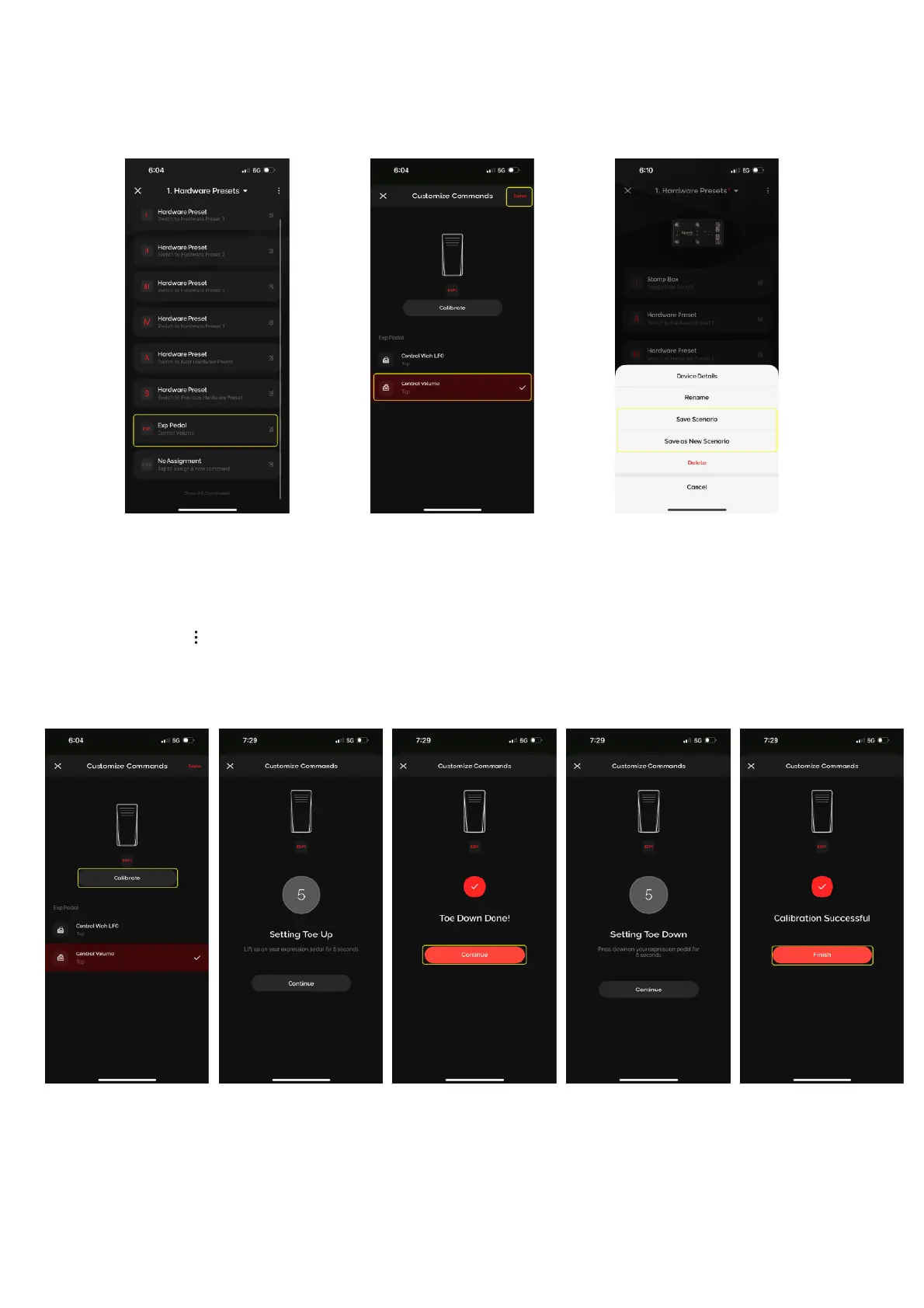
Spark Control X supports Expression Pedal inputs to control certain actions
To assign a command to connected expression pedals:
1. In the Command Assignment Menu, scroll down and tap on the EXP1 or EXP2 command slots
2. Tap on a command to assign the command to that expression pedal slot
3. Tap on and tap Save Profile to save the setting once you’ve finished customizing your commands
Spark Control X: Expression Pedal Calibration
Some expression pedals may require calibration to get the full range of motion of the pedal. To calibrate
your expression pedal:
1. In the Command Assignment Menu, scroll down and tap on the EXP1 or EXP2 command slots
2. Tap on Calibrate to start the calibration process
(A) Depress the expression pedal during Toe Down for 5 seconds, then tap Continue
(B) Raise the expression pedal during Toe Up for 5 seconds
(C) Tap on finish to finish calibration


 To Next Page