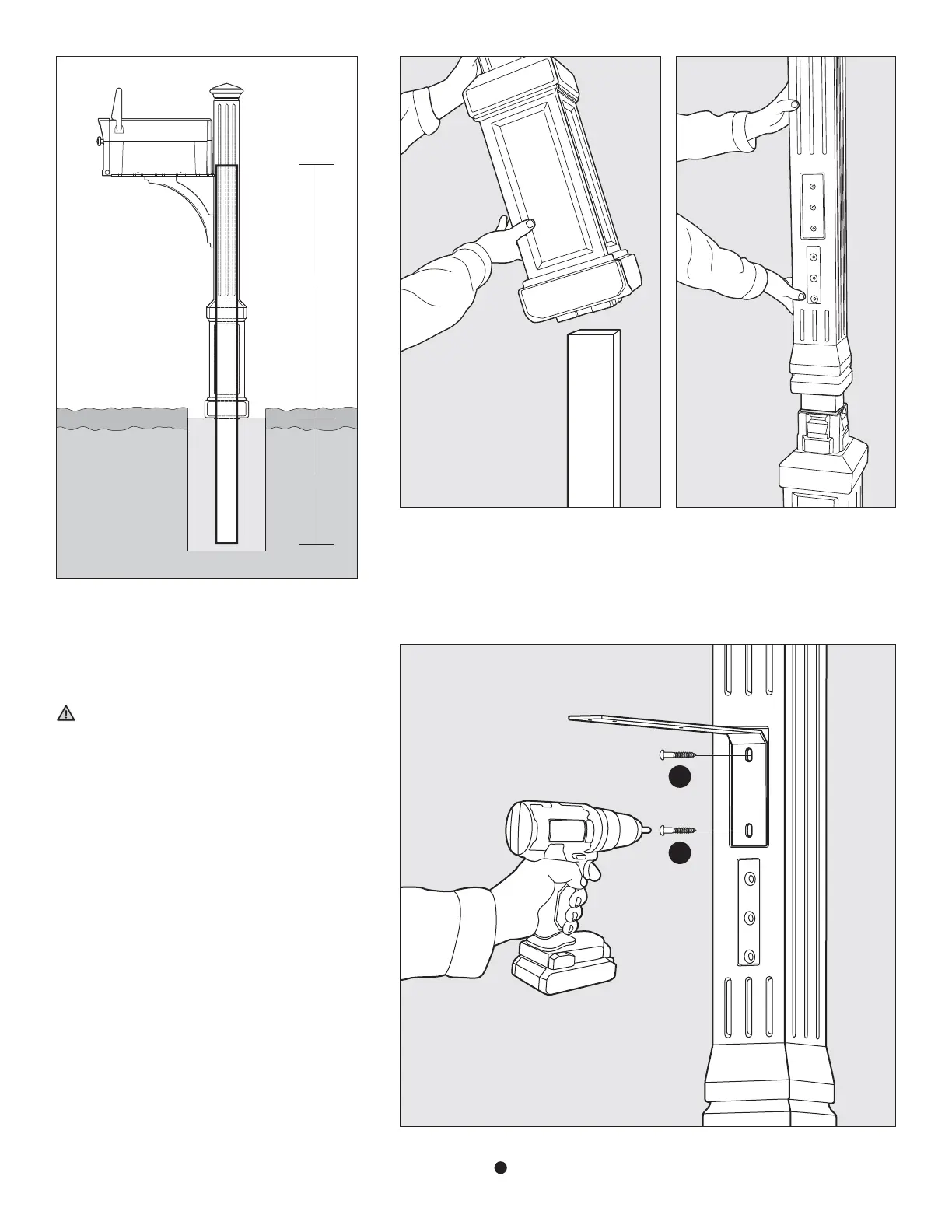
24"
48"
STEP 1 Determine location for mailbox. Using post hole
digger, dig a hole 24" in depth. Install treated pine post
by burying 24" of the post in the ground - leaving 48"
of post above ground. Using a level, make sure post is
perfectly vertical before packing soil / adding concrete
to permanently secure post into position.
IMPORTANT: The pressure treated wood post MUST
extend up into the Lexington Post a minimum of 48" as
shown on Fig 1. When completing installation steps 3
and 4 (attaching Steel L Bracket and Decorative Support
Piece), the screws must self-tap through the wall of
plastic and then drill into the wood post in order to fully
stabilize the product.
STEP 2 Slide the Lower Post Section over the wooden post. NOTE: there is not a “front” to
this section, so it does not matter what side is facing the street. Secondly, slide the Upper
Post Section over the wooden post. NOTE: make sure the side with the part / screw pattern
(shown in Fig. 2B) is facing the street. Press the Upper Section onto the Lower Section until
the two components snap together completely.
STEP 3 Attach the Steel L Bracket to the Upper Post Component using the (2) #14 x 1-1/2"
Pan Head Screws
F
included in the kit.
Fig. 1
Fig. 2A
Fig. 3
Fig. 2B
F
F



 To Next Page