Need help?
Do you have a question about the Powapacs Atom Pro and is the answer not in the manual?
How to provide power for DC12V and 5V USB appliances.
How to provide power for AC output.
Advice on using batteries to maintain their health.
Debunking the myth of battery memory effect for lithium-ion batteries.
Explains the 'stadium effect' phenomenon during battery charging.
Emphasizes reading the manual for proper battery care.
Guidance on when and why to angle solar panels for optimal performance.
Practical tips for maximizing solar panel efficiency.
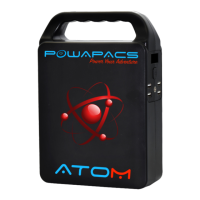
The ATOM Pro is a portable power bank designed to provide versatile power solutions for various appliances and portable electronic devices. It features a robust built-in protection battery system and an auto-protection circuit to ensure safe operation.
The ATOM Pro serves as a multi-functional power source, offering USB QC, Type-C, DC 12V, and AC power outputs. It is designed for users who need reliable power on the go, whether for charging smartphones, tablets, or powering small appliances. The device incorporates a User Information Display (UID) to provide real-time feedback on its status, including AC/DC power indicators, error indicators, battery fuel gauge, and charging status.
The package contents include: 1 x Portable power bank, 1 x Home charger, 1 x Instruction manual, and 1 x Vehicle DC charger cable.
The ATOM Pro offers straightforward operation for its various power outputs:
1. DC12V and 5V USB Power: To activate, press the ON/OFF switch briefly. The UID will illuminate, indicating that 12V and USB outputs are active. The device features auto power detection; if no device is connected to the USBs for 30 seconds, or once a connected device is fully charged, the ATOM Pro will automatically power off. Note: The DC output voltage ranges from 9V to 12.6V, with a maximum current of 10A. If a connected DC12V appliance lacks voltage stabilization, voltage drops due to declining battery levels may cause instability. In such cases, usage should be discontinued.
2. AC Output Power: To activate AC power, double-press the ON/OFF switch. The UID will display "AC ON," indicating that AC output is now powered. Double-pressing the button again will turn off AC power, and the AC power symbol will disappear from the display. The AC socket will remain powered until explicitly turned off via the ON/OFF switch. Note: The AC output rated power is 150W. Appliances exceeding 150W should not be connected. An internal fan will automatically activate for cooling when the working temperature is high. Users are advised to read the manual carefully, especially regarding voltage requirements in different countries, to prevent hazards.
3. Recharging: The ATOM Pro can be recharged via three methods:
4. User Information Display (UID): The UID will power down (dark display) after 20 seconds when using USB or 12V DC outputs. However, "AC ON" will remain illuminated when AC power is in use to remind the user of its active status.
1. Battery Health and Longevity: The ATOM Pro uses high-quality lithium-ion batteries with no memory effect. For optimal charging capacity, it is recommended to operate the device within a temperature range of 10°C to 30°C.
2. Storage and Downtime: When storing the ATOM Pro for extended periods, it is recommended to charge it to approximately 75%. This practice helps prolong battery life and ensures the device is ready for use. To extend the product's life, it is best to charge it within 3 months of non-use, and at least once every 6 months.
3. Charging Environment: When charging, keep the device away from TV, radio, and other equipment to avoid interference.
4. Solar Panel Usage (if applicable):
5. Recycling: Users are encouraged to return used electronic products, batteries, and packaging materials to dedicated collection points to promote responsible waste disposal and material recycling.
The ATOM Pro is designed for optimal performance and durability, providing a reliable power source for various applications while emphasizing user safety and product longevity.
 General
| Brand | Powapacs |
|---|---|
| Model | Atom Pro |
| Category | Accessories |
| Language | English |

 To Next Page