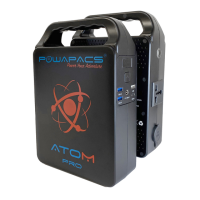
The ATOM portable power bank is a versatile device designed to provide USB 5V, DC 12V, and AC power for various appliances and portable electronics. It features a built-in protection battery system and an auto protection circuit for enhanced safety.
Before initial use or storage, the ATOM should be fully charged by plugging it into a wall outlet. It is recommended to keep the unit charged when not in use to maintain battery health. Users should refer to the "BATTERIES 101" section for tips on battery maintenance.
Several important safety guidelines must be followed:
- Keep the device away from objects that may cause a short circuit, such as large metal objects.
- Do not heat the device, place it in fire, water, or other liquids.
- Keep the device shaded from direct sunlight when possible.
- Avoid high humidity and dusty environments.
- Do not crush the device.
- Do not open or tamper with the device, as this will void the warranty.
- Avoid dropping or subjecting the device to hard shock.
- Do not place heavy objects on the device.
- Keep out of reach of children.
- Do not cover the device with towels, clothing, or other items, as it may become hot during charging.
- At the end of its life, dispose of the product in accordance with local regulations.
Product Parameters:
- Capacity: 60,000mAh - 78,000mAh
- Dimensions (LWH): 200x65x165mm
- Weight: Approx 2-2.1KG
- Built-in battery cell: 100% High quality lithium battery cells
- Charging power: DC15V/4A
- Charging time: DC 15V: 4-5 hours
- USB output: USB1+USB2 5V-3.1A(Max), USB3+USB4 5V-3.1A(Max)
- DC power: DC 9~12.6V/10A (Max)
- AC power: AC100V/60Hz or 220V/50Hz. Pure sine wave output (customized according to different countries/areas).
- AC Continuous Power Output: 150W
- Peak Power Output: 200W
- Power indicator: Digital Display (UID)
- Working temperature: -20°C to 60°C
- Cycle life: >500 times
Accessories:
- 1 x Portable power bank
- 1 x Home charger
- 1 x Instruction manual
Product Description and Features:
The ATOM features a User Information Display (UID) that shows AC/DC power indicators, an error indicator, battery fuel gauge, and charging status. It has an ON/OFF button, four USB outputs (USB1, USB2, USB3, USB4), a DC/Solar input, and a charge input. Additionally, it includes a Torch On/Off button, an LED Torch, an AC Output socket, and a 12V DC Output.
Product Instruction:
-
Providing power for DC12V and 5V USB appliances:
- Press the ON/OFF switch briefly to activate the UID and power 12V and USB outputs.
- The device has auto power detection; if no device is connected to 5V USB or 12V after 30 seconds, or once the charging device is fully charged, the ATOM will auto power off.
- Note: The DC output voltage ranges from 9~12.6V, with a maximum output current of 10A. If a connected DC12V appliance lacks voltage stabilization, voltage drops with battery capacity may cause informal operation.
-
Providing power for AC output:
- Double-press the ON/OFF switch to activate AC output, indicated on the UID. Double-press again to turn AC power off.
- Note: The AC socket will remain powered until manually turned off.
- The AC output rated power is 150W. Do not attempt to power appliances exceeding 150W.
- The internal fan will automatically activate for cooling when the working temperature is high.
- Warning: Different countries require different voltage. Users must read the manual carefully to minimize hazards.
Recharging Atom:
- Using the AC Adapter: Connect the standard charging adapter's AC plug to a household AC socket and the DC plug to the ATOM's DC input. The UID will display the battery level percentage. Remove the charger once the display reads 100%.
- Solar charging (if applicable): Connect the DC cable from a solar panel directly to the ATOM's DC input. "IN" will flash on the UID, indicating charging.
- Vehicle Charging: The ATOM can be charged using a 12V-24V vehicle input with a suitable vehicle cable (sold separately).
- ## %: Current remaining battery level
- IN - Flashing: Atom Charging
- USB 12V: Power to USB & 12V
- 2.1A: USB Device Connected @ 2.1A
- AC On: AC output active
Product Application:
- The product uses high-quality original lithium-ion batteries, offering durability and high capacity without memory effect. For optimal charging capacity, operate within 10°C to 30°C.
- When charging, keep the device away from TVs, radios, and other equipment to avoid interference.
- If the device is not used for a long time, disconnect the charger cable and store it.
- Some portable devices may require being set to charge mode; refer to their respective manuals.
- To extend the life of the lithium battery, it is best to charge within 3 months of non-use and at least once every 6 months.
Recycling:
Always return used electronic products, batteries, and packaging materials to dedicated collection points to prevent uncontrolled waste disposal and promote material recycling.
The device has an internal, non-removable, rechargeable battery. Do not attempt to remove it, as this may damage the device. The battery can be charged and discharged over 500 times but will eventually wear out.
After Service Repair:
- A 12-month warranty is provided against defective parts or materials.
- For repairs or refunds, present the purchase receipt within the 12-month period to your local Powapacs retailer.
- DO NOT OPEN or attempt to repair the device.
- The warranty covers defective performance under normal use.
- Damage caused by misuse is not covered.
- Powapacs is not responsible for returning the device for warranty repairs.
Damage Excluded from After Service Repair:
- Defects due to misuse, including but not limited to:
- Damage to appearance
- Dropped device
- Overloading the circuit
- Compression deformation
- Opening the device
- Damage caused by:
- Fire
- Water
- Corrosive substances
- Damage caused by over-standard voltage load.
Implied Warranties:
The limited warranty stated in the manual is in lieu of all other express warranties. No event shall any implied warranties, including but not limited to warranties of merchantability, fitness for a particular purpose, or non-infringement, extend beyond the applicable warranty period. Some states do not allow limitations on how long an implied warranty lasts, so this limitation may not apply to all users. This warranty grants specific legal rights, and other rights may vary by state.
Exclusive Remedy; Limitation of Liability:
The provisions outline POWAPACS LTD's entire liability and the user's exclusive remedy for any warranty breach. POWAPACS LTD will not be liable for consequential or incidental damages arising from the use or malfunction of any POWAPACS LTD product, or from any warranty breach, including damage to other devices. POWAPACS LTD's liability for any claim, whether in contract, warranty, tort (including negligence and strict liability), or any other theory of liability, will not exceed the amount paid for the POWAPACS LTD product. Some states do not allow the exclusion or limitation of incidental or consequential damages, so this limitation or exclusion may not apply to all users.
Education - BATTERIES 101:
The ATOM utilizes advanced Lithium Ion battery technology. To ensure optimal performance and longevity, consider the following tips:
- Batteries need exercise: Use the battery regularly. Avoid leaving it uncharged for extended periods. If storing the ATOM, ensure it is fully charged beforehand.
- The "Battery Memory" myth: Unlike old Nickel-Cadmium (NiCd) batteries, advanced lithium batteries (like those in ATOM) do not require complete draining ("deep cycling") before recharging. In fact, deep cycling can be harmful.
- The "Stadium Effect": When recharging, batteries fill up quickly at first, then slow down noticeably as they approach full capacity. This is because it's easier for energy to find empty space initially, but takes longer to fill the remaining small gaps.
- Read the manual: The manual provides essential "dos and don'ts" for the battery in your specific device, ensuring proper care and maintenance.
Storage and Downtime Maintenance:
Keeping the ATOM connected to a power source (solar panel or wall plug) between uses or during storage helps maintain battery health and keeps it topped up, prolonging battery life. If continuous connection is not possible, fully charge the ATOM every 3 months and store it in a cool, dry place. Failure to follow these steps can result in battery damage and void the product warranty.
Solar Panel (If Applicable):
- How solar panels work: Solar panels convert sunlight into electricity. The more direct sunlight a panel receives, the more energy it generates. Panels work most efficiently when pointed directly at the sun, which constantly changes position throughout the day and seasons.
- Best angle for solar panels: The optimal angle depends on location and desired efficiency. At solar noon (halfway between sunrise and sunset), when the sun's energy is greatest, panels should be positioned to maximize capture. In the UK, solar noon means the sun is due south. The angle varies by location and season (e.g., around forty degrees off vertical in London in June, thirty-five degrees in Manchester).
- Does the amount of tilt matter? Yes, tilt affects power output by influencing how much sunlight is captured. A flat panel will capture less sunlight when the sun is at an angle (e.g., 30° from horizontal, where a 1m wide shaft of light spreads over 2m on the ground), producing less energy than if the sun were directly overhead. Tilting the panel (e.g., by 60°) ensures it captures all the sunlight.
Solar Panel Top Tips:
- For crystalline panels, even a thin wire's shadow can reduce power output. Ensure as many cells as possible are in full sun.
- Solar panels work behind glass but with reduced efficiency (up to three times longer to charge). They are designed for direct sunlight.
- Position your solar panel to take advantage of the midday sun, which is the strongest. Angling the panel towards the sun will increase energy generation outside of summer months.
- The power generated by a solar panel depends on the condition of your unit's battery, so maintain your device.
- Solar panels generate direct current (DC). To power devices that plug into a home-style 230V AC socket, an inverter is required to convert DC to alternating current (AC).
The device is marked with symbols indicating proper disposal (crossed-out wheeled bin), battery type (Li-ion), and compliance with European (CE) and Federal Communications Commission (FC) standards.

 Need help?
 General

 To Next Page