EasyManua.ls Logo

Power Acoustik PDN-721HB - User Manual

Power Acoustik PDN-721HB
23 pages
Print Icon
To Next Page IconTo Next Page
Loading...
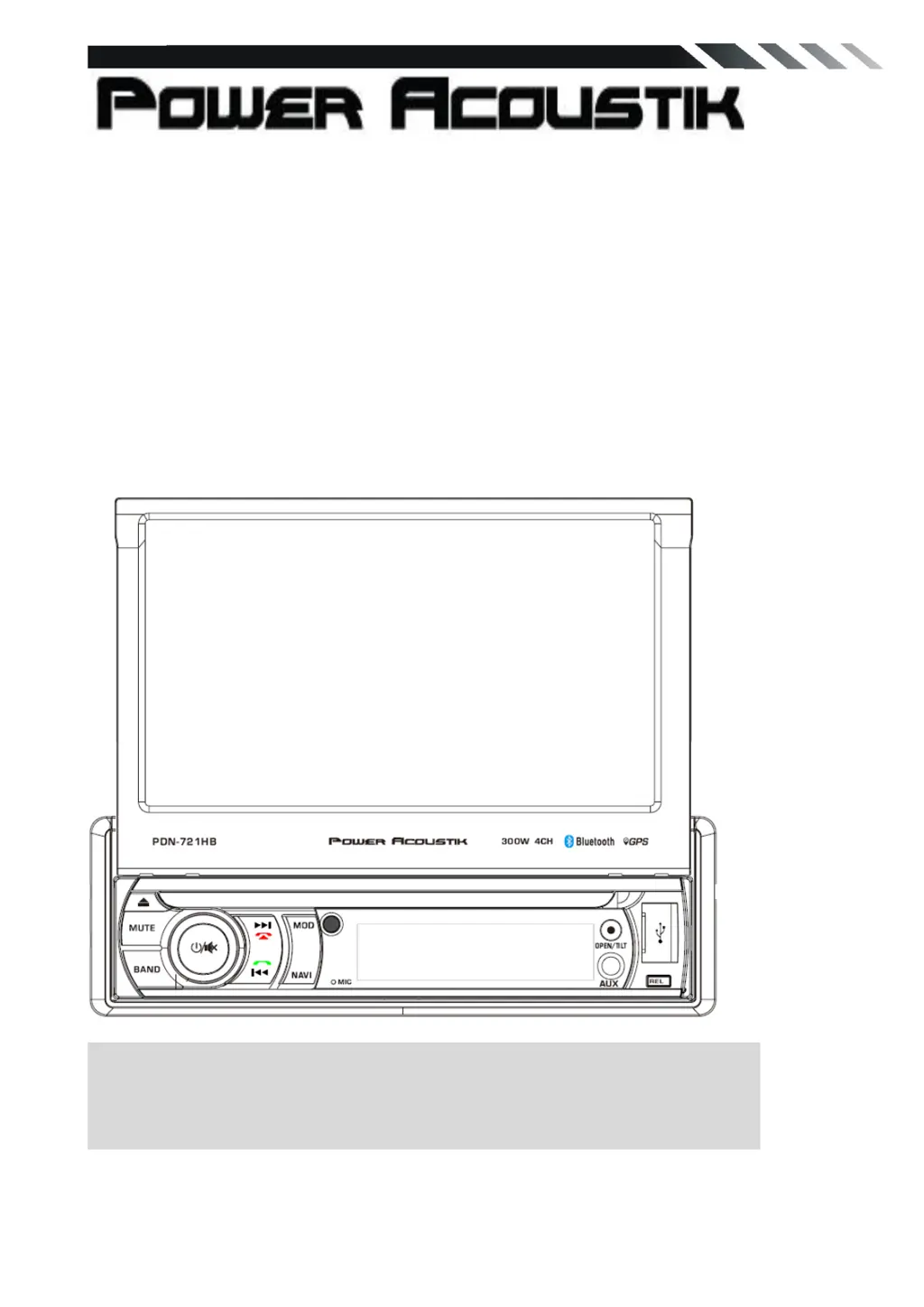
PDN-721HB
In-Dash 7' Touch screen
DVD/CD/MP3/MP4 Player
AM/FM Radio
Support Bluetooth
Support Mobile Phone link
Build in GPS
Owner’s Manual
Take the time to read through this owner’s manual.
Familiarity with installation and operation procedures will help you obtain the best
Performance from your new DVD-receiver.

Questions and Answers

  • J
    Jim GillAug 10, 2025
    How to fix no sound from Power Acoustik PDN-721HB with amplifiers?
    • M
      Melissa TranAug 10, 2025
      If there's no sound output from your Power Acoustik Touch Panel when using amplifiers or a power antenna, the power antenna lead might be shorted to ground, requiring excessive current, or there might be an issue with the remote on the amplifiers or power antenna. Here’s how to troubleshoot: 1. Turn off the unit. 2. Remove all wires attached to the power antenna lead and check each wire for shorts to ground using an ohm meter. 3. Turn on the unit. 4. Reconnect each amplifier remote wire to the power antenna lead one by one. If the amplifiers turn off before all wires are attached, use an external replay to provide remote-on voltage (excessive current required).
  • C
    cherylgarrisonAug 18, 2025
    Why won't my Power Acoustik PDN-721HB turn on?
    • P
      perezjosephAug 18, 2025
      If your Power Acoustik Touch Panel isn't turning on and no sound is produced, it could be due to a blown fuse. Replace it with a fuse of the same amperage. If it blows again, consult your store of purchase. Another cause might be incorrect wiring; in this case, consult your local retailer.
  • D
    David YoungAug 25, 2025
    What to do if buttons aren't working on my Power Acoustik Touch Panel?
    • D
      Debra ClementsAug 25, 2025
      If nothing happens when you press the buttons and the display is not accurate on your Power Acoustik Touch Panel, it could be due to a microprocessor malfunction caused by noise. Turn off the power, then press the [no open] button and remove the DCP. Press the reset button for about 2 seconds using a thin rod. Alternatively, the panel or main unit connectors might be dirty. Wipe them clean with a soft cloth moistened with cleaning alcohol.
  • M
    murraymatthewSep 2, 2025
    What does error message on Power Acoustik PDN-721HB mean?
    • C
      Charles WarnerSep 2, 2025
      If your Power Acoustik Touch Panel displays an error message on the LCD, here's what it could mean and how to address it: * **ERROR 1:** This indicates a deck mechanism error. Reset the unit. * **ERROR 2:** This suggests a disc or servo error. Try changing the disc or resetting the unit. * **ERROR 3:** This points to a USB error. 1. Remove the USB and re-insert it. 2. Check the file for errors. 3. Reset the unit.

Summary

SAFETY WARNINGS

General Safety Precautions

Essential safety information regarding unit operation and potential hazards.

Operational Safety Guidelines

Precautions for safe usage, environmental conditions, and handling the unit.

INSTALLATION AND UN-INSTALLATION

Unit Installation Procedure

Step-by-step guide for installing the main unit into the vehicle dashboard.

WIRING CONNECTIONS

ADVANCED WIRING AND CONNECTIONS

Reversing Line and Camera Setup

Connecting the reversing line and rear view camera for parking assistance.

Speaker Connections and Guidelines

Proper connection of loudspeakers and impedance requirements.

FRONT PANEL OPERATION

REMOTE CONTROL FUNCTIONS

DVD PLAYER OPERATION

SYSTEM SETTINGS AND CUSTOMIZATION

MOBILE PHONE LINK

BLUETOOTH OPERATION

OTHER FUNCTIONS

Parking Camera Display

How the screen displays video when the car is stopped and parking brake is active.

Back View Camera Connection

Connecting and enabling the rear view camera for parking assistance.

TROUBLESHOOTING GUIDE

Power, Sound, and Button Issues

Solutions for common problems like no power, no sound, or unresponsive controls.

Disc Playback and LCD Errors

Addressing issues related to CD playback, disc reading, and LCD display errors.

Disc Loading and Radio Problems

Resolving disc loading failures, sound skips, and radio reception issues.

TECHNICAL SPECIFICATIONS

General and Display Specifications

Details on power supply, dimensions, screen size, and resolution.

Radio Frequency Ranges

Specifications for FM and AM/MW radio frequency bands.

Audio and USB Specifications

Information on audio response and USB interface capabilities.

Power Acoustik PDN-721HB Specifications

General IconGeneral
BrandPower Acoustik
ModelPDN-721HB
CategoryTouch Panel
LanguageEnglish

Related product manuals