BOX CONTENTS
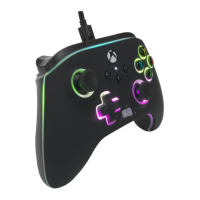
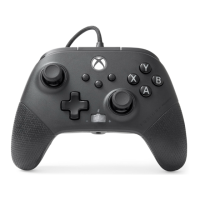
• FUSION Pro 4 Wired Controller
• USB-C
®
Cable: 10 ft. (3 m) Braided Cable
SETUP
1. Connect the USB cable into an available port on the Xbox and into the USB-C port on
controller. If Xbox is OFF, press the Xbox Button to power ON. The controller’s LED
indicator will illuminate.
2. For player and controller assignment, refer to the Xbox user manual.
USING THE SHARE BUTTON
Refer to Xbox documentation for details related to the Share button.
USING THE HEADSET DIAL
Once you insert the 3.5 mm plug from your headset into the audio jack, the dial will
become active and the dial will turn red to indicate mic is muted. Press down on dial to
mute/unmute mic. To adjust volume, tap left or right to adjust step by step, or press and
hold left or right to adjust volume to off or full volume.
NOTE: Audio controls within Xbox Settings will take first priority, followed by the Headset
Dial, and finally any audio or mute controls on your headset. Refer to your Xbox and
headset documentation for additional details.
TROUBLESHOOTING
For latest FAQs, visit PowerA.com/Support
PROBLEM: Controller will not connect to game console.
SOLUTION: Confirm cable is properly connected to console and the USB port on
the controller.
PROBLEM: Advanced Gaming Buttons are not functioning properly.
SOLUTION: Review “Mapping the Advanced Gaming Buttons” section above.
For additional troubleshooting, refer to your Xbox user guide.
MOTION WARNING
Playing video games can make your muscles, joints, skin or eyes hurt. Follow these
instructions to avoid problems such as tendinitis, carpal tunnel syndrome, skin irritation
or eyestrain:
• Avoid excessive play. Take a 10- to 15-minute break every hour, even if you don’t think
you need it. Parents should monitor their children for appropriate play.
• If your hands, wrists, arms or eyes become tired or sore while playing, or if you feel
symptoms such as tingling, numbness, burning or stiffness, stop and rest for several
hours before playing again.
• If you continue to have any of the above symptoms or other discomfort during or after
play, stop playing and see a doctor.
EN
• Quick-Start Guide
• Sticker
11







 To Next Page