FAQS
For latest FAQs, visit PowerA.com/Support
PROBLEM: My controller will not power on?
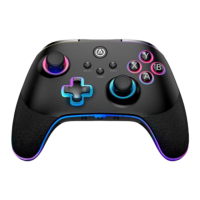
SOLUTION: Confirm the controller is fully charged by pressing the battery
status button (
) on front lower left of controller. Plug in to recharge
as needed.
PROBLEM: I do not see MOGA controller listed in mobile devices
Bluetooth settings?
SOLUTION: Press and hold the Bluetooth sync button ( ) on back of
controller for 2 seconds to enter pairing mode (LED will flash rapidly).
PROBLEM: The integrated power bank is not functioning?
SOLUTION: Confirm the controller has more than 25% charge and Power
Bank button is switched on.
CONTACT/SUPPORT
For support with your authentic PowerA accessories, please visit
PowerA.com/Support.
MANUFACTURED FOR
ACCO Brands USA LLC, 4 Corporate Drive, Lake Zurich, IL 60047
ACCOBRANDS.com | POWERA.com | MADE IN CHINA
ADDITIONAL LEGAL
© 2024 ACCO Brands. All Rights Reserved. MOGA and MOGA by PowerA
logo, PowerA and PowerA Logo are trademarks of ACCO Brands. All other
trademarks are the property of their respective owners.
USB Type-C® and USB-C® are registered trademarks of USB
Implementers Forum.
BATTERY WARNING
• Do not attempt to repair the Li-ion battery yourself—you may damage
the battery, which could cause overheating, fire, and injury.
• The Li-ion battery in your device should be serviced or recycled by
PowerA or an authorized provider and must be recycled or disposed of
separately from household waste.
• Dispose of batteries according to your local environmental laws and
guidelines.
• Do not use or leave a device containing rechargeable batter-ies in a
high-temperature environment (e.g., in strong direct sunlight, or in
a vehicle in hot weather). High temperatures may cause batteries to
overheat or catch fire, and the battery performance or longevity may
be negatively affected.
• Do not use a device containing rechargeable batteries in an
environment with high levels of static electricity. Excessive static
electricity can impair the batteries’ internal safety measures,
increasing the risk of overheating or fire.
• If liquid leaking from a battery pack comes into contact with your eyes,
DO NOT RUB EYES! Immediately flush eyes thoroughly with clean running
water and seek medical attention to prevent injury to eyes.
• If the battery gives off an odor, generates heat, or in any way appears
abnormal during use, recharging or storage, im-mediately remove it from
any charging device and place it in a sealed fireproof container such as a
metal box, or in a safe location away from people and flammable items.
• Discarded batteries may cause fire. Do not heat the controller or
battery, or place either in or near fire.
BATTERY LEAKAGE WARNING
• Leakage of chemicals contained within the battery pack can cause
personal injury as well as damage to game controller.
• Avoid allowing battery chemicals to contact skin. If contact occurs,
immediately wash thoroughly with soap and water.
• If liquid leaking from a battery pack comes into contact with your
eyes, DO NOT RUB EYES! Immediately flush eyes thoroughly with clean
running water and seek medical attention to prevent injury to eyes.
MOTION WARNING
Playing video games can make your muscles, joints, skin or
eyes hurt. Follow these instructions to avoid problems such as
tendinitis, carpal tunnel syndrome, skin irritation or eyestrain:
• Avoid excessive play. Take a 10 to 15-minute break every hour, even
if you don’t think you need it. Parents should monitor their children
for appropriate play.
• If your hands, wrists, arms or eyes become tired or sore while playing,
or if you feel symptoms such as tingling, numbness, burning or
stiffness, stop and rest for several hours before playing again.
• If you continue to have any of the above symptoms or other
discomfort during or after play, stop playing and see a doctor.
FCC STATEMENT
This device complies with Part 15 of the FCC Rules. Operation is subject
to the following two conditions: (1) this device may not cause harmful
interference, and (2) this device must accept any interference received,
including interference that may cause undesired operation.
WARNING: Changes or modifications to this unit not expressly approved
by the party responsible for compliance could void the user’s authority
to operate the equipment.
NOTE: This equipment has been tested and found to comply with the
limits for Class B digital device, pursuant to Part 15 of the FCC Rules.
These limits are designed to provide reasonable protection against
harmful interference in a residential installation. This equipment
generates, uses and can radiate radio frequency energy and, if not
installed and used in accordance with the instructions, may cause
harmful interference to radio communications. However, there is no
guarantee that interference will not occur in a particular installation. If
this equipment does cause harmful interference to radio or television
reception, which can be determined by turning the equipment off and on,
the user is encouraged to try to correct the interference by one or more
of the following measures:
• Reorient or relocate the receiving antenna.
• Increase the separation between the equipment and receiver.


 To Next Page
 Loading...