Bulletin No. 3020IM9503R6/98 Power Meter
December 1998 Chapter 1—Introduction
1998 Square D All Rights Reserved 3
USING THIS BULLETIN
This document provides the information required to install and operate the
power meter. The document consists of a table of contents, chapters, several
appendices, and an index. To locate information on a specific topic, refer to
the table of contents or the index.
Notational Conventions
This document uses the following notational conventions:
• Procedures. Each procedure begins with a statement of the task, followed
by a numbered list of steps. Procedures require you to take action.
• Bullets. Bulleted lists, such as this one, provide information but not
procedural steps. They do not require you to take action.
• Cross-References. Cross-references to other sections in the document
appear in boldface. Example: see Power Meter Connections in Chapter 3.
Not Covered in this Bulletin
Some of the power meter’s features, such as PC-based logging, onboard
logging for the PM-650, trending, and PC-based alarming, must be set up
using POWERLOGIC application software. For instructions on setting up
these features, refer to the application software instruction bulletin.
Note: The PM-650 is supported by POWERLOGIC System Manager Software
(SMS)-3000 v. 3.1 (and higher).
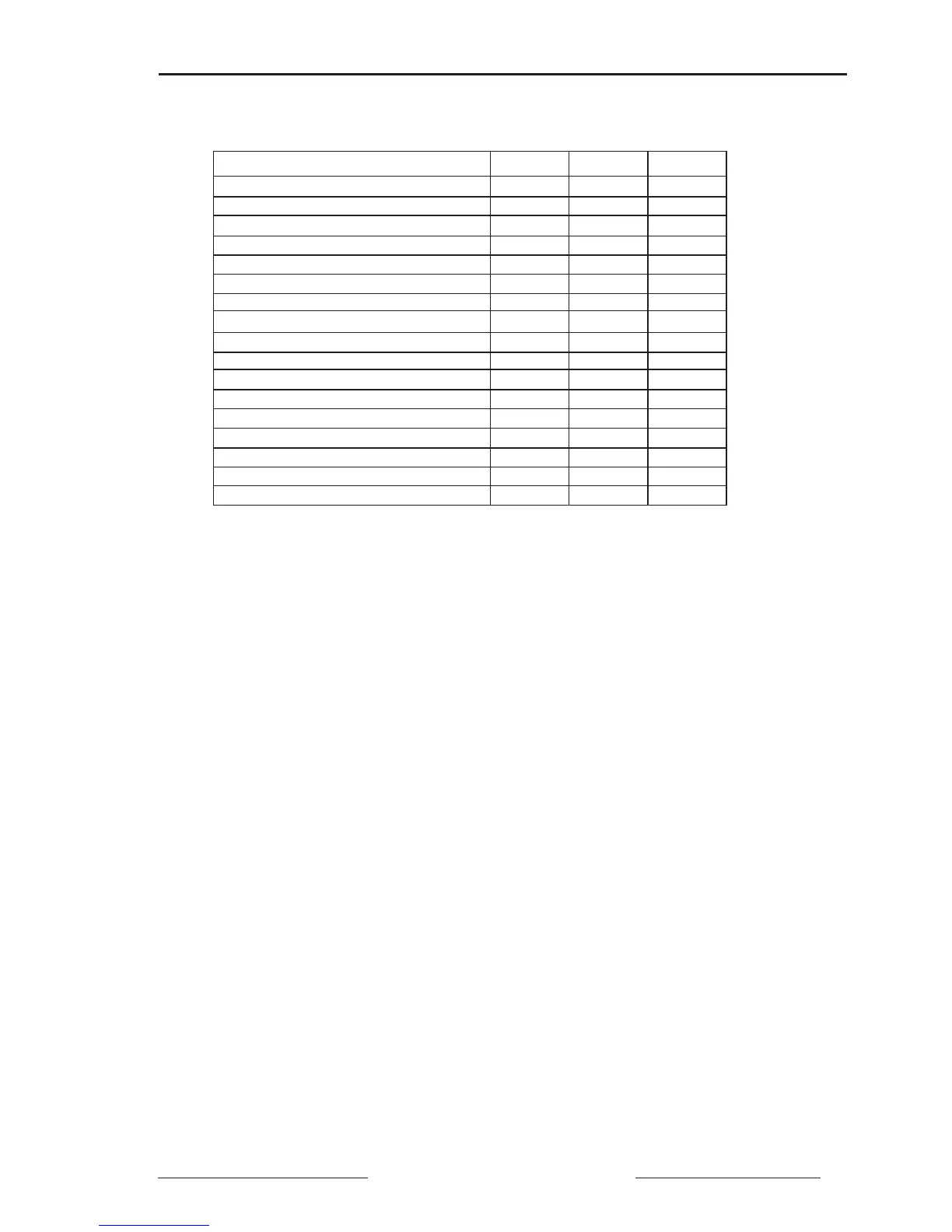
Feature PM-600 PM-620 PM-650
Full Instrumentation ✘✘✘
RS-485 Communications Port ✘✘✘
Wiring Diagnostics ✘✘✘
ANSI C12.16 Accuracy ✘✘✘
Current Demand (per phase, neutral) ✘✘
Power Demand (3-phase total, present) ✘✘
Peak Power & Current Demand ✘✘
Date/Time Stamping ✘✘
THD or thd (Voltage and Current) ✘✘
Calculated Neutral Current ✘✘
Onboard Alarms ✘
Min/Max Readings ✘
Predicted Power Demand ✘
Data Log ✘
Event Log ✘
Demand Interval Synch to Comms ✘
Rolling Block Demand ✘
Table 1-4
Power Meter Feature Comparison



 To Next Page