Need help?
Do you have a question about the PowerOak PS1 and is the answer not in the manual?
Provides a detailed introduction regarding the use of the generator and its capabilities.
Explains how users can understand generator operation and whom to contact for installation questions.
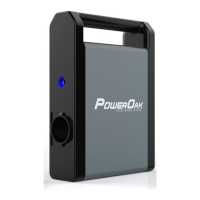
Details the smart, portable solar generator battery, its integrated components, and its suitability for various applications.
Instructions for inspecting the product for damage or missing parts after unpacking and contacting support.
Guides on how to turn the generator on and off using the main power button and its indicators.
Explains the process of turning DC power on and off, including LED and screen indicators.
Details how to activate and deactivate AC power, noting the LED indicators and screen display.
Describes the generator's LCD screen and provides a legend for its various ports and indicators.
Lists the essential information required by customer service for effective diagnosis of generator failures.
Specifies the data needed about solar panels to troubleshoot issues related to charging the generator.
Provides a comprehensive list of error codes, their causes, and recommended solutions for troubleshooting.
 General
| DC Output | 1 x 12V/10A |
|---|---|
| Battery Type | Li-ion |
| USB Ports | 2 x USB-A, 1 x USB-C |
| Recharge Time | 6-7 hours (AC) |
| Charging Methods | AC, Solar, Car |

 To Next Page