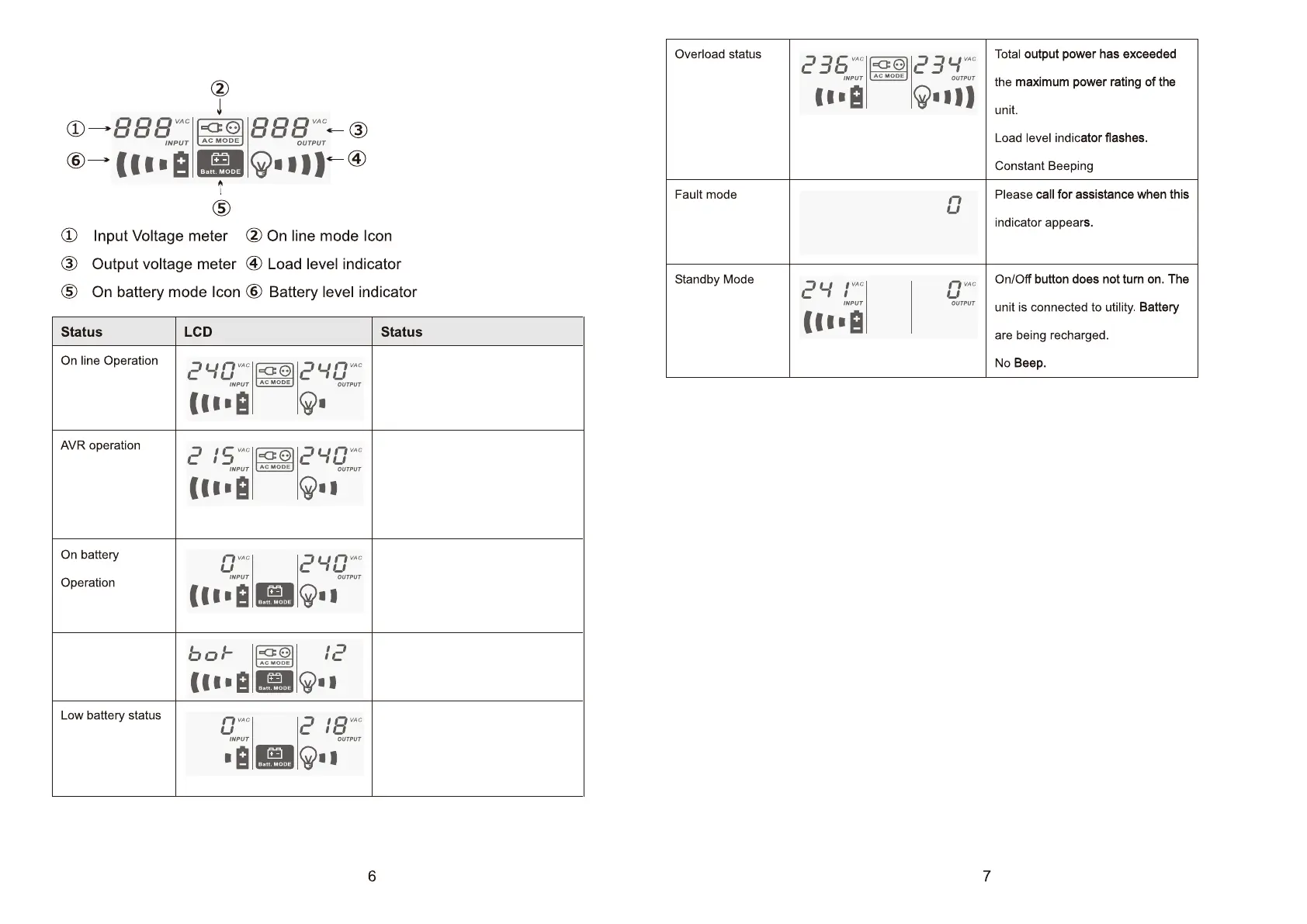
There is power distrbances / black
out. the unit is supplying power
from battery.
Beeps 2 beeps every 30 sec
The normal display of battery and
Battery Remain Time will
Exchange once per 5s.
The unit is boosting / bucking
input volage.
On line mode icon flashes every 1
sec.
No Beep
Utility is stable and the unit is
supplying its power from utility.
No beep
Battery capacity becomes low.
The unit will shut its output down.
On battery mode icon flashes.
Rapid beep one sec interval
Battery Remain
Time
Defender 650/1200/1600/2000VA have inbuilt native Battery management
compatible with Windows and Mac OS.
If you wish to use NetGuard monitoring Software please follow the instructions
below:
1. Please download the latest NetGuard Monitoring software from
www.powershield.com.au/index.php/downloads
2. When the installation is completed, NetGurad agent icon will appear on the
Task bar
3. Once installation is completed, click the plug icon found on the Task bar to
start the program
7. Software Installation
6. Understanding LCD display



 To Next Page