User Manual
15
en
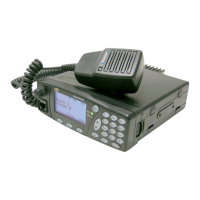
No. Description Observations
1
Microphone
connector
Connector for handheld Microphone or Micro-loudspeaker or
desktop microphone (DT-410).
Connector for the programming cable.
2 Volume control
Adjusts the volume level. Screen adjustment Contrast,
Volume audio and Volume tones.
3 Screen
Alphanumeric display 4 x 16, line of symbols and line of ‘soft
keys’.
4 STS LED Indicator Call status indicator.
5 SVC LED Indicator Service indicator.
6 ON/OFF key Key to switch on / off
7 Navigation keys
Navigation by menus/submenus and their options.
Editing phone books / messages.
8
Alphanumeric
keyboard
For entering number and characters. (See section 6.3)
9 Emergency key Starts / cancels the emergency call.
10 Function key
Combined with other keys, it enables rapid access to certain
functions.
By continuous pressing, it changes the working mode
(TETRA V+D<-> DMO)
11 Menu key Access to Main Menu.
12 Soft keys Press to select the corresponding on-screen option.


 To Next Page