EasyManua.ls Logo

PowerTrunk MDT-400 - Page 46

PowerTrunk MDT-400
48 pages
Print Icon
To Next Page IconTo Next Page
To Previous Page IconTo Previous Page
Loading...
User Manual
(*) Available for the fist microphone accessory
(**) Available if programmed (contact your official dealer for more information)
en
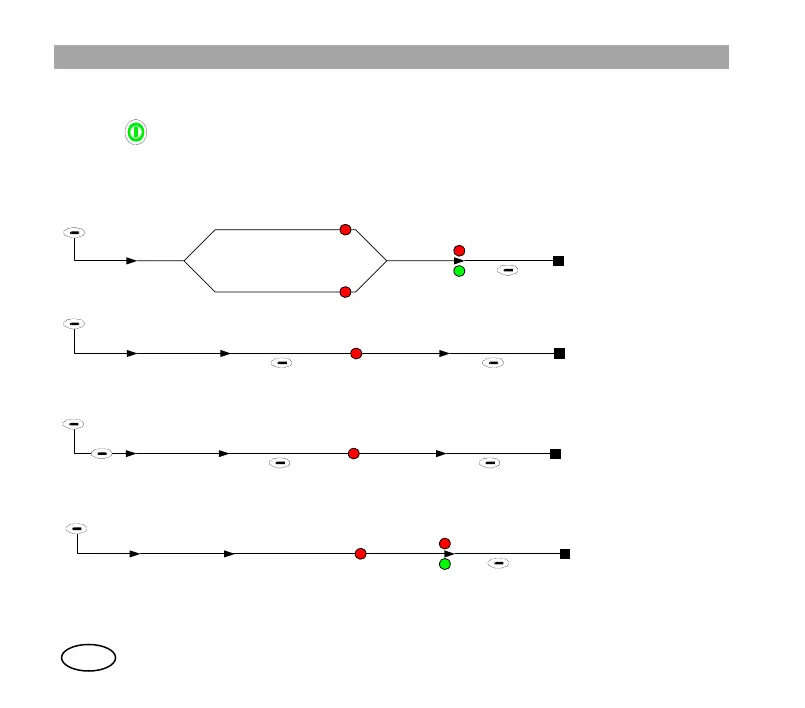
POWERING ON AND OFF
Keep key pressed for a few seconds.
MAKING V+D CALLS
Semi-duplex private calls
Duplex private calls
Telephone calls
Group calls
Mode
PRV
Dial number
or select
Press PTT
(direct signalling)
or AUX (*)(**)
(hook signalling)
red
STS
red
Press and hold
PTT (to speak)
Release PTT
(to listen)
Press 'End'
or AUX (*)
Mode
PRV Dial number
or select
Press 'Call'
STS
Listen
and speak
red
Press 'End'
or AUX (*)
Mode
PHN Dial number
or select
Press 'Call'
STS
Speak
and listen
red
Press 'End'
or AUX (*)
PBX
Mode
Select
GRP range / group
from phone book
Press PTT
STS
(to speak)
Release PTT
red
Press 'End'
or AUX (*)
(to listen)
Press and hold PTT
BRD(**)