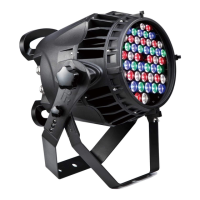
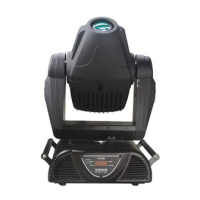
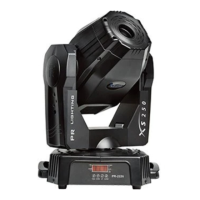
The PR LIGHTING XS 250 (PR-2226) is a projector designed for indoor use, offering a range of features for professional lighting applications. This product manual provides comprehensive information for its safe installation, operation, and maintenance.
Function Description
The XS 250 is a versatile projector capable of producing various lighting effects. It operates using a discharge lamp, with options for PHILIPS MSD 250W/2, OSRAM HSD 250/78, or GE CSD250/2/SE lamps, each offering different color temperatures and rated lifespans. The projector features a color wheel with 12 dichroic color filters plus white, allowing for variable speed bi-directional rainbow effects and step/linear color changing.
Gobo projection is a key feature, with one rotating gobo wheel and one fixed gobo wheel. The rotating gobo wheel holds 7 interchangeable gobos (glass or metal) plus white, which are indexable and bi-directionally rotatable at variable speeds. The fixed gobo wheel contains 10 interchangeable gobos plus white, offering bi-directional wheel scrolling at variable speeds. The gobos have a diameter of 22.5mm and an image diameter of 17mm.
Further enhancing its capabilities, the XS 250 includes a 1x3 facet prism that is bi-directionally rotatable at variable speeds, adding dynamic visual effects. The projector offers DMX-controlled focus, allowing for precise beam adjustments. Dimming is linearly adjustable from 0-100%, and the shutter features double blades with a speed range of 0.3 to 12 F.P.S.
Head movement is extensive, with a Pan of 540° and Tilt of 270°, both with auto position correction, ensuring accurate and repeatable positioning. The beam angle is fixed at 16°.
Control of the XS 250 is primarily through DMX512, supporting 3-pin and 5-pin interfaces. It also incorporates the RDM control protocol. The projector offers three DMX modes: short mode (12 channels), standard mode (16 channels), and extended mode (218 channels), providing flexibility for different control setups. Beyond DMX, it supports Master/Slave mode for synchronized operation of multiple units without a dedicated controller, and Stand-Alone mode for independent operation. A self-test mode is also available for diagnostics.
Usage Features
The XS 250 is designed for ease of setup and operation. Installation requires mounting the projector with two clamps and a safety cord, ensuring it is firmly anchored to a secure structure capable of supporting its weight. The manual emphasizes unlocking the PAN and TILT before initial use and lifting the projector by its handles.
Connecting the power supply involves a standard 3-pin connection, with clear instructions for live, earth, and neutral wires. It's crucial to match the projector's voltage and frequency requirements and ensure proper earthing. For DMX control, the projector uses 2-core screened cables with 3-pin or 5-pin XLR plugs and sockets. Multiple fixtures can be daisy-chained, with the last fixture requiring a DMX terminator to prevent signal corruption.
The projector features an intuitive operation menu accessible via press buttons and an LED display. Users can set the DMX start address, browse various setup options (AddR to Edit), and save settings. The LED display provides clear indications of the projector's status, including DMX signal status (OK, no signal, error), panel setting, power status, and operating mode (slave, self-test, master).
For lamp replacement, the manual provides detailed steps, including locking the yoke, opening the rear cover, gently pulling out the lamp holder, and inserting a new lamp. A critical note advises against touching the lamp bulb with bare hands to avoid affecting beam output. It also highlights the high-pressure nature of MSD series lamps and the importance of reading manufacturer's instructions.
Gobo replacement is also straightforward, with separate instructions for fixed and rotating gobos. For rotating gobos, the gobo holder can be removed, the spring pulled out, and the gobo replaced. Special care is advised for glass gobos, recommending handling with soft tissue or cloth.
The projector includes several other functions to enhance usability: adjustable Pan & Tilt speed, display of fixture and lamp usage time, an English language menu on the LED display, an energy-saving function for the ballast, a built-in analyzer for fault finding and error messages, and built-in demo sequences. Input signal isolating protection is also integrated for reliability.
Maintenance Features
Regular maintenance is crucial for the longevity and optimal performance of the XS 250. The manual provides clear guidelines for cleaning and lubrication.
Cleaning:
- The fans should be cleaned every 15 days to prevent overheating and ensure proper thermal management.
- The lens and dichroic color filters require regular cleaning to maintain optimum light output.
- External optics should be cleaned at least once every 20 days, and internal optics every 30-60 days.
- A soft cloth and typical glass cleaning products are recommended.
- Crucially, no organic solvents (e.g., alcohol) should be used on the reflector mirror, dichroic color filters, or the housing.
Lubrication:
- To ensure continuous rotation of the gobos and linear motion of the focusing lens, the bearings for the rotating gobos and the two shafts for the focusing lens holder should be lubricated periodically, preferably every two months.
- High-quality, high-temperature resistant grease should be used, not oil.
- A syringe with a fine needle is suggested for introducing grease to the bearings around each gobo.
Troubleshooting:
The manual includes a troubleshooting section to address common issues:
- If the projector doesn't switch on, check the fuse and replace the lamp.
- If the lamp comes on but the projector doesn't respond to the controller, verify configuration and check/repair the DMX cable.
- Intermittent functioning may indicate a dirty or non-working fan.
- Defective projection could be due to broken lenses, dust/grease on lenses, or incorrect lamp installation.
- A halo in the projected image suggests dirty optical group lenses or projector components.
- A dim beam points to dirty optics or a need for lamp replacement with the specified type and rating.
The manual emphasizes that all maintenance work should only be carried out by qualified technicians. It also advises against operating the projector without a lamp or with covers removed. If the lamp or shields/lens become damaged or deformed, they must be replaced. After switching off, a cooling period of approximately 15 minutes is required before restarting the lamp, and frequent on/off cycles should be avoided to prolong lamp and projector life.


 To Next Page
 General