EasyManua.ls Logo

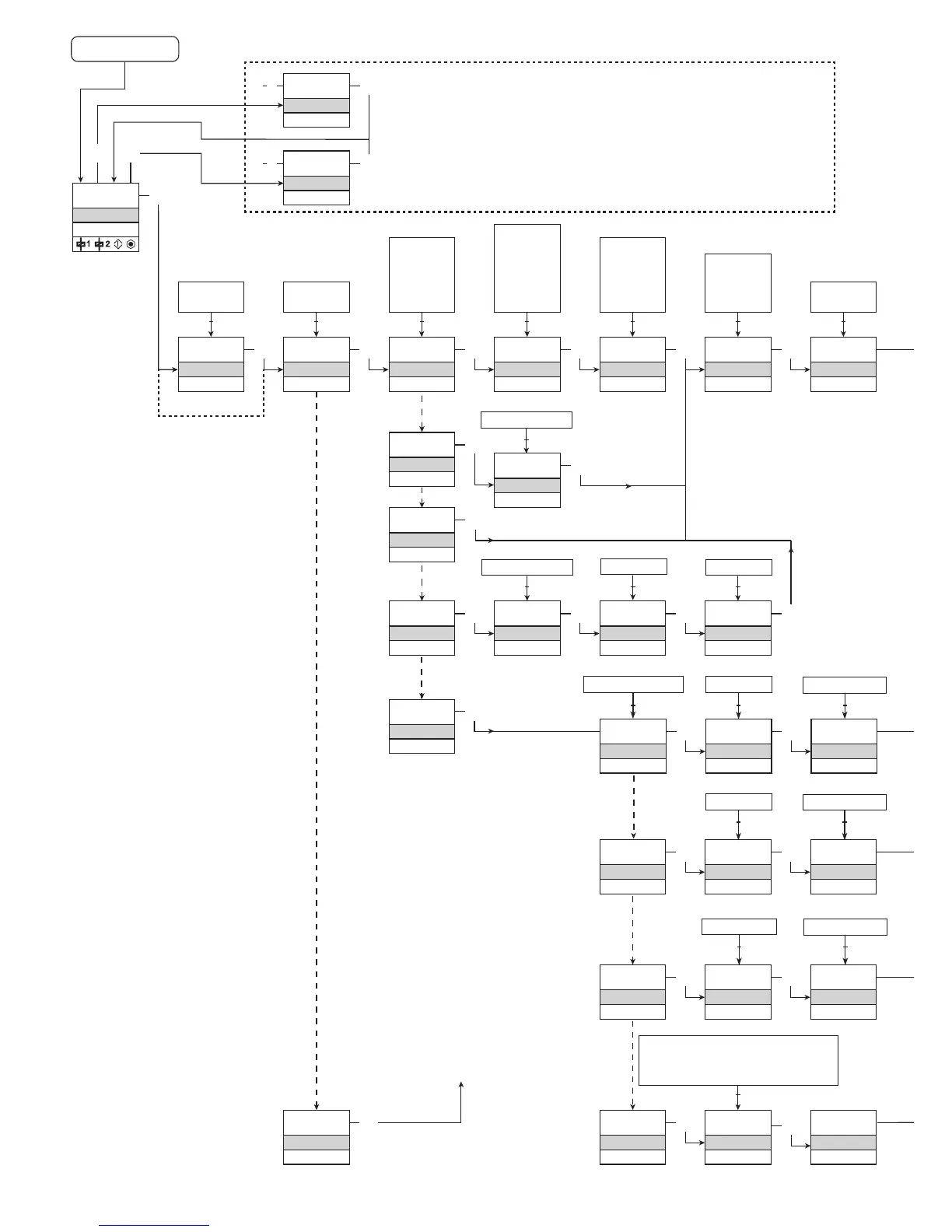
PR 4131 - Routing Diagram (Power Up); Power Up

PR 4131
37 pages
Print Icon
To Next Page IconTo Next Page
To Previous Page IconTo Previous Page
Loading...
Power up
1 2
0000
PASSW.
Txt 1
50.0
%
12.0
3
3
0000
9999
1 2
NO
ADV.SET
Txt 2
NO
YES
1 2
3
VOLT
IN TYPE
Txt 3
VOLT
CURR
LIN.R
POTM
TEMP
1 2
3
50.0
RELAY1
Txt 57
3
75.0
RELAY2
Txt 57
3
1 2
1 2
2-10
V.RANGE
Txt 4
2-10
0-10
1-5
0-5
0.2-1
0-1
1 2
3
YES
ADV.SET
Txt 2
3
0.0
DISP.LO
Txt 13
999.9
-199.9
1 2
111.1
DEC.P
Txt 12
1111
111.1
11.11
1.111
1 2
3
UNIT
%
Txt 11
@C
mA
rpm
(69 units)
1 2
3
1.0
1.2
1.1
TC.B TC.E TC.J TC.K TC.L
TC.N TC.R TC.S TC.T TC.U
TC.W3 TC.W5 TC.Lr
1 2
CURR
IN TYPE
Txt 3
3
4-20
I.RANGE
Txt 5
3
LIN.R
IN TYPE
Txt 3
3
3W
CONNEC.
Txt 6
2W 3W W
1 2
3
POTM
IN TYPE
Txt 3
3
TEMP
IN TYPE
Txt 3
0
R 0%
Txt 7
3
2500
R 100%
Txt 8
1 2
3
Pt
SENSOR
Txt 10
3
Ni
SENSOR
Txt 10
3
TC
SENSOR
Txt 10
3
100
Pt TYPE
Txt 16
3
3W
CONNEC.
Txt 6
100
Ni TYPE
Txt 17
3
3W
CONNEC.
Txt 6
TC.K
TC.TYPE
Txt 18
3
INT
CJC
Txt 63
Cu
SENSOR
Txt 10
Cu Pt Ni TC
1 2
3
10
Cu TYPE
Txt 69
10...100
3
3W
CONNEC.
Txt 6
2W 3W W
1 2 1 2
10...1000
2W 3W W
1 2 1 2
50...1000
2W 3W W
1 2 1 2
0...9999
1 2
0...9999
3
0-20 4-20
1 2
24 4131V104-UK
Fast setpoint adjustment
and relay test
1 Increase setpoint
2 Decrease setpoint
3 Save and exit the menu
1 and 2 simultaneously = change relay state
Continued on the page
Routing diagram ADV.SET
1.0 = Default state Line 1
shows input signal.
Line 2 shows UNIT.
Line 3 shows TAG.
Line 4 shows relay and
communication status.
1.1 = Only if password-
protected.
1.2 = Only if FastSet is acti-
vated and the relay
function is setpoint.
1.3 = Not valid for these input
signals: 0...20 mA and
voltage.
1.4 = The relay can only be
deactivated by an ope-
rator and only if the
normal conditions for
deactivation are met.
If the input signal still
has a value that will
activate the relay, the
relay will latch again.

Related product manuals