GB
|
35
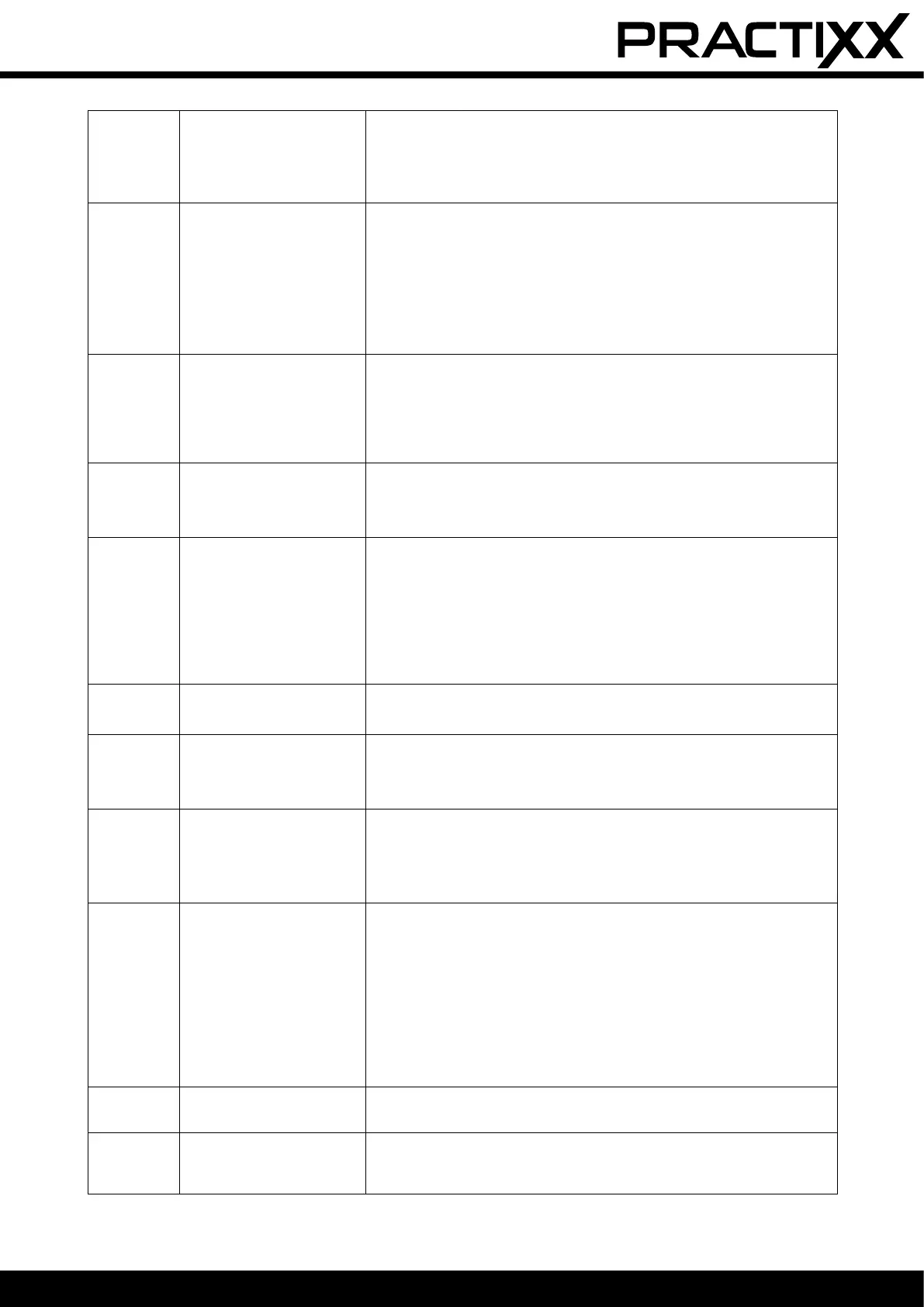
E11 No boundary signal
• When the mower is in the working area, check the charging station LED
indicator. If it lights up red, make sure that the boundary wires are well
connected to the terminals on the charging station. If the problem per-
sists, check whether the boundary wires have been cut.
E2 Wheel motor blocked
• Switch the mower o. Move the mower to an area that is free of obsta-
cles. Press the “START” button and then the “OK” button.
• If the error message is still displayed, switch o the product. Turn the
mower upside down and check what is preventing the wheels from turn-
ing.
• Remove the objects blocking the wheel(s), turn the mower over.
• Then press the “START” and “OK” buttons.
E3 Cutter disc blocked
• Switch the mower o.
• Turn the mower upside down and check what is preventing the blades
from turning.
• Remove the objects and turn the mower over.
• Place the mower in an area with short grass.
• Then press “START” and “OK”.
E4
Obstacle sensor trigger not
reset
• Contact your specialist dealer.
• Take the mower to a specialist dealer.
E5 The mower was lifted
• Switch the mower o.
• Move the mower to an area that is free of obstacles. Press the “START”
button and then the “OK” button.
• If the error message is still displayed, switch o the product. Turn the
mower upside down and check if there is anything preventing the front
axle from moving.
• Remove all obstacles, turn the mower up the right way again and switch
it on. Press “START” and then “OK”.
E6
Roll-over sensor was trig-
gered
• Stand the mower upright.
• Press “START” and then “OK”.
E7
Inclination sensors were
triggered
• Switch the mower o.
• Move the mower to an area in your lawn with level ground.
• Switch the mower on. Press “START” and then “OK”.
E8 Docking/recharging failed
• Check that there is 1 metre of space before and after the charging sta-
tion, without obstacles or corners.
• The charging station must be placed on level ground.
• Manually place the mower in the charging station for charging. After the
mower is fully charged, press “START” and then “OK”.
BP
Rechargeable battery ther-
mal protection
• Switch the mower o.
• Move the mower to an area in your lawn with level ground.
• Check the temperature of the rechargeable battery.
• If the temperature is too high, let the rechargeable battery cool down.
• If the temperature is too low, wait until the temperature is higher than 5°C.
• Re-start the mower.
• If the error still occurs, replace the rechargeable battery.
• If the error still occurs, contact your specialist dealer.
EE Error unknown
• Re-start the mower.
• If the error still occurs, contact your specialist dealer.
LOCK
Robot mower locked (PIN
entered incorrectly too
many times)
• Wait 10 minutes and then enter the PIN again
• Do not switch the robot mower o
• If the error still occurs, contact your specialist dealer.


 To Next Page
 Loading...