EasyManua.ls Logo

PRASTEL M2000PE - User Manual

PRASTEL M2000PE
4 pages
Print Icon
To Next Page IconTo Next Page
Loading...
M2000PE
ENGLISH
ISM2000PEEU_02_05.doc
5
1. GENERAL DESCRIPTION
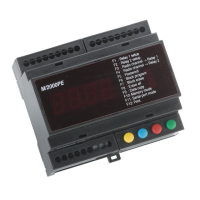
M2000PE is an access control unit for the operation of two doors.
It is equipped with an integrated 433MHz radio receiver, two inputs for external readers, two output relays with 5A-capacity contacts for direct
connection to the electric locks, and an internal memory with a storage capacity of 2000 user codes.
It is also fitted with 4 keys and a 4-digit display for code and functional parameter setting, and more precisely for
programming new codes into the memory (through self-learning via the radio or the readers connected to the inputs);
deleting single codes from the memory;
selecting either bistable or timed operation mode independently for each relay;
setting activation time for each relay (in the timed operation mode);
associating any of the four channels of the radio transmitters to each relay;
activating transfer of set data to another M2000PE unit connected via the RS485 serial line.
All operations can also be performed through the remote M/KEYB keyboard/display connected to the unit via RS/485.
All M2000PE circuits and components are housed in a plastic enclosure suitable for indoor installation and for mounting on bars according to DIN
standards. The M/KEYB keyboard is housed in an enclosure for wall-mounting or for countertop use.
2. TECHNICAL FEATURES
Power supply
12-24Vac/dc
Inputs
integrated 433.92MHz radio receiver, 4 channels + 2 inputs with Wiegand protocol
Memory capacity
2,000 users
No. of output relays
2, controlled by two Wiegand inputs and/or by radio input, with the possibility of selecting channel address for each
relay. Example: channel 4 transmitter on relay 2.
Contact for enabling reading function on the door (one for each relay).
Inputs for forcing activation of the single door (“door opener” push-button)
Relay operating mode
timed from 1 to 180 seconds
Relay contact capacity
5 A
Programming 4 keys (FUN, INC, DEC, VAL) and 4 displays plus M/KEYB remote optional keyboard/display
Other functions RS/485 serial communication port for transferring data to a slave unit and for connection of the M/KEYB remote
keyboard with 4 keys and 4 displays
Dimensions and weight
105x90x60, 320 grams
3. FUNCTIONS
Programming new codes
1. Simultaneously press keys INC and DEC.
2. Select a free storage location via keys INC and DEC (free location is indicated by decimal points being off).
3. Perform transmission or have the badge to be stored read by the badge reader (decimal points will go on).
4. Confirm by pressing key VAL (decimal points will briefly flash).
5. Repeat procedure from step 2 to enter other codes or simultaneously press keys INC and DEC to exit from programming mode.
Deleting codes
1. Simultaneously press keys INC and DEC.
2. Select the storage location to be deleted via keys INC and DEC (decimal points on indicate that the location is engaged)
3. Press the VAL key. The letter -C- will now appear on the left-hand side of the display.
4. Press the VAL key again to confirm deletion. The decimal points will go off and the storage location ‘h’ will be deleted.
5. Repeat procedure from step 2 to delete other codes and simultaneously press keys INC and DEC to exit from the programming mode.
Selecting operation mode and relay timing
1. Simultaneously press keys INC and DEC.
2. Press key FUN to access the function selection menu.
3. Select function F1 (relay 1) or F2 (relay 2) by pressing keys INC and DEC.
4. Confirm selection by pressing the VAL key; current parameter value will appear on the display.
5. Select the value to be assigned to the parameter by pressing keys INC and DEC. If value 0000 is set, the relay will operate in the bistable mode.
If a value between 1 and 180 is selected, the relay will operate in the monostable mode with activation time corresponding to the set value
(expressed in seconds).
6. Confirm by pressing key VAL; display will return to function selection and the new parameter will be stored.
7. Simultaneously press keys INC and DEC to exit from programming mode.
Assigning radio channel to the relay
1. Simultaneously press keys INC and DEC.
2. Press the FUN key to access the function selection menu.
3. Select function F3 (relay 1) or F4 (relay 2) by pressing keys INC and DEC.
4. Confirm selection by pressing the VAL key; current parameter value will appear on the display.
5. Select the desired radio transmitter channel (1, 2, 3 or 4) to be assigned to the relay by pressing keys INC and DEC.
6. Confirm by pressing key VAL; display will return to function selection and the new parameter will be stored.
7. Simultaneously press keys INC and DEC to exit from programming mode.
Entering the password
1. Access programming mode by pressing keys INC + DEC.
2. Press the FUN key to access the function selection menu.
3. Select function F5 by pressing keys INC and DEC and confirm by pressing the VAL key.
4. The letter P will appear on the left side of the display. Digit a sequence of six keys within 10 seconds. Each time a key is pressed, the letter P will
flash.
5. Upon the full sequence of six keys having been completed, the function selection menu will reappear on the display.
Failure to complete sequence within 10 seconds will abort password entry. This also avoids entry of incorrect passwords in case of any doubts as to
the sequence to be entered or erroneous pressing of any key.


Other manuals for PRASTEL M2000PE

Question and Answer IconNeed help?

Do you have a question about the PRASTEL M2000PE and is the answer not in the manual?

Summary

General Description of M2000 PE

M2000 PE Technical Features

M2000 PE Functions and Operations

Programming New Codes

Procedure for adding new user codes into the memory via keypad or reader.

Deleting Codes

Steps to remove single user codes from the device memory.

Selecting Operation Mode and Relay Timing

Configure relay behavior (bistable/timed) and activation duration.

Assigning Radio Channel to Relay

Associate specific radio transmitter channels to device relays.

Entering the System Password

Procedure for setting or changing the system access password.

Deleting a Resident Password

Instructions for removing a forgotten or existing system password.

Entering a Set of Codes

Method for programming multiple consecutive user codes efficiently.

Deleting a Set of Codes

Procedure for removing a range of previously programmed user codes.

Deleting All Codes

Completely clear the entire user code memory of the device.

Serial Data Transfer

How to copy settings and data from one M2000PE to another.

M2000 PE Memory Modalities

M2000 PE Communication Protocols

M2000 PE Printing Functions

Printing the List of Codes

Procedure to print all stored user codes from the device memory.

Printing Events

Outputting event logs such as valid codes and invalid entries.

M2000 PE Operation via Remote Keyboard

M2000 PE Terminal Strip and Key Functions

Overview

The M2000PE is an access control unit designed for operating two doors. It integrates a 433MHz radio receiver, two inputs for external readers, and two output relays with 5A-capacity contacts for direct connection to electric locks. The unit features an internal memory capable of storing up to 2,000 user codes. For user interaction, it includes four keys (FUN, INC, DEC, VAL) and a four-digit display, which are used for setting codes and functional parameters.

Function Description

The M2000PE allows for:

  • Programming New Codes: Codes can be programmed into memory through self-learning via the integrated radio receiver or external readers connected to the inputs.
  • Deleting Single Codes: Individual codes can be removed from the memory.
  • Selecting Operation Mode: Users can choose between bistable or timed operation modes independently for each relay.
  • Setting Activation Time: For timed operation mode, the activation time for each relay can be set (from 1 to 180 seconds).
  • Assigning Radio Channels: Any of the four channels of the radio transmitters can be associated with each relay.
  • Data Transfer: Set data can be transferred to another M2000PE unit via the RS485 serial line.
  • Remote Operation: All programming and operational functions can also be performed using the optional M/KEYB remote keyboard/display, which connects via RS/485.

Technical Specifications

  • Power Supply: 12-24Vac/dc
  • Inputs: Integrated 433.92MHz radio receiver (4 channels), 2 inputs with Wiegand protocol.
  • Memory Capacity: 2,000 users.
  • Output Relays: 2 relays, controlled by two Wiegand inputs and/or radio input. Each relay can have a specific channel address selected (e.g., channel 4 transmitter on relay 2).
  • Relay Contact Capacity: 5 A.
  • Relay Operating Mode: Timed (1 to 180 seconds) or bistable.
  • Programming Interface: 4 keys (FUN, INC, DEC, VAL) and 4 displays. Optional M/KEYB remote keyboard/display.
  • Other Functions: RS/485 serial communication port for data transfer to slave units and connection of the M/KEYB remote keyboard.
  • Dimensions: 105x90x60 mm.
  • Weight: 320 grams.
  • Enclosure: Plastic, suitable for indoor installation and DIN rail mounting.
  • M/KEYB Keyboard: Housed in an enclosure for wall-mounting or countertop use.
  • Maximum Link-up Distance (M2000PE to M/KEYB): 500 meters.

Usage Features

Programming New Codes:

  1. Press INC and DEC simultaneously.
  2. Use INC/DEC to select a free storage location (indicated by decimal points being off).
  3. Perform a transmission (e.g., from a badge reader) to store the code (decimal points will turn on).
  4. Press VAL to confirm (decimal points will briefly flash).
  5. Repeat from step 2 for other codes or press INC/DEC simultaneously to exit.

Deleting Codes:

  1. Press INC and DEC simultaneously.
  2. Use INC/DEC to select the storage location to be deleted (decimal points on indicate engagement).
  3. Press VAL; "-C-" appears on the left display.
  4. Press VAL again to confirm deletion; decimal points turn off, and 'h' indicates deletion.
  5. Repeat from step 2 for other codes or press INC/DEC simultaneously to exit.

Selecting Operation Mode and Relay Timing:

  1. Press INC and DEC simultaneously.
  2. Press FUN to access the function selection menu.
  3. Use INC/DEC to select function F1 (relay 1) or F2 (relay 2).
  4. Press VAL to confirm; the current parameter value appears.
  5. Use INC/DEC to select the desired value: 0000 for bistable mode, 1-180 for monostable mode (seconds).
  6. Press VAL to confirm; the display returns to function selection, and the new parameter is stored.
  7. Press INC/DEC simultaneously to exit.

Assigning Radio Channel to the Relay:

  1. Press INC and DEC simultaneously.
  2. Press FUN to access the function selection menu.
  3. Use INC/DEC to select function F3 (relay 1) or F4 (relay 2).
  4. Press VAL to confirm; the current parameter value appears.
  5. Use INC/DEC to select the desired radio transmitter channel (1, 2, 3, or 4).
  6. Press VAL to confirm; the display returns to function selection, and the new parameter is stored.
  7. Press INC/DEC simultaneously to exit.

Entering the Password:

  1. Access programming mode by pressing INC + DEC.
  2. Press FUN to access the function selection menu.
  3. Use INC/DEC to select function F5 and press VAL to confirm.
  4. "P" appears on the left display. Enter a six-key sequence within 10 seconds (P flashes with each key press).
  5. After the sequence, the function selection menu reappears. Failure to complete within 10 seconds aborts entry.

Deleting a Resident Password:

  1. Access programming mode (password requested if set).
  2. Enter the password.
  3. Press FUN to access the function selection menu.
  4. Select function F5 and press VAL.
  5. Allow 10 seconds to elapse; the password is deleted and will not be requested for subsequent programming access.

Entering a Set of Codes:

This feature is useful for programming multiple consecutive codes (e.g., from packages of 10, 50, or 100).

  1. Access programming mode (INC+DEC).
  2. Press FUN to access the function selection menu.
  3. Select function F6 (INC+DEC).
  4. Press VAL to confirm. The first location to be programmed (default 0001) appears, with the left decimal point indicating initial location selection.
  5. Select the initial location (INC+DEC) and confirm (VAL).
  6. The final location appears (must be greater than the initial location), with the right decimal point indicating final location selection.
  7. Select the final location (INC+DEC) and confirm (VAL). The M2000PE will now accept a code transmission (radio or reader). Once received, it is entered into the initial location, and subsequent locations are filled by incrementing the initial code by one unit.
  8. After all locations are entered, the system returns to the function selection menu.

Deleting a Set of Codes:

  1. Access programming mode (INC+DEC).
  2. Press FUN to access the function selection menu.
  3. Select function F7 (INC+DEC).
  4. Press VAL to confirm. The first location to be deleted (default 0001) appears, with the left decimal point indicating initial location selection.
  5. Select the initial location (INC+DEC) and confirm (VAL).
  6. The final location appears (must be greater than the initial location), with the right decimal point indicating final location selection.
  7. Select the final location (INC+DEC) and confirm (VAL); "-C-" appears on the left display.
  8. Press VAL again to confirm. The M2000PE deletes all codes in the specified range.
  9. Upon completion, the system returns to the function selection menu.

Deleting All Codes:

This clears the entire memory without needing to scroll through individual locations.

  1. Access programming mode (INC+DEC).
  2. Press FUN to access the function selection menu.
  3. Select function F8 (INC+DEC).
  4. Press VAL to confirm; "C" appears on the left display.
  5. Press VAL again to confirm. The M2000PE deletes only the code area; other parameters (relay times, channels) remain unaltered.
  6. Upon completion, the system returns to the function selection menu.

Serial Transferring of Data:

  1. Access programming mode (INC+DEC).
  2. Press FUN to access the function selection menu.
  3. Select function F9 (INC+DEC).
  4. Press VAL to confirm. The first location to be transferred (default 0001) appears, with the left decimal point indicating initial location selection.
  5. Select the initial location (INC+DEC) and confirm (VAL).
  6. The final location appears (must be greater than the initial location), with the right decimal point indicating final location selection.
  7. Select the final location (INC+DEC) and press VAL to confirm; the four lower display segments turn on.
  8. Press VAL again to initiate data transfer (four lower segments flash during transfer).
  • Pressing FUN at any time during data transfer exits the mode, but the system completes the transfer of the current code before returning to the function selection menu.

Selecting Memory Modalities (F10):

  • F (Function): Codes activate either of the two relays based on F3/F4 assignment.
  • H (Half): Memory is divided into two parts (1-1000 for PORT 1, 1001-2000 for PORT 2). Useful for managing two groups of users or discriminating relay activation with the same user code.
  • P (Anti-passback): Once a code activates one relay, it cannot reactivate until the other relay is activated.
  • Warning: Changing memory modalities deletes all previously stored codes.

Selecting Communication Protocol (F11):

  • 0: Communication with GTSYSTEM, M2000, or MKEYB.
  • 1: Communication with printer PRINT2000.

Printing the List of Codes (F12):

  1. Connect PRINT2000 printer to the serial port.
  2. Set protocol 1 via function F11.
  3. Select function F12.
  4. Press VAL.
  • The control unit returns to the select functions menu after printing.

Printing Events:

If protocol 1 is selected and PRINT2000 is connected, each received code prints a string with location, user status, user code, date, time, and door.

  • Example: POS.0001 VALID 00524602 01/12/00 04:59 DOOR1
  • The printer PRINT2000 must be programmed with the correct date and time.

Operating via Remote Keyboard (M/KEYB):

  • The M2000PE can connect to an M/KEYB terminal for remote programming, entering, and deleting codes via an RS485 serial line.
  • The M2000PE automatically detects the remote terminal.
  • Programming cannot be done simultaneously on both the central unit and the remote keyboard. If initiated from one, the other's display remains off.
  • The M/KEYB supports all M2000PE programming operations except serial data transfer between central units.
  • Maximum connection distance is 500 meters.

Maintenance Features

  • Password Management: The password is stored in EEPROM. If forgotten, contact the system supplier.
  • Code Deletion: Various options for deleting codes (single, set, or all) simplify memory management.
  • Data Transfer: Allows for easy transfer of configuration and codes to other M2000PE units, potentially for system replication or backup.

Terminal Strip Notes:

  • Terminals 4 and 13 must be connected to terminals 6 and 15, respectively, to enable the corresponding relay outputs. This is useful for external devices like buried magnetic coils (to prevent accidental openings) or timed relays.
  • Inputs for forcing single door activation (clamps 5 and 14) are active when referred to GND.
  • If RS485 is used to connect MKEYB or GTSYSTEM, any other M2000PEs connected via terminals 21 and 22 must be disconnected.

Declaration of Conformity:

PRASTEL S.p.A. declares that M2000PE complies with the essential requirements and relevant provisions of Directive 1999/5/EC.

PRASTEL M2000PE Specifications

General IconGeneral
BrandPRASTEL
ModelM2000PE
CategoryIP Access Controllers
LanguageEnglish