1. GENERAL DESCRIPTION
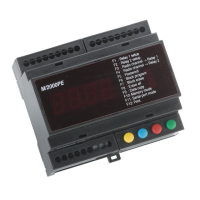
M2000PE
is an access control unit for the operation of two doors.
It is equipped with an integrated 433MHz radio receiver, two inputs for external readers, two output relays with 5A-capacity contacts for direct
connection to the electric locks, and an internal memory with a storage capacity of 2000 user codes.
It is also fitted with 4 buttons and a 4-digit display for code and function setting. These functions allow:
•
programming new codes into the memory (through self-learning via the radio or the readers connected to the inputs);
•
deleting single codes from the memory;
•
selecting either bistable (toggle) or timed operation mode independently for each relay;
•
setting activation time for each relay (in the timed operation mode);
•
selecting any one of the four channels of the radio transmitter to operate one or both relays;
•
activating transfer of set data to another M2000PE unit connected via the RS485 serial line.
All operations can also be performed through the remote
M/KEYB
keyboard/display connected to the unit via
RS/485.
All
M2000PE
circuits and components are housed in a plastic enclosure suitable for indoor installation and for mounting on bars according to DIN
standards. The
M/KEYB
keyboard is housed in an enclosure for wall-mounting or for countertop use.
2. TECHNICAL FEATURES
Power supply
12-24Vac/dc
Inputs
integrated 433.92MHz radio receiver, 4 channels + 2 inputs with Wiegand protocol
Memory capacity
2,000 users
No. of output relays
2, controlled by two Wiegand inputs and/or by radio input, with the possibility of selecting channel address for each
relay. Example: channel 4 transmitter on relay 2.
Contact for enabling reading function on the door (one for each relay).
Inputs for forcing activation of the single door (“door opener” push-button)
Relay operating mode
toggle or timed from 1 to 180 seconds
Relay contact capacity
5 A
Programming
4 buttons (FUNCTION, DECREASE, INCREASE, VALIDATE) and display (optional MKEYB remote buttons/display)
Other functions
RS/485 serial communication port for transferring data to a slave unit and for connection of the
M/KEYB
remote
keyboard with 4 keys and 4 displays
Dimensions and weight
105x90x60, 320 grams
3. FUNCTIONS
Programming new cards, tokens and transmitters
1. Simultaneously press BLUE (decrease) and RED (increase) buttons
2. Select a free storage location using the BLUE and RED buttons (free location is indicated by decimal points being off).
3. Perform radio transmission or have the card/token to be stored read by the card reader (decimal points will go on).
4. Confirm by pressing GREEN (validate) button (decimal points will briefly flash).
5. Repeat procedure from step 2 to enter other cards or simultaneously press BLUE and RED buttons to exit from programming mode.
Deleting cards, tokens and transmitters
1. Simultaneously press BLUE (decrease) and RED (increase) buttons
2. Select the storage location to be deleted using BLUE and RED buttons (decimal points on indicate that the location is engaged)
3. Press the GREEN (validate) button. The letter -C- will now appear on the left-hand side of the display.
4. Press the GREEN button again to confirm deletion. The decimal points will go off and the storage location is now cleared.
5. Repeat procedure from step 2 to delete other cards and simultaneously press BLUE and RED buttons to exit from the programming mode.
Selecting operation mode and relay timing
1. Simultaneously press BLUE and RED buttons.
2. Press YELLOW (function) button to access the function selection menu.
3. Select function F1 (relay 1) or F2 (relay 2) by pressing RED and BLUE buttons.
4. Confirm selection by pressing the GREEN button; current parameter value will appear on the display.
5. Select the value to be assigned to the parameter by pressing RED and BLUE buttons. If value 0000 is set, the relay will operate in toggle mode.
If a value between 1 and 180 is selected, the relay will operate in the monostable mode with activation time corresponding to the set value
(expressed in seconds).
6. Confirm by pressing GREEN button; display will return to function selection and the new parameter will be stored.
7. Simultaneously press RED and BLUE buttons to exit from programming mode.
Assigning radio channel to the relay
1. Simultaneously press BLUE and RED buttons.
2. Press the YELLOW button to access the function selection menu.
3. Select function F3 (relay 1) or F4 (relay 2) by pressing RED and BLUE buttons.
4. Confirm selection by pressing the GREEN button; current parameter value will appear on the display.
5. Select the desired radio transmitter channel (1, 2, 3 or 4) to be assigned to the relay by pressing the RED and BLUE buttons.
6. Confirm by pressing GREEN button; display will return to function selection and the new parameter will be stored.
7. Simultaneously press RED and BLUE buttons to exit from programming mode.
Entering the password
1. Access programming mode by pressing RED and BLUE buttons.
2. Press the YELLOW button to access the function selection menu.
3. Select function F5 by pressing RED and BLUE buttons and confirm by pressing the GREEN button.
4. The letter P will appear on the left side of the display. Digit a sequence of six buttons within 10 seconds. Each time a key is pressed the letter P
will flash.
5. Upon the full sequence of six buttons having been completed, the function selection menu will reappear on the display.
Failure to complete sequence within 10 seconds will abort password entry.


 To Next Page
 Loading...