955205_01 11/11 19
Planng Operaon
Setup and Operaon (Planter)
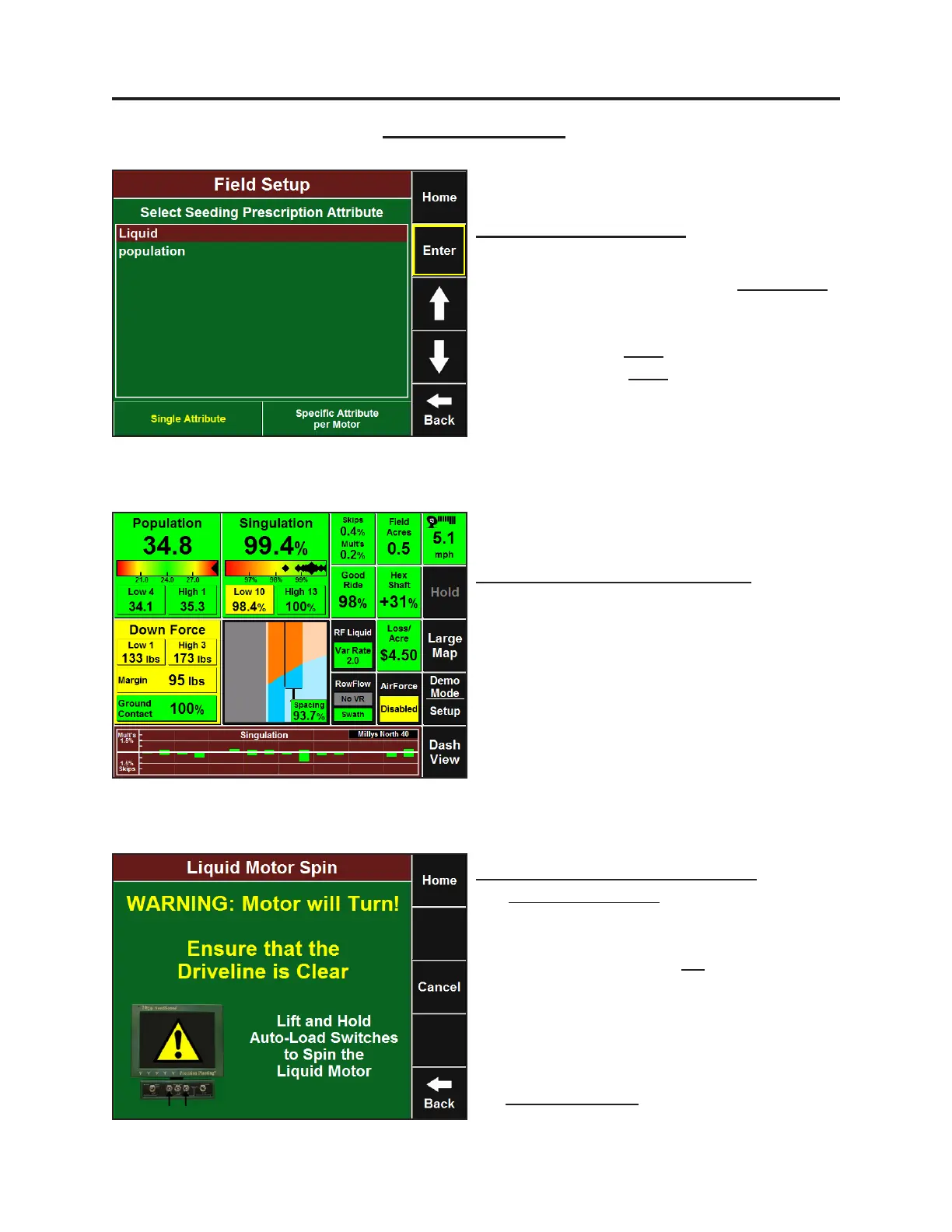
Field Prescripon Selecon
Select eld from eld selecon menu
(Setup-Field Name), and press the Prescripon
buon to select the prescripon with seeding
rate and liquid rates. First choose the seeding
aribute and press Enter. Select the liquid
aribute, and press Enter.
RowFlow Liquid Dashboard Buons
The RowFlow Liquid Dashboard buon is
displayed by default when a liquid motor is
setup. It funcons similarly to the RowFlow
Dashboard buon. An addional dashboard
buon can be congured that will show both
pressure and ow rates.
Cab Control Module Toggle Switches
The Master Plant Switch stops all motors,
including the liquid motor. The toggle switch
that correlates with the liquid motor will NOT
stop it when ipped to the O posion.
Holding up switches #2 and #4 to manually spin
the seeding motors or to Auto Load the meters
will NOT spin the liquid motor. To manually spin
the liquid motor using Auto Load Switches, go
to the RowFlow Liquid Control page and press
the Spin Liquid Motor buon.


 To Next Page
 Loading...
