955205_01 11/11 20
Setup and Operaon (Planter)
RowFlow Liquid Control Page
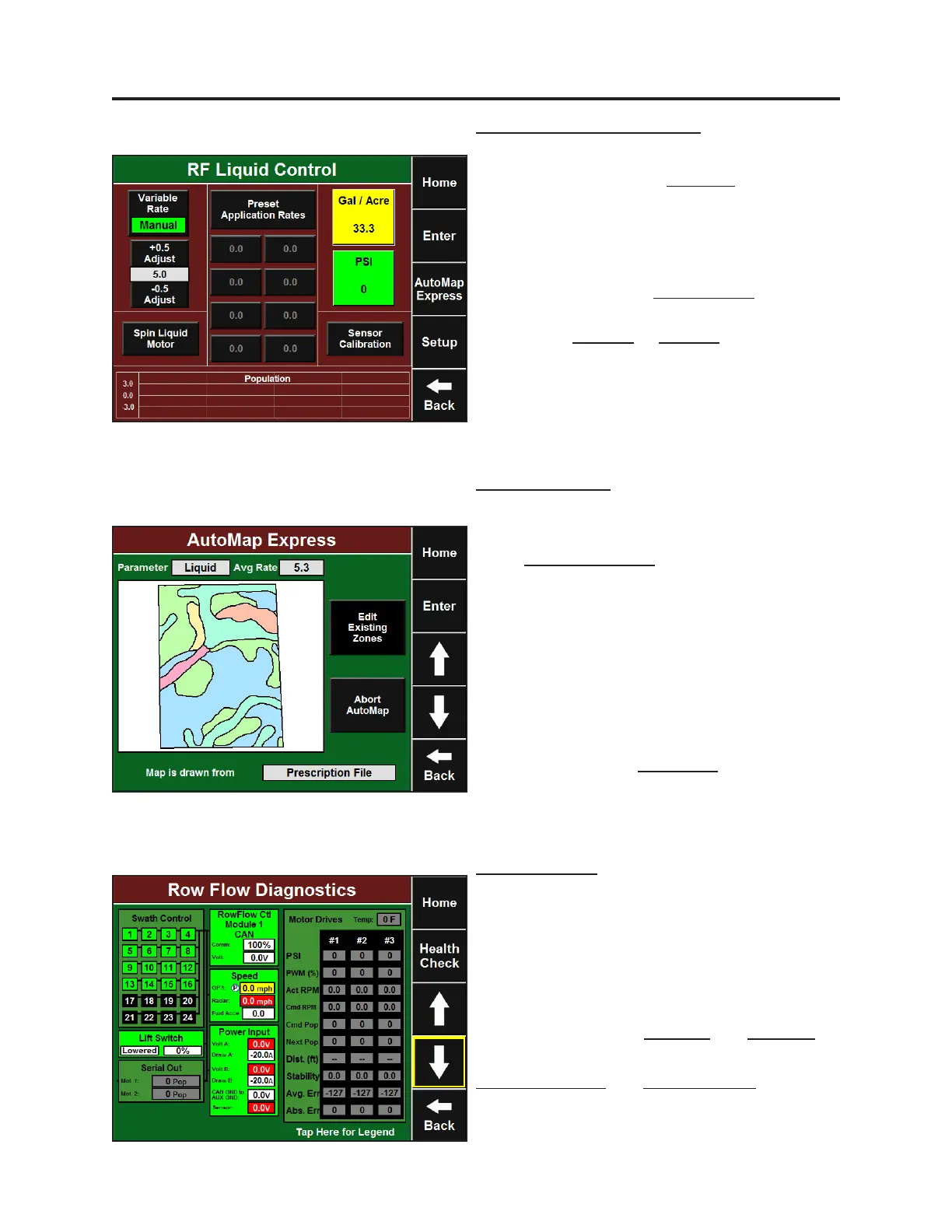
The RowFlow Liquid Control page can be
accessed by pressing the RF Liquid buon from
the home screen or by pressing
Setup-Systems-RF Liquid (Control). This page
allows you to toggle between automac
variable rate liquid applicaon and manual rate
control by pressing the Variable Rate buon
near the top le. When in Manual mode, you
may use the + Adjust or – Adjust buons to
change the rate of liquid applicaon. You may
also select one of the Preset Applicaon Rates
from the center of the page. This page also
shows you the Flow Rate and Pressure in the
liquid system.
Automap Express
Automap Express will work with a liquid
aribute just like it does with seeding. You can
get to Automap Express through either the
RowFlow Control page or the RF Liquid Control
page. Press the Automap Express buon on the
right. If the Parameter box in the top le reads
“populaon,” press it and select Liquid. You may
then edit the prescripon accordingly.
If the prescripon that is imported was not
created in Automap, you may need to assign
the correct parameter to each aribute. This is
done by pressing the Parameter box from the
Automap Express map screen and then
selecng the parameter to the right of each
aribute.
Diagnosc Page
The RowFlow Diagnosc page (Setup-Diagnose-
RowFlow) contains the diagnosc informaon
for the RowFlow Liquid system. The hydraulic
drive motor aached to the liquid pump will
have all of the same diagnoscs as that of a
seeding motor when used in a planng
applicaon. However, Cmd Pop and Next Pop
will have ow rates in Gallons per Acre (GPA).
Voltage / Current and Motor Stability Health
Checks will test the liquid system, where the
others will not.


 To Next Page
 Loading...
