955205_01 11/11 25
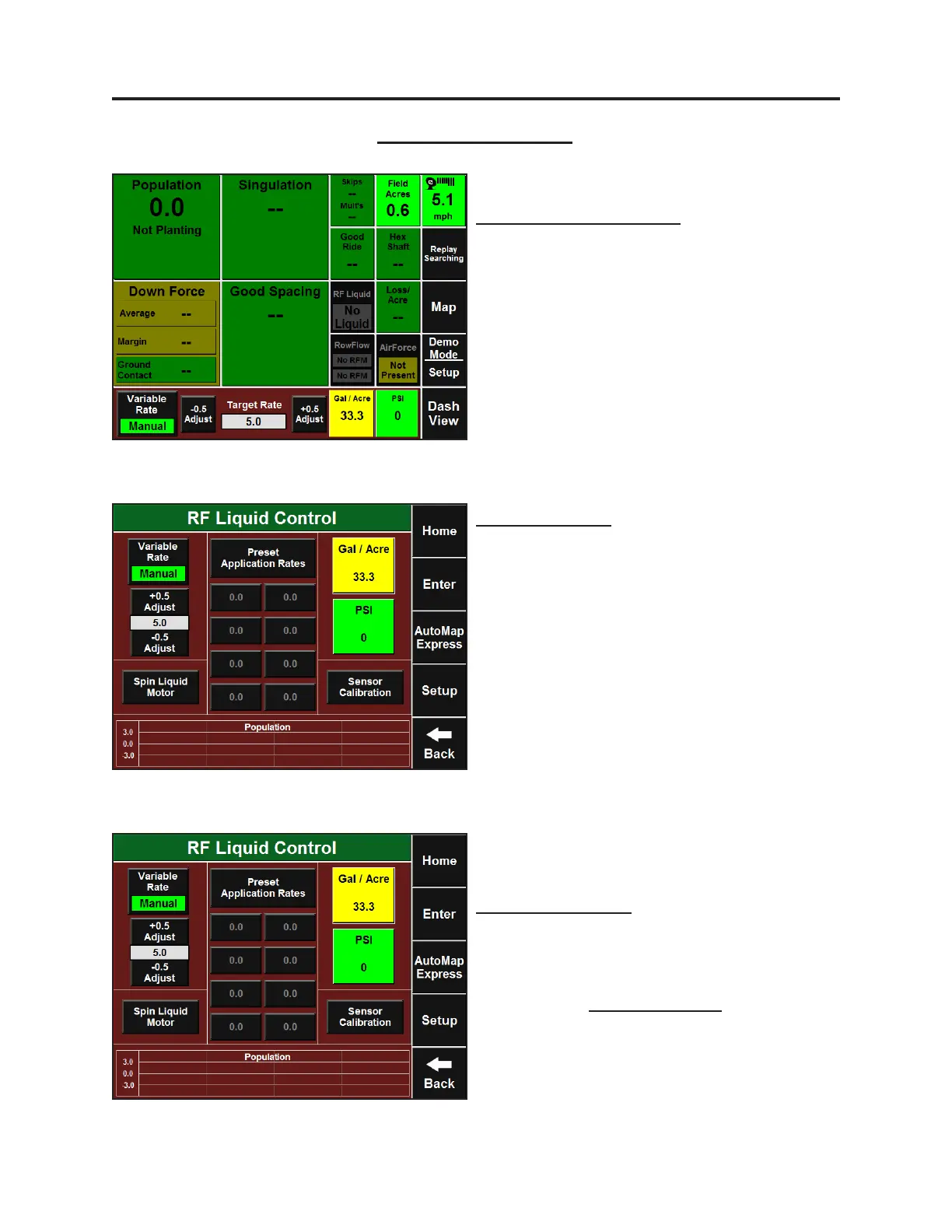
Home Screen – Dashboard
Sidedress mode operates in a paral replay
mode. You will see grayed out areas on the
screen that is replayed planng data while you
run. Areas not grayed out contain live data. This
mode also gives access to two new 4x4 buons:
Planng Speed and Hybrids. These buons can
be congured through Setup-Systems-Display-
Dashboard Buons.
Setup and Operaon (Sidedress)
Sidedress Operaon
Sidedress Control
Sidedress Control can be done from either
the RF Liquid Control page or the Dashboard
Minichart while in Sidedress Mode. The RF
Liquid Control page can be accessed by
pressing the Dashboard Minichart. Manual
variable rang is done in the same way as
seeding and liquid planng applicaon. Quick
Adjust Rates and Preset Rates will need to be
set up separately from liquid planng
applicaon. They are saved separately as well.
Cab Control Module
Holding up the #2 and #4 switches (Autoload
switches) on the Cab Control Module while in
Sidedress Mode will spin the liquid motors.
Therefore, the Spin Liquid Motor buon on the
RF Liquid Control page is disabled.


 To Next Page
 Loading...
