
 Need help?
Do you have a question about the Premax PM-CC35D and is the answer not in the manual?
Lists items included in the package for verification upon purchase.
Explains automatic counting process and display of counted banknotes.
Details UV detection operation, counterfeit alerts, and continuation.
Explains MG and MT detection for counterfeit notes and alerts.
Describes IR detection for double notes and DD detection for width.
Explains modes for calculating total value by denomination.
Details setting batch quantity and adding counted banknotes.
Covers half-note, chained-note, and double-note detection.
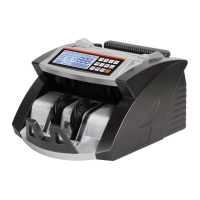
This document outlines the operation manual for a Money Counter, a device designed for fast, accurate, and reliable banknote counting. It emphasizes safety, optimal use, and proper care.
The Money Counter is a versatile machine capable of processing various tasks related to currency counting. Its primary function is to count banknotes quickly and accurately. Beyond simple counting, it incorporates several detection mechanisms to identify suspicious or improperly fed notes, ensuring the integrity of the count.
Counting Function: The machine automatically begins counting once banknotes are placed in the hopper. The total number of counted banknotes is displayed, and if recounted, the display clears, showing the last counted batch.
UV (Ultraviolet) Detection Function: This function checks for UV features present in banknotes. It is automatically enabled upon power-up. If a counterfeit note is detected, the machine stops, emits a beeping sound, and displays "A or E10," indicating a suspicious note. The user must remove the suspicious note and press "START" to resume counting.
MG (Magnetic) Detection Function: The MG detection function identifies magnetic features in banknotes. It is also automatically turned on when the unit is powered up. Upon detecting a counterfeit note, the machine stops, beeps, and displays "b or E6X." The suspicious note must be removed, and "START" pressed to continue.
MT (Metal Thread) Detection Function: This function specifically checks for metal threads in banknotes. Like UV and MG detection, it is automatically enabled. If a counterfeit note with an issue related to the metal thread is found, the machine stops, beeps, and shows "b or E6X." The user needs to remove the suspicious note and press "START" to proceed.
IR (Infrared) Detection Function: The IR detection function is used to identify double-notes. It is automatically active when the machine is powered up. If a double-note is detected, the machine stops, beeps, and displays "C or ECO." The double-note must be removed, and "START" pressed to continue counting.
DD Detection Function: This function detects banknotes with different widths. It memorizes the width of the first counted banknote. If a subsequent banknote differs in width by more than 5mm, the machine stops, beeps, and displays "d or E8X," indicating a suspicious note. Removing the note and pressing "START" allows counting to resume.
Half-note Detection Function: Automatically enabled by default, this function detects half-notes. If a half-note is identified, the machine stops, beeps, and displays "F or E4X." The suspicious note should be removed, and "START" pressed to continue. The half-note will be added to the counted quantity.
Chained-note Detection Function: This function, also automatically enabled, detects chained-notes. If a chained-note is found, the machine stops, beeps, and displays "d or E8X." The suspicious note must be removed, and "START" pressed to continue. The chained-note will be added to the counted quantity.
Double-note Detection Function: Similar to IR detection, this function is automatically on by default and identifies double-notes. If a double-note is detected, the machine stops, beeps, and displays "C or ECO." The suspicious note should be removed, and "START" pressed to continue. The double-note will be added to the counted quantity.
Total Value Calculation Mode: This mode allows for the calculation of the total value of counted denominations. It can be entered or exited by long-pressing the MODE or VALUE button.
The Money Counter is designed for ease of use with several operational features:
Quick Start Guide:
Correct Feeding of Banknotes: Banknotes must be placed orderly and between the counting guides in the hopper.
Control Panel Functions:
Automatic or Manual Counting Mode:
Batch Function: This function allows counting in preset batches.
ADD Function: When enabled, subsequent banknotes placed in the hopper are added to the previous count, with the total displayed. Press "ADD" again to disable.
Hopper Plate Adjustment: If banknote feeding is uneven or counting is inaccurate, the vertical adjusting screw can be adjusted to change the gap between the resistance rubber and rubber wheel. Turning clockwise decreases the gap (adds friction), while turning anticlockwise increases the gap (reduces friction).
Proper maintenance is crucial for the longevity and accurate operation of the Money Counter.
General Maintenance Guidelines:
Troubleshooting (Before Repair):
Error Code Solutions: The manual provides a table of error codes (e.g., A or E10, b or E6X, C or ECO, d or E8X, F or E4X, CE1-CE5, CE7-CE8) with corresponding reasons (e.g., fake note, double note, half note, sensor problems) and solutions (e.g., remove suspicious note, clean/replace sensor, replace motor). For sensor-related errors, cleaning or replacement is often the solution.
 General
| Brand | Premax |
|---|---|
| Model | PM-CC35D |
| Category | Cash Counter |
| Language | English |

 To Next Page
