ECM-D70T / ECM-D70T1.5
Installation Instructions Visit the Premier Mounts website at http://www.premiermounts.com Page 11
Tilt Positioning
Adjusting the Flat Panel Friction Tilt Angle
➊
Place one hand at the center top edge of the
at-panel.
➋
Place the other hand on the center bottom
edge of the at-panel.
➌
Using the upper hand, gently pull the top of
the at-panel towards you while the
lower hand gently pushes the bottom of the
at-panel away from you.
Adjusting the Flat Panel to the Original Position
➊
Place one hand at the center top edge of the at
panel.
➋
Place the other hand on the center bottom edge of
the at-panel.
➌
Using the upper hand, gently push the top of the
at-panel towards the wall while the lower hand
gently pulls the bottom of the at-panel away from
the wall.
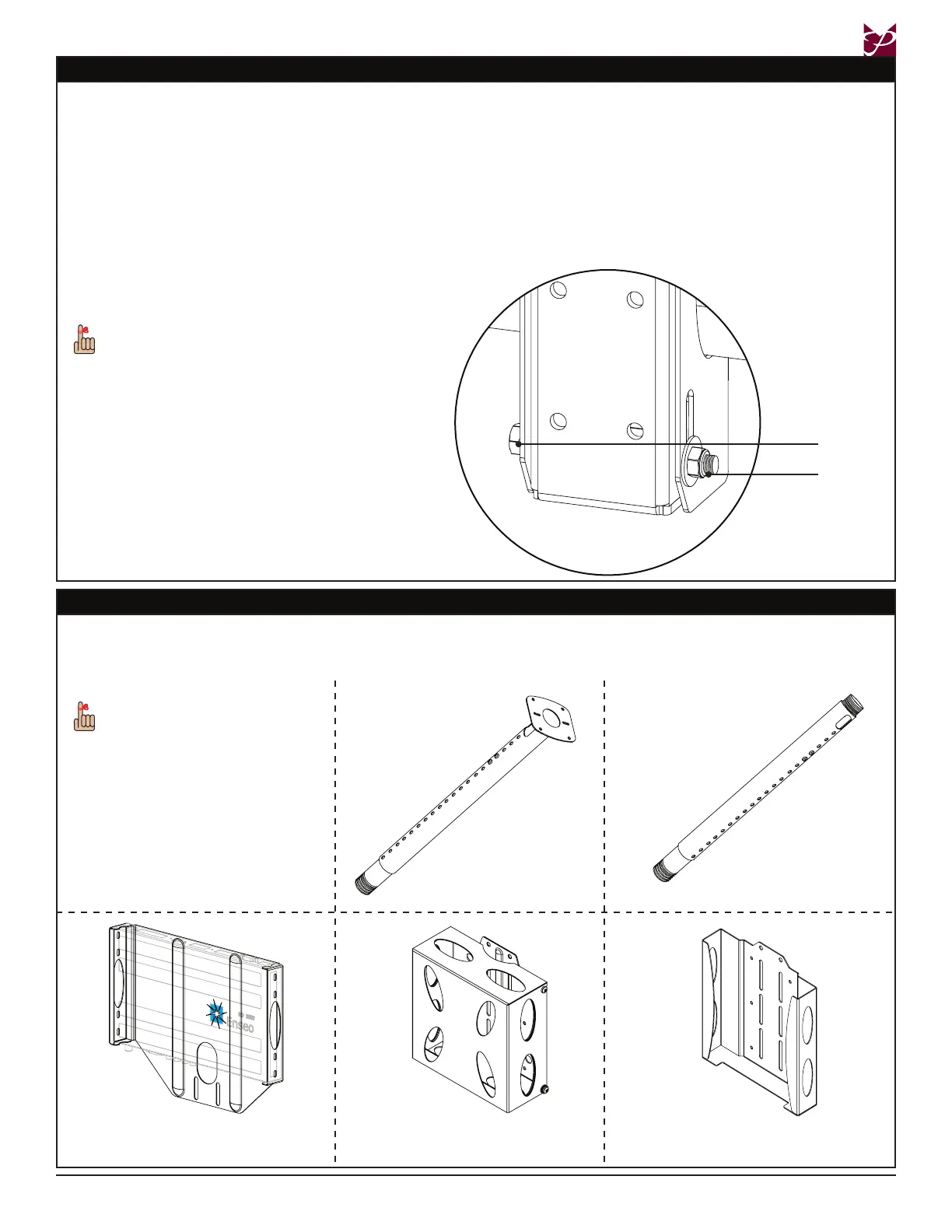
If additional tilt friction is required, tighten the
lower nut and lower bolt only, to increase the
tilt friction.
Lower Bolt
Lower Nut
Optional Mounting Congurations and Accessories
The ECM-D70T is designed for use with either a standard piece of 1-½˝ NPT or 2” pipe, or any the following ceiling mount adapters
from Premier Mounts. Please refer to the ceiling mount adapter installation instructions when mounting. Please contact Premier
Mounts at (800) 368-9700 with any questions. To view the complete line of our products, please visit us at www.mounts.com.
AST-2446 1-½˝ NPT
Adjustable Height Adapter
ECM-MPC
Media Player Adapter
ECM-MAC2
Mac mini™ Adapter
ECM-ENS
Enseo HD2000 Adapter
Please refer to the installation
instructions that come
packaged with these products
for correct installation
procedures.
APP-2446 1-½˝ NPT
Adjustable Height Adapter


 To Next Page