This document describes the Premier Pet™ In-Ground Add-A-Dog® system, a pet containment solution designed to act as a deterrent to remind pets by static correction to remain within an established boundary. The system is not a solid barrier, and regular training reinforcement is crucial for its effectiveness.
Function Description
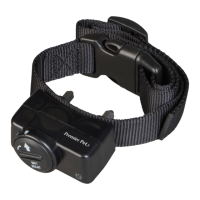
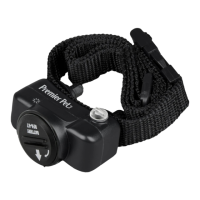
The In-Ground Add-A-Dog® system uses a receiver collar that delivers static corrections to a pet when it approaches a defined boundary. The system is designed to help train pets to stay within a designated area. The receiver collar features adjustable static correction levels, allowing owners to customize the intensity based on their pet's needs and temperament. It also includes a tone-only mode for initial training or as a warning before a static correction. The collar is powered by a replaceable battery, designed for easy replacement and increased water protection.
- Aggressive Dogs: This product should not be used with aggressive dogs, as it can cause severe injury or death to owners or others. Consultation with a veterinarian or certified trainer is recommended if there's uncertainty about suitability for a pet.
- Battery Safety: There is a risk of explosion if the battery is replaced incorrectly. Users must not short-circuit, mix old and new batteries, dispose of batteries in fire, or expose them to water. Used batteries must be disposed of properly and protected from shorting.
- Containment System Limitations: The In-Ground Fence™ system is a deterrent, not a solid barrier. Radio Systems Corporation cannot guarantee that the system will always keep a pet within the boundary due to varying tolerance levels to static correction. It is crucial not to rely solely on the system for containment if a pet poses a danger to others or itself by crossing boundaries. Radio Systems Corporation is not liable for property damage, economic loss, or consequential damages resulting from an animal crossing the boundary.
- Not a Toy: The product is not a toy and should be kept out of reach of children.
- Collar Fit and Skin Health: Proper collar fit is essential to prevent skin damage, such as redness or pressure ulcers (bed sores). The collar should not be worn for more than 12 hours per day, and its position on the pet's neck should be repositioned every 1 to 2 hours. Regular checks for excessive pressure are necessary. Trimming hair around contact points may be needed, but shaving the dog's neck is not recommended as it can lead to rash or infection.
- Leash Connection: Never connect a leash to a collar with contact points, as this can cause excessive pressure. If a separate collar is used for a leash, ensure it does not put pressure on the receiver collar.
- Hygiene: The dog's neck area and the collar's contact points should be washed weekly with a damp cloth. The contact area should be examined daily for signs of rash or sores. If a rash or sore is found, discontinue use until the skin heals. If the condition persists beyond 48 hours, a veterinarian should be consulted.
- Training and Supervision: Proper pet training is vital for successful system use. During the first two weeks of training, direct supervision of the pet is required when using the system.
- System Adjustments: Always remove the receiver collar from the pet before performing any transmitter testing or adjustments to prevent unintended corrections. The boundary width must be tested after any adjustment to the pet area.
- Electrical Safety: Do not use an outlet protected with a residual current device (RCD) or ground fault circuit interrupter (GFCI). While the fence system will function, nearby lightning strikes can trip the RCD or GFCI, leading to power loss and potential pet escape. Users would need to reset the RCD or GFCI to restore power.
Usage Features
Collar Fit:
- Ensure the collar is turned off and the dog is standing comfortably.
- Place the collar on the pet with the Premier Pet™ logo right side up and centered under the dog's chin. The contact points should touch the skin.
- Check tightness by inserting one finger between a contact point and the dog's neck; it should be snug but not constricting.
- Recheck the fit after the dog has worn the collar for several minutes and becomes more comfortable.
- Caution: Do not shave the pet's neck to avoid skin irritation. The collar should not be worn for more than 12 hours per day to prevent skin irritation.
Battery Insertion and Removal:
- Caution: Do not install the battery while the receiver collar is on the pet.
- The receiver collar uses a replaceable battery (GAC11-16351).
- To Insert: Align the symbols (arrow on battery, triangle on collar) and use the edge of the test light tool to turn the battery clockwise until the arrow aligns with the lock symbol.
- To Remove/Replace: Turn the battery counter-clockwise using the edge of the test light tool. Do not cut into or pry open the battery.
- Discharge Used Battery: Before discarding, hold the static level button down until the light is no longer illuminated to discharge all power.
- Warning: Risk of explosion if batteries are replaced by an incorrect type. Do not short circuit, mix old and new batteries, dispose of in fire, or expose to water. Batteries must be protected from shorting during storage or disposal.
- Replacement batteries (GAC11-16351) are available from retailers or the Customer Care Center.
Setting the Static Correction Level:
- Remove the clear plastic cover using the test light tool to expose the correction level button.
- With the battery installed, press and release the correction level button when the receiver LED indicator light illuminates.
- The LED indicator light will flash a series of times, indicating the current static correction level.
- To increase the level, press and release the correction level button within 5 seconds of the previous series of flashes.
- After setting the desired level, replace the cover.
- Static correction levels range from 1 to 5. Pressing the button at level 5 will revert the collar to level 1.
- The receiver indicator light also functions as a low battery indicator, flashing every 4 to 5 seconds when replacement is needed.
- Remove the receiver collar from the pet.
- Press the button and verify the LED light illuminates.
- If the LED light does not come on, remove the battery.
- Gently lift the metal tabs in the battery compartment to ensure good contact.
- Replace the battery and recheck the LED light.
Static Correction Level Table:
| Static Correction Level |
Indicator Light Response |
Receiver Collar Function |
| 1 |
1 Flash |
No Static Correction, Tone Only |
| 2 |
2 Flashes |
Low Static Correction |
| 3 |
3 Flashes |
Medium Static Correction |
| 4 |
4 Flashes |
Medium High Static Correction |
| 5 |
5 Flashes |
High Static Correction |
| Flashes once every 4 to 5 seconds |
Indicates Low Battery |
|
Maintenance Features
- Collar Hygiene: Wash the dog's neck area and the contact points of the collar weekly with a damp cloth.
- Inspection: Examine the contact area daily for signs of rash or sores.
- Battery Replacement: The collar uses a replaceable 6-volt lithium coin cell battery (GAC11-16351). Users should check local regulations for proper disposal of spent batteries.
Warranty and Compliance
- Warranty: This product includes a one-year non-transferrable limited warranty. Full details are available at premierpet.com.
- Perchlorate Battery: The battery contains Perchlorate Material, which may require special handling. Users should consult www.dtsc.ca.gov/hazardouswaste/perchlorate for guidance.
- Battery Disposal: Separate collection of spent batteries is required in many regions. Users should check local regulations or contact the Customer Care Center for disposal options.
- Recycling Advice: Users should respect Waste Electrical and Electronic Equipment regulations. The equipment must be recycled at the end of its life and not placed in normal municipal waste systems. Recycling options can be found by checking local regulations, returning to the purchase point, or contacting the Customer Care Center.
- FCC Compliance: This device complies with part 15 of the FCC Rules. Operation is subject to two conditions: (1) no harmful interference, and (2) acceptance of any received interference. The equipment has been tested and found to comply with Class B digital device limits. Users are encouraged to try to correct interference by reorienting the receiving antenna, increasing separation between equipment and receiver, connecting to a different circuit, or consulting customer care/dealer/technician.
- Caution: Modifications or changes not expressly approved by Radio Systems Corporation may void the user's authority to operate the equipment.
Customer Support:
For questions, training tips, or assistance, contact the USA-based Customer Care Center at +1 (866) 381-2785.
Hours: Mon-Fri 8am-8pm EST | Sat 9am-5pm EST (USA & Canada).
The product includes a one-year warranty. Users are encouraged to call, click, or chat before returning the product.
Website: premierpet.com

 Need help?
 General


 To Next Page