3
① “+” button
This button can set room temperature.
Press it once, the temperature increases 1
℃
.Press it continuously, the temperature
increases at the speed of 4
℃
/s.
This function is invalid when the appliance at the Fan and
Auto mode.
② “SWING” button
Press the button, the horizontal airflow direction plate can adjust automatically. When you
have the desired wind direction, please press it again, the airflow direction plate will stop at
the situation.
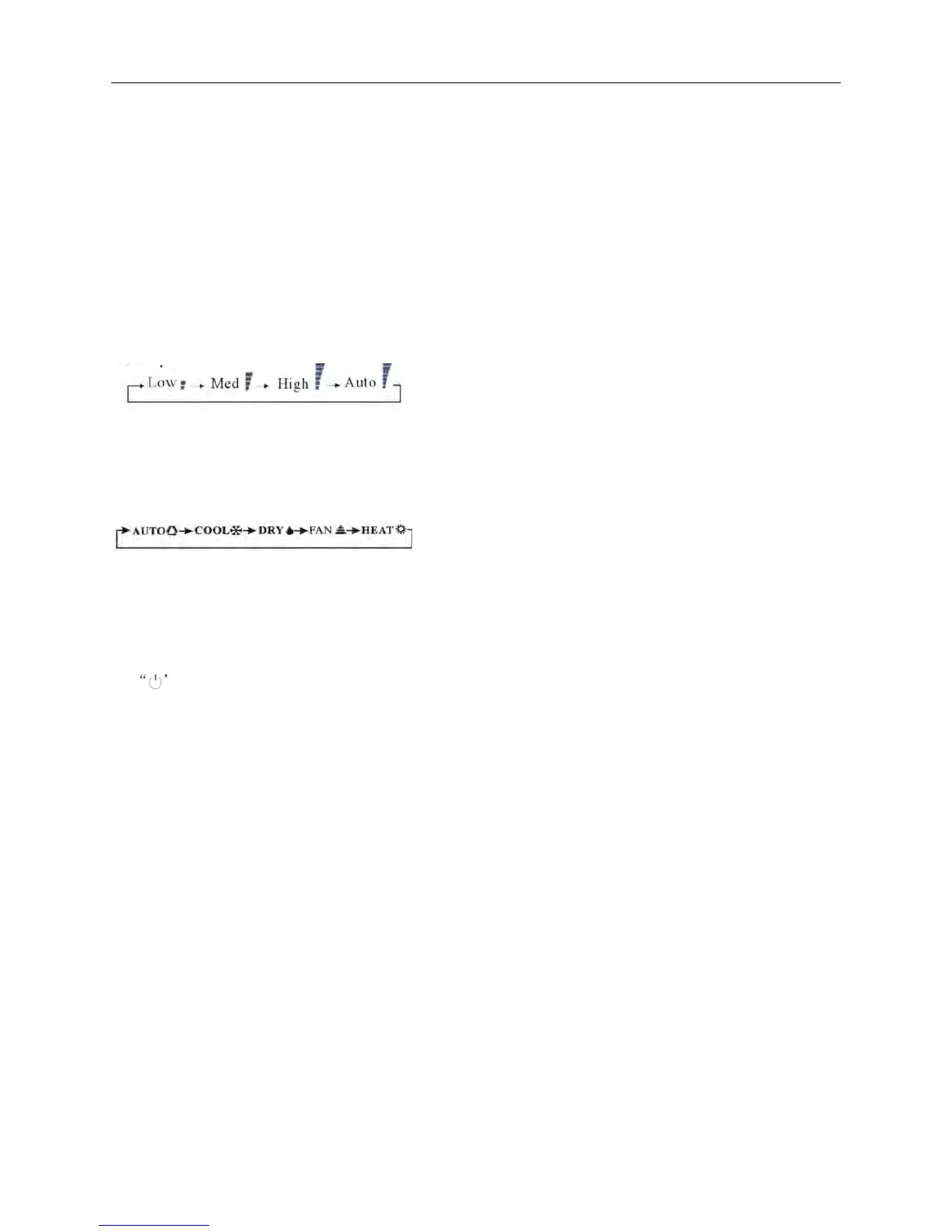
③ “FAN” button
Use to select the indoor fan motor speed: “Power”、 “High” 、 “Low” 、“Mute”
Remark: The floor st
anding type select fan speed only from “Low” to “High”.
④ “MODE” button
Which enables you to select different operation modes after each pressing, the operation
mode will be changed. It shows in the following display:
⑤ “-” button
This button can set room temperature.
Press it on
ce, the temperature decreases 1
℃
. Press it continuously
, the temperature
decreases at the speed of 4
℃
/s.
This function is invalid when the appliance at the Fan and
Auto mode.
⑥
Button
You can st
art the air-conditioner by pressing this button and stop its operation by pressing
it again.



 To Next Page