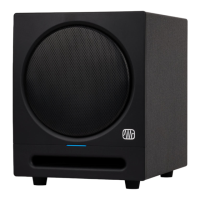
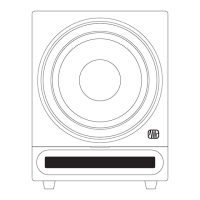
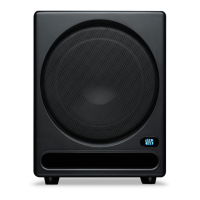
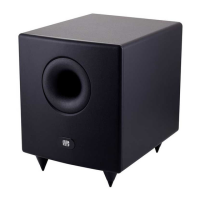
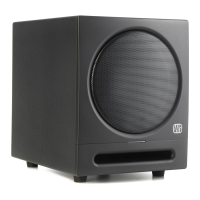
The PreSonus Eris Sub8 is a compact 8-inch active studio subwoofer designed to enhance full-range speakers by providing responsive, defined bass with low distortion. It is an ideal component for 2.1 and surround sound applications, particularly when paired with Eris monitors.
Function Description:
The Eris Sub8 is an active subwoofer featuring an 8-inch paper-composite driver with a high-density rubber surround, housed in a front-ported cabinet. This configuration delivers natural and musical sound, extending the low-frequency response of your audio system without overshadowing the main speakers. It includes a variable low-pass filter (50 to 130 Hz) to seamlessly integrate with various full-range systems. Additionally, an 80 Hz high-pass filter with a defeat switch is provided for satellite connections, allowing the subwoofer to manage frequencies below 80 Hz, thus offloading the main monitors and creating a more linear frequency response. The subwoofer offers both balanced 1/4" TRS and unbalanced RCA inputs and outputs, ensuring compatibility with a wide range of audio equipment. The illuminated logo on the front indicates the power status.
Important Technical Specifications:
- Amplifier Type: Class AB
- Amplifier Power: 50W RMS / 100W Peak
- Driver: 8-inch paper-composite with high-elasticity rubber surround
- Frequency Response: 30 Hz - 200 Hz
- Low Pass Filter Frequency: 50 - 130 Hz (variable)
- Signal-to-Noise Ratio: >98 dB (A-weighted)
- THD: 0.05%
- Power Consumption: 100W
- Standby Power Consumption: <0.5W
- Input Gain Control: -30 to +6 dB
- Polarity Switch: 0° or 180°
- High Pass Filter Switch: On/Off
- Inputs: 2- Balanced 1/4" TRS, 2- Unbalanced RCA
- Outputs: 2- Balanced 1/4" TRS (full range with 80 Hz HPF option), 2- Unbalanced RCA (full range with 80 Hz HPF option)
- Cabinet: Vinyl-laminated MDF, front-ported
- Dimensions (W x D x H): 9.84" (250 mm) x 12.75" (324 mm) x 11.6" (295 mm)
- Weight: 16.3 lbs (7.4 kgs)
- Power: 100-120V~50/60 Hz or 220-240V~50/60 Hz
Usage Features:
The Eris Sub8 offers several user controls for optimal integration into any studio setup:
- Input Gain: This control adjusts the level of the input signal before amplification, allowing users to match the subwoofer's input sensitivity with their audio source.
- Polarity Switch: Reverses the polarity of the input signals (0° or 180°). Users are advised to experiment with both settings to find the position where the bass is loudest, indicating optimal phase alignment with the main monitors.
- High Pass Filter (HPF): When engaged, this filter removes frequency content below 80 Hz from the signal sent to the Sub8's outputs. This is particularly useful for main studio monitors that lack their own high-pass filters, preventing overlapping frequencies and creating a cleaner bass response.
- Low Pass Filter: This variable control (50-130 Hz) determines the upper frequency limit reproduced by the Eris Sub8. If the onboard HPF is enabled, it is recommended to set the Low Pass Filter to 80 Hz. Otherwise, it should be set to the lowest frequency that the main monitors can reliably reproduce for a smooth transition.
- AC Select Switch: Allows users to select the appropriate input-power voltage (100-120V or 220-240V) to match the local power standard. This switch should only be used if the subwoofer is being operated in a country with a different voltage standard than where it was purchased.
- Hookup Diagrams: The manual provides detailed hookup diagrams for various setups, including basic configurations with media players/mobile devices, audio interfaces, and advanced home theater systems, simplifying the connection process.
- Subwoofer Placement Tutorial: Offers guidance on finding the best location for the subwoofer to ensure a natural extension of full-range monitors without exaggerating bass response. It suggests temporarily placing the subwoofer in the listening position, playing bass-heavy music, and walking around the room to find the spot where the bass sounds best, avoiding reflective surfaces or corners that can cause "boomy" sound.
- Level Calibration Tutorial: Provides a step-by-step process for matching the levels of the monitors and the subwoofer using an SPL meter and pink noise. This ensures a consistent listening environment where the subwoofer's output is balanced with the main speakers, preventing it from being too loud or too quiet with different types of music.
Maintenance Features:
The Eris Sub8 is designed with several protection features to ensure reliability and longevity:
- RF Interference Protection: Shields against radio frequency interference, maintaining signal integrity.
- Output-Current Limiting: Prevents excessive current draw, protecting the amplifier and driver.
- Over-Temperature Protection: Shuts down the unit if it overheats, preventing damage.
- Turn-on/off Transient Protection: Safeguards against sudden power surges or drops during power cycling.
- Subsonic Filter: Filters out extremely low frequencies that are inaudible but can waste amplifier power and potentially damage the driver.
- External Mains Fuse: Provides an easily replaceable fuse for protection against electrical faults.
Troubleshooting:
The manual includes a troubleshooting section to address common issues:
- No Power: Advises checking power connections, power conditioners, and contacting PreSonus if the issue persists.
- No Audio: Suggests verifying cable connections, ensuring they are working correctly, and checking the Input Gain control setting.
- Hum: Explains that hum is usually caused by a ground loop and recommends connecting all audio equipment to the same power source, using a power conditioner, and utilizing balanced cables whenever possible. It also advises against running audio cables near power cables and using appropriate cable lengths to minimize interference.
The Eris Sub8 is a robust and versatile studio subwoofer, designed for both professional and home audio enthusiasts seeking to extend the low-frequency capabilities of their monitoring systems with precision and clarity.

 Need help?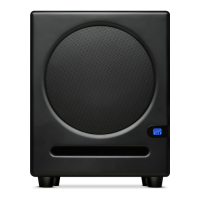

 To Next Page
 General