EasyManua.ls Logo

Prestige APS-25HT - User Manual

Default Icon
24 pages
Print Icon
To Next Page IconTo Next Page
Loading...
Page 1
Model APS-25HT
Owner’s Manual
3 Button Remote Security System
with Anti Hi-Jack Feature
IMPORTANT !
In order to provide you and your vehicle with the highest level of
security, this system is equipped with a dual mode Anti Hi-Jack feature. The
selectable Anti Hi-Jack mode and the secured Anti Hi-Jack mode are described in
this manual. Having a thorough working knowledge of the operation of both these
safety features of your security system will afford you the highest level of personal
protection. We urge you to read this manual completely to take advantage of
all the features included in the security system.
FEATURES :
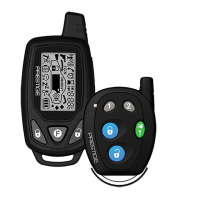
! Two 3 Button Transmitters
! Four Channel Code Learning Scan Deterrent Receiver
! Negative Pulsed Door Lock Outputs
! Selectable Door Lock/Unlock Output Duration
! Selectable Ignition Controlled Lock On/Off
! Selectable Ignition Controlled Unlock On/Off
! Selectable Passive/Active Arming
! Selectable Passive/Active Door Locks
! Selectable Voltage Sensing On/Off
! Selectable Anti Hi-Jack Mode On/Off
! Selectable Hi-Jack Initiation Sequence 15/45 Seconds
! Selectable Secured Mode Anti-Hi-Jack Feature Active or Passive
! Selectable Horn Operation,Siren Operation, Or Both
! Remote Anti Hi-Jack Operation When Programmed
! User Selectable Chirp Delete
! 7 Function LED With Memory
! Intrusion Chirps With Memory
! On Board Light Flash Relay
! (+) & (-) Door Trigger Inputs
! Additional Negative Trigger Input
! Six Tone Multi-Tone Siren
! Starter Inhibit Output W/Relay
! Additional Ignition/Fuel Cut Output (Relay Required)
! Dual Stage Shock Sensor
OPTIONS :
! Remote Trunk Release ( must have electric trunk release )
! Remote Keyless Entry ( must have power door locks )
! Multiple Vehicle Capable
! Remote Starter
! Remote Power Window Roll Up
Question and Answer IconNeed help?

Do you have a question about the Prestige APS-25HT and is the answer not in the manual?

Summary

System Arming Modes

Arming the System - Active

Procedure to arm the security system using the active mode via transmitter.

Silent Arming - Active

Procedure for silent arming of the system via transmitter.

Arming the System - Passive (Automatic)

Procedure for automatic passive arming of the system.

System Protection and Disarming

Protection While the System is Armed

Details on how the system protects the vehicle while armed.

Disarming the System

Procedure to disarm the security system using the transmitter.

Advanced Disarming and Warnings

Silent Disarming

Procedure for silent disarming of the security system.

Intrusion Warning Signals

How the system indicates intrusion attempts.

Eliminating Arm;Disarm Chirps

Procedure to permanently disable or enable arm/disarm chirps.

System Override and Programming

Valet Switch Operation

Using the valet switch to bypass alarm functions temporarily.

Manual Override via Valet Switch

Disarming the system without the transmitter using the valet switch.

Programming Custom Override Code

Instructions for programming a personal override code.

Custom Code Programming Example

Custom Code Programming Example

A step-by-step example for programming a custom override code.

Manual Override and Sensor Control

Manual Override using Custom Code

Disarming the system using the custom override code.

Sensor Defeat from Transmitter

How to temporarily defeat system sensors using the transmitter.

Remote Functions and Panic Operation

Remote Panic Operation

Using the transmitter as a panic switch for emergency situations.

Additional Remote Function (Channel 2)

Activating optional accessories via Channel 2.

Anti Hi-Jack Mode Operation

Additional Remote Function (Channel 3)

Activating optional accessories via Channel 3.

Additional Remote Function (Channel 4)

Activating the Anti Hi-Jack feature via transmitter.

Anti Hi-Jack Mode Operation

Description of the automatic Anti Hi-Jack mode sequence.

Hi-Jack and Secured Mode

Disarming the Hi-Jack Feature

How to disarm the Anti Hi-Jack feature once triggered.

Secured Mode of Operation

Details on the secured mode for enhanced protection.

Secured Mode Details

Entering Secured Mode (Active)

Procedure to enter the secured mode actively.

Exiting the Secured Mode

Procedure to exit the secured mode and resume normal operation.

System Functions at a Glance

Dash LED Indicators

Overview of dash-mounted LED indicator meanings.

Siren Chirp Indicators

Meaning of different siren chirp patterns.

Parking Lamp Indicators

Meaning of parking lamp flash patterns.

Features Activated Overview

List of activated system features.

Prestige APS-25HT Specifications

General IconGeneral
BrandPrestige
ModelAPS-25HT
CategorySecurity System
LanguageEnglish

Related product manuals