9
(4) Place the oven as far away from
radios and TV as possible.
Operation of microwave oven
may cause interference to your
radio or TV reception.
2. Plug your oven into a standard
household outlet. Be sure the
voltage and the frequency is the
same as the voltage and the
frequency on the rating label.
WARNING: Do not install the oven
over a range cooktop or other
heat-producing appliance. If installed
near or over a heat source, the oven
could be damaged and the warranty
would be void.
Accessible surfaces may get hot
during operation.
C
C
O
O
N
N
T
T
R
R
O
O
L
L
P
P
A
A
N
N
E
E
L
L
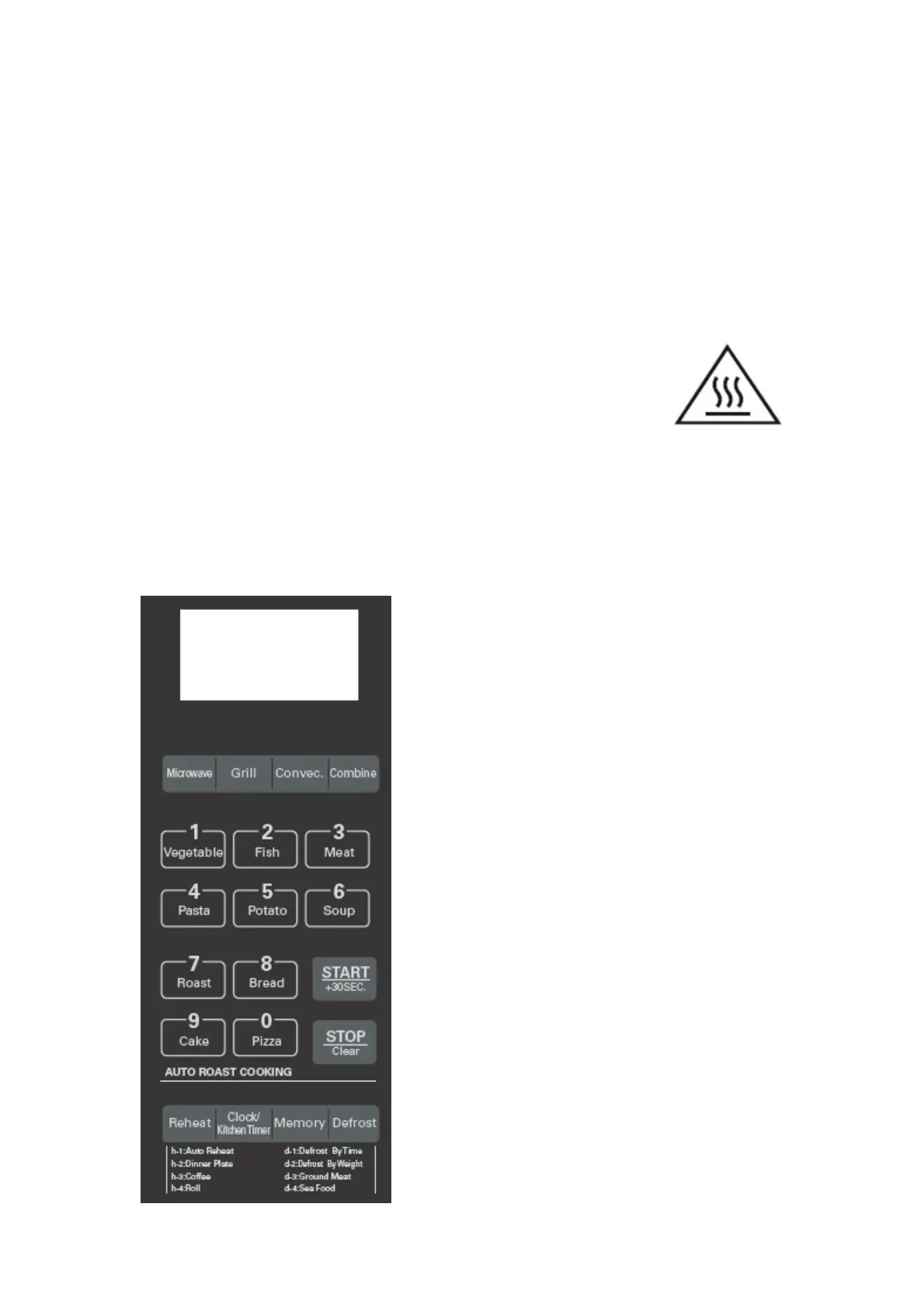
DISPLAY SCREEN
Cooking time, power, indicators and present
time are displayed.
MICROWAVE
Press to set microwave power level.
GRILL
Press to set a grill-cooking program.
CONVECTION
Press to program convection cooking.
COMBINE
Press repeatedly to select one of four
combination cooking settings.
AUTO MENU (0-9 Numeric buttons)
Press one numeric button (0 – 9) to select
auto cook menus or enter time or weight.
START / +30SEC.
Press to start cooking program or set speed
cooking program.
Press to confirm the setting.


 To Next Page