14
Auto Menu
For the food in the following table, it is not necessary to program the cooking
power and time. Take the following steps:
Example: Cook 350g vegetable:
1. In standby mode, press VEGETABLE, and “AUTO” indicator lights will
come on.
2. Press VEGETABLE again to choose weight. “350” will appear on the
display. “g” will come on.
3. Press START/+30SEC. to start cooking. “g” will go out, and “AUTO”
indicator lights will flash.
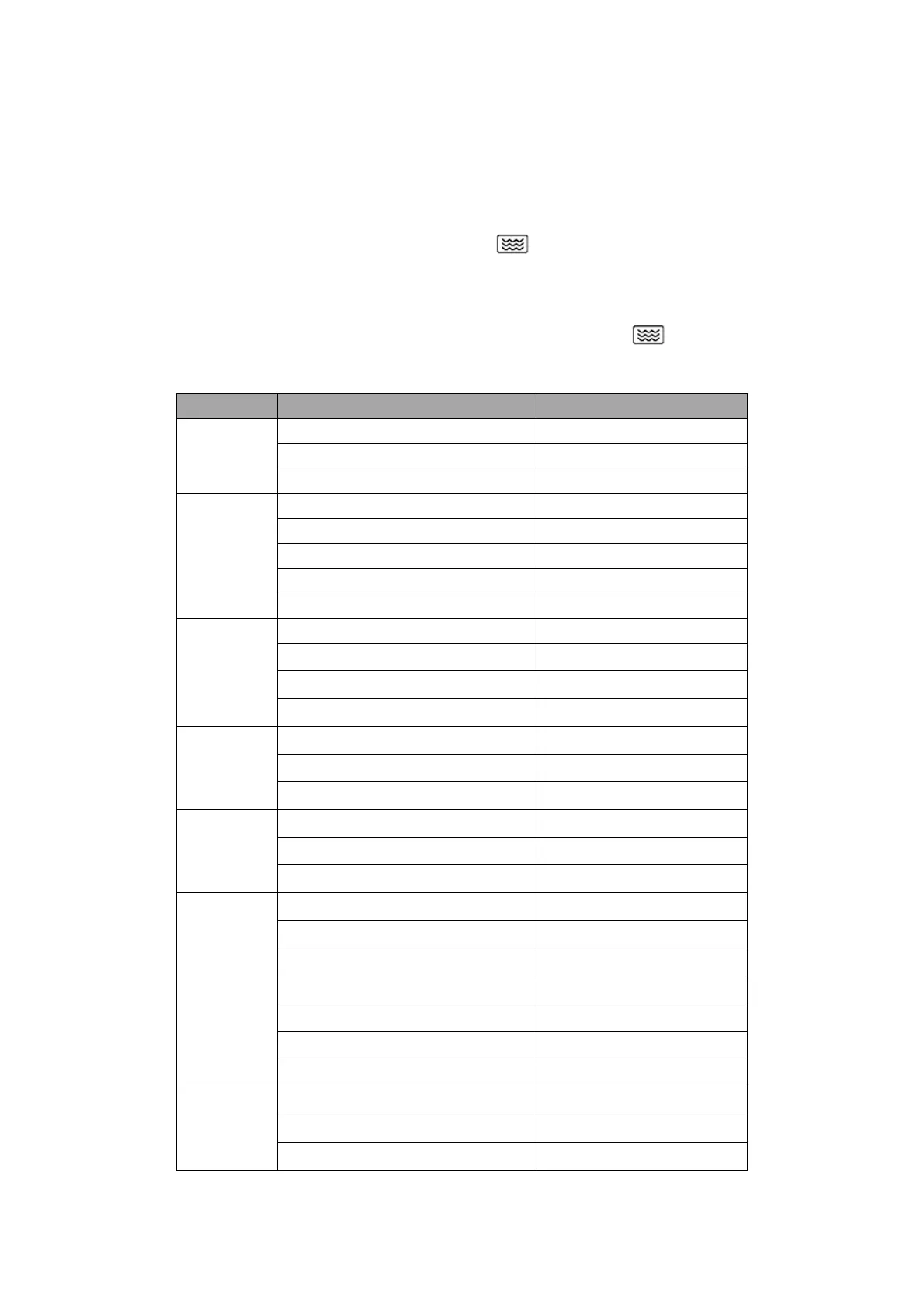
Menu Weight(g) Press Times
Vegetable
150 Once
350 Twice
500 Three times
Fish
150 Once
250 Twice
350 Three times
450 Four times
650 Five times
Meat
150 Once
300
Twice
450
Three times
600
Four times
Pasta
50 (with 450g cold water)
Once
100 (with 800g cold water)
Twice
150 (with 1200g cold water)
Three times
Potato
1 (approximately 230g)
Once
2 (approximately 460g)
Twice
3 (approximately 690g)
Three times
Soup
200 ml
Once
400 ml
Twice
600 ml
Three times
Roast
Chicken
500
Once
750
Twice
1000
Three times
1200
Four times
Bread
50
Once
100
Twice
150
Three times


 To Next Page