132018 Voxx Electronics Corporation. All rights reserved.
Adjusting the Clock and Timer Settings
The clock, alarm clock and programmable countdown timer are accessed through the
Function Menu. Press and hold
F
for 5 seconds to access the function menu, once
you have accessed the feature menu press and release
F
to scroll through each
feature and follow the steps below to adjust the settings for each. Press and hold
F
for 5 seconds to exit the menu.
Clock Hour Press to increase or
OPT
to decrease
Clock Minute Press to increase or
OPT
to decrease
Alarm Clock Hour Press to increase or
OPT
to decrease
Alarm Clock Minute Press to increase or
OPT
to decrease
Alarm Clock Alert Tone Press or
OPT
to change tone
Alarm Clock ON / OFF Press to turn ON or
OPT
to turn OFF
Countdown Timer Hour Press to increase or
OPT
to decrease
Countdown Timer Minute Press to increase or
OPT
to decrease
Shutdown Alert Tone Press or
OPT
to change tone
Countdown Timer ON / OFF Press to turn ON or
OPT
to turn OFF
Remote Start Alert Tone Press or
OPT
to change tone
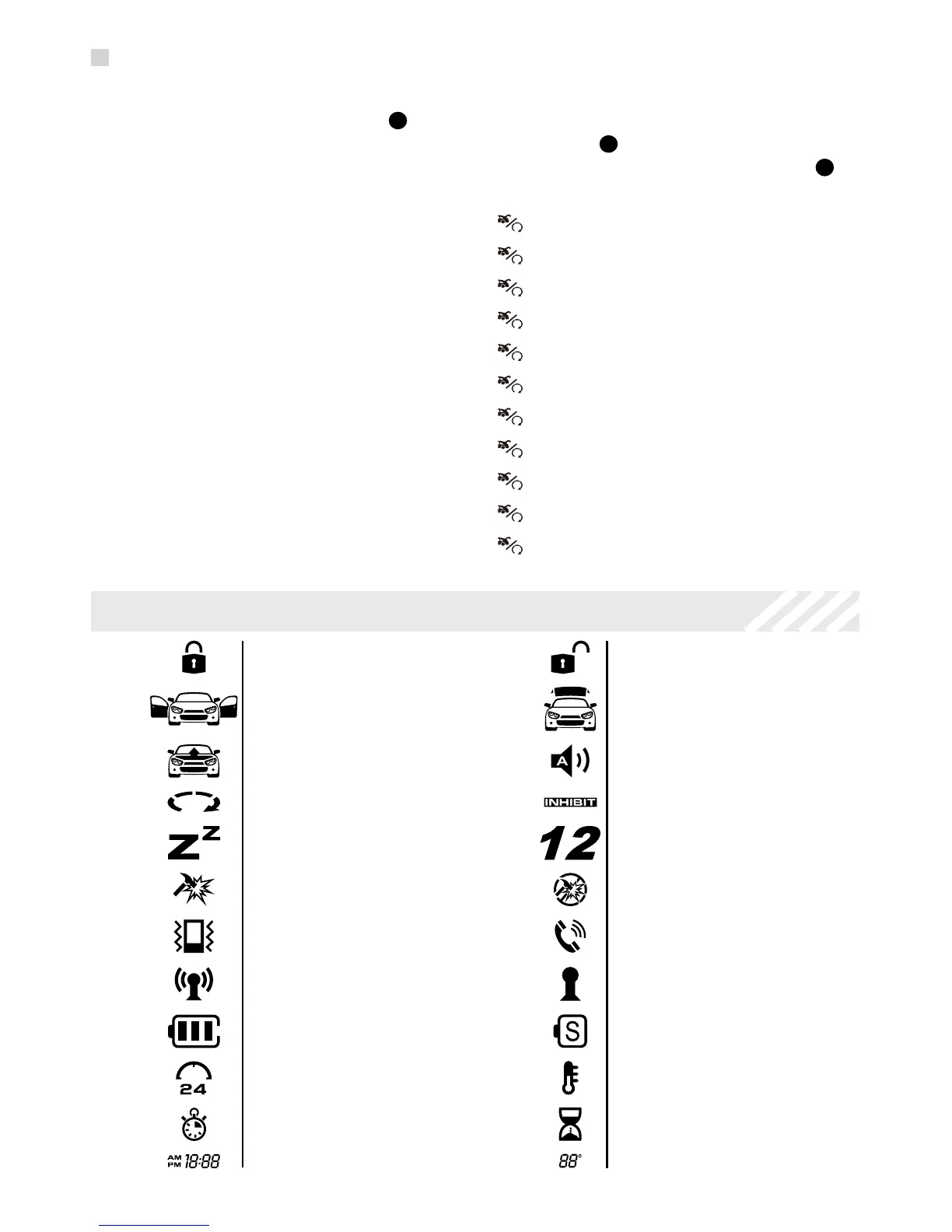
LCD Remote Control ICON’s
Lock / Arm
Door Open
Hood Open
Engine Runnin
Valet Mode
Shock Sensor
Vibrate Mode
Unlock / Disarm
Alarm Clock
Transmitting
Battery Indicator
Timer Start
Time Display
Trunk Open
Alarm Notification
Remote Start Shutdown
1 / 2 Car Mode
Shock Sensor OFF
Remote Page
Out Of Range
Power Save Mode
Temp Start
Count Down Timer
Temp Display



 To Next Page