EN – 4
Basic Operations
Hold and slide for 5 seconds to turn on the device. It will automatically
enter the main menu on Home screen after the start-up screen. The main
menu includes Book list, Audio, Bookmark, Internet, Image, Settings
and Shortcut. Tap on the icon at the main menu to enter the desired mode.
Press
to return to the previous option.
z Books viewed in the past will be displayed at the bottom of the screen.
Tap on
to confirm selection.
Book list
z Tap on
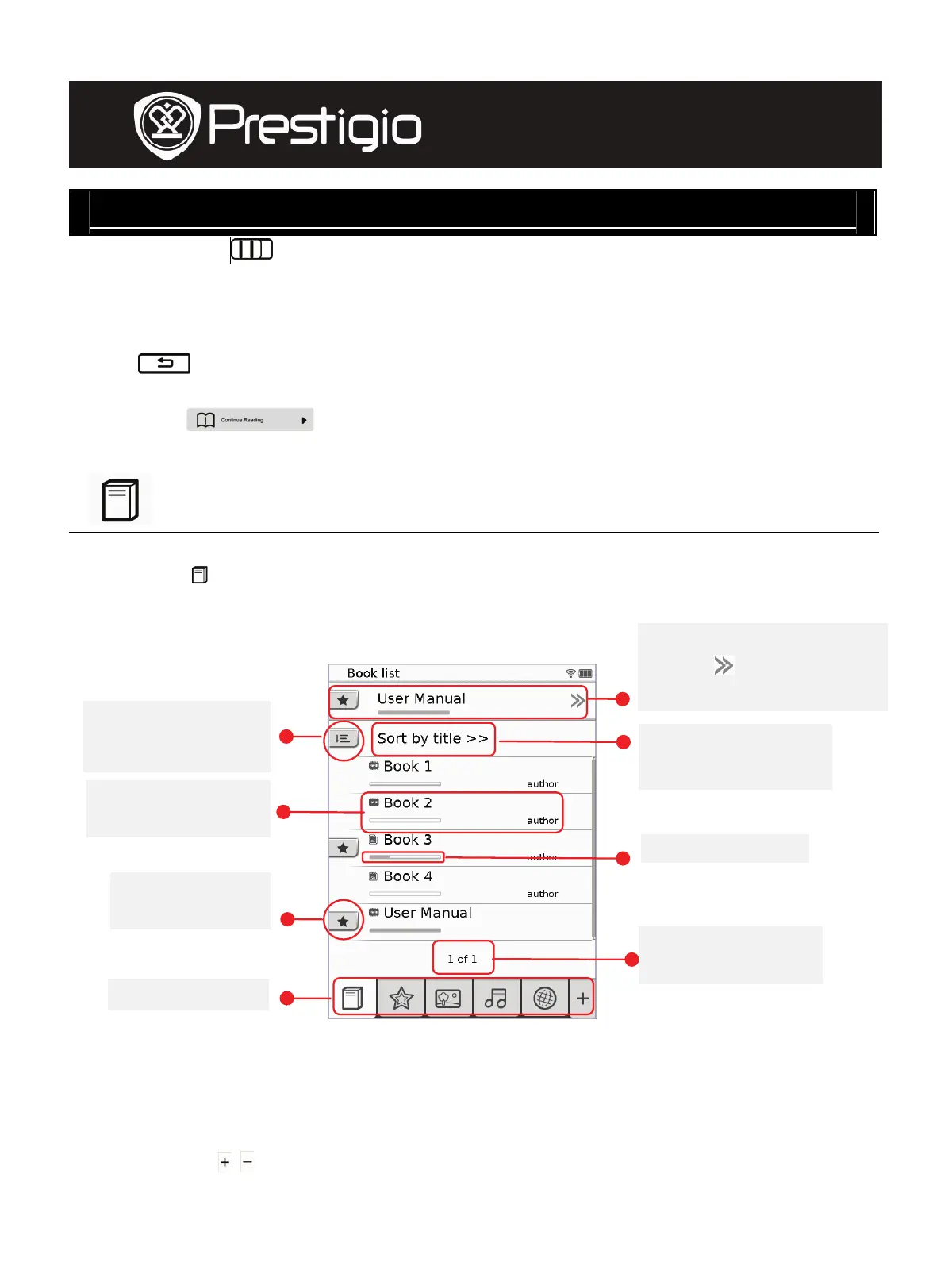
at main menu to enter Book list mode. Please refer to
below diagram for detailed function description:
NOTE:
z Book saved on micro SD card will be displayed in the list. The
device supports the following formats such
as .PDF, .HTML, .TXT, .FB2, and .EPUB.
z Tap on
/ to display/hide the shortcut. Tap on the desired option
on the shortcut to enter the mode directly.
1. Last viewed book
2. Tap to resume
reading.
Sorting items by
type
The current
sorting method
File source, title
and autho
Progress bar
Bookmarks o
notes
Current/total
page
Shortcut
User Manual
Prestigio Libretto
PER5062B










 To Next Page