www.prestigio.com
Camera
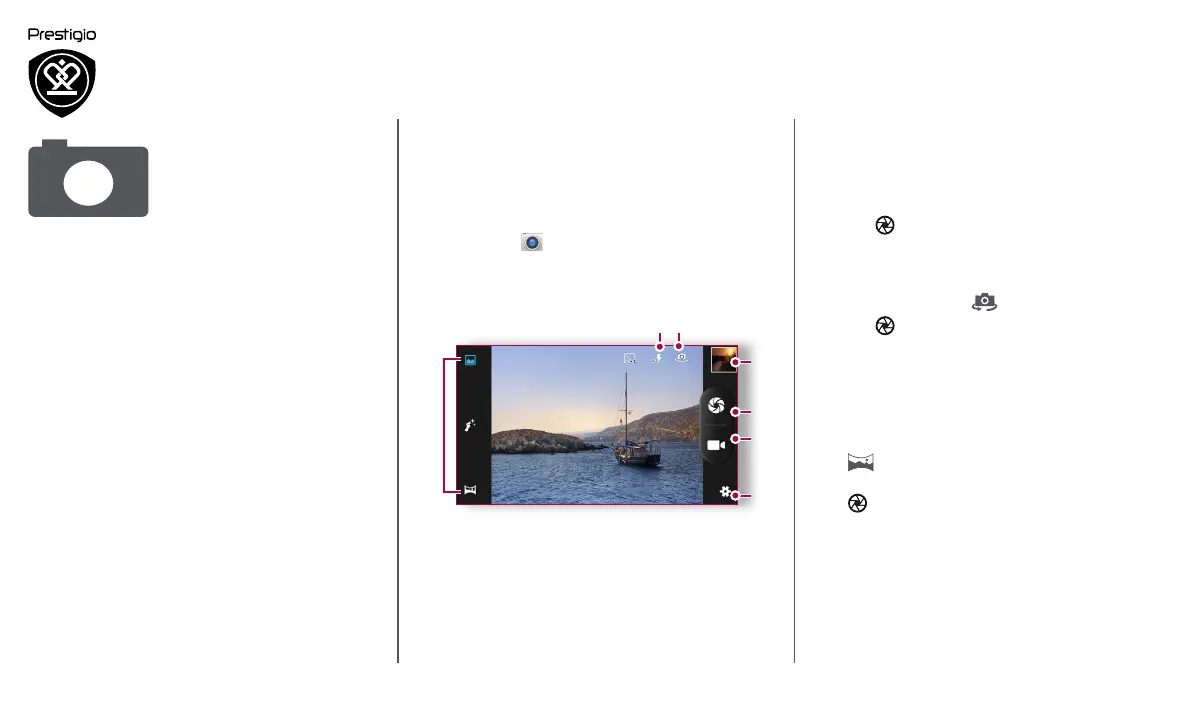
Your camera at a galance
Take a photo
Record a video
Photo and video settigns
Take a photo
1. Turn on the camera.
2. Change the camera setting if necessary.
3. Point the camera at what you want to capture.
4. Tap to capture the photo.
Take a photo of yourself
1. Turn on the camera.
2. On the screen, tap .
3. Tap to capture the photo.
Take a panoramic photo
You can capture anything wide or tall objects in a
single photo with your phone.
1. Turn on the camera.
2. Scroll down the capture modes, and then tap
.
3. When you are ready to take the first shot, tap
.
4. A directional arrow appears. Pan your phone as
smoothly as you can.
5. The camera will stitch the shots into a single
photo.
With your phone, you can take both photos and
videos as desired. In addition to a rear camera,
there is a camera on the front for video calls and
self-portraits.
- To use the camera, on the home screen or list
menu, tap Camera.
Your camera at a galance
2
3
4
1
5
6 7
1. Capture mode
2. Image preview
3. Capture photo
4. Video recording
5. Phone / video settings
6. Flash settings
7. Switch between front/rear camera












 To Next Page