12
USER MANUAL MultiPhone PAP5451 DUO
as a notice in the center of the screen that remains until you acknowledge it.
When you get a new notification, you can open the Notifications panel to see what event
notification or new information you have received. You can also quickly access settings from the
Notifications panel.
- To open the Notifications panel, slide down from the top of the screen.
- To close the Notifications panel, drag up the bar that is on the bottom of the screen.
- To dismiss the notification, tap .
- To enter system settings, tap .
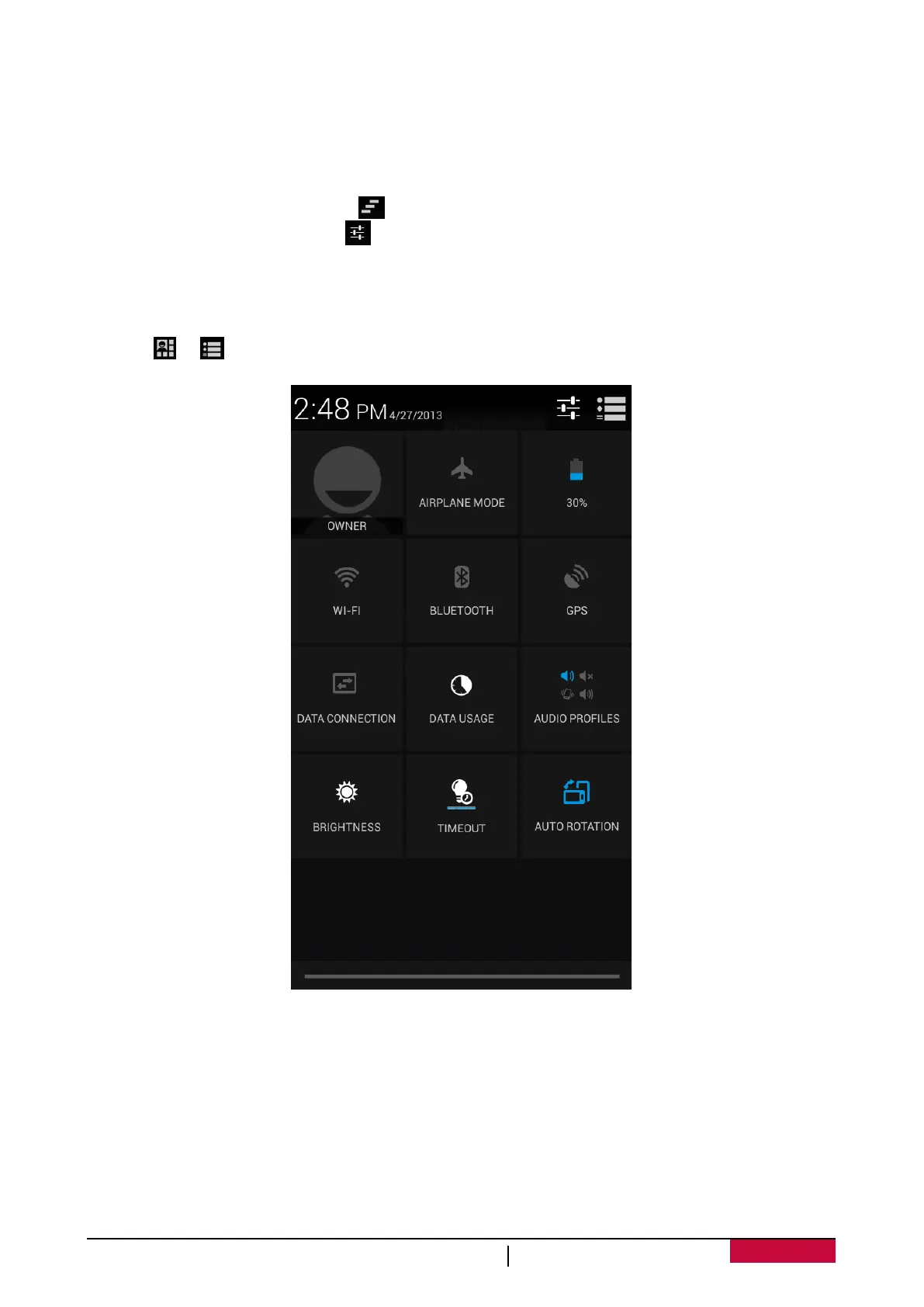
Using Quick Settings
The Quick Settings tab lets you easily turn on Airplane mode, Wi-Fi, and more, and also provides a
quick shortcut to change the mode and set the brightness, auto rotation if slide the tab.
- Tap or to switch between notifications and quick setting list.
You can view your phone’s current status and use the following options:
- Airplane mode: turn on or off your phone's wireless radios.
- Battery: check the battery status.
- Wi-Fi: activate or deactivate the Wi-Fi feature.
- Bluetooth: activate or deactivate the Bluetooth feature.
- GPS: activate or deactivate the GPS feature.
- Data connection: activate or deactivate the data connection.
- Data usage: check the data usage of the data connection.
- Audio profiles: switch to General, Silent, Meeting or Outdoor profiles quickly.












 To Next Page