34
USER MANUAL MultiPhone PAP5451 DUO
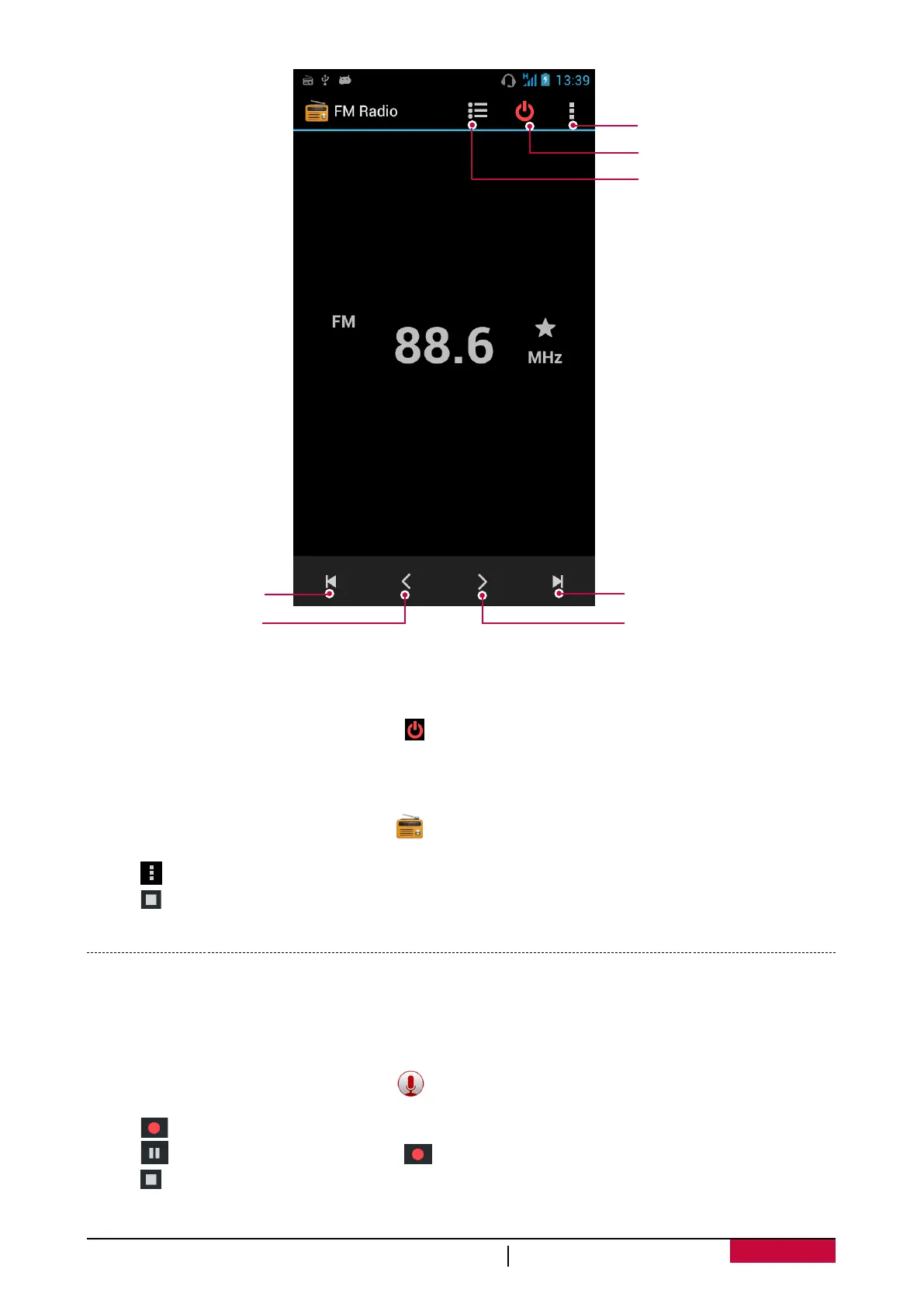
More options.
Turn off FM radio and exit.
Open channel list.
Skip to next channel.
Skip to previous
channel.
Increase the frequence
by 0.1MHz.
Decrease the frequence
by 0.1MHz.
Turn off FM
- You can use other apps while listening to the radio.
- To turn off FM Radio completely, tap .
Record radio programs
You can record a radio program when listen to it.
1. On the home screen or list menu, tap .
2. Tune to your desired radio station.
3. Tap > Record FM.
4. Tap to stop recording.
5. Enter a name for the voice and tap Save.
Voice recorder
Use Voice Recorder to capture information during lectures, interviews, or even to create your own
audio log.
Record a voice memo
1. On the home screen or list menu, tap .
2. Hold the microphone near the sound source.
3. Tap to start recording a voice clip.
4. Tap to pause voice recording. (Tap to resume voice recording.)
5. Tap to stop recording.
6. Tap Save.












 To Next Page