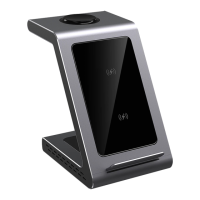
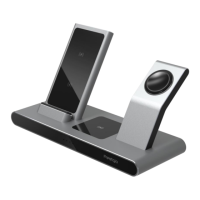
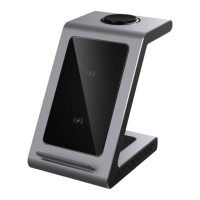
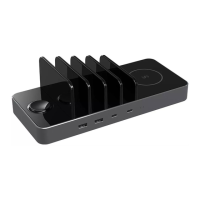
The Prestigio ReVolt A6 is a wireless charging station designed to charge up to six devices simultaneously. It features a laconic design with a metal gray body and tempered glass charging surfaces, ensuring stability and preventing slippage.
Function Description
The ReVolt A6 serves as a centralized charging hub, eliminating the need for multiple chargers and cables. It offers both wired and wireless charging capabilities. For wired charging, it includes four fast-charging ports: two USB-A ports and two USB-C ports. The station comes with two USB-C/USB-C cables and two USB-C/USB-A cables to facilitate charging various devices.
Wireless charging is a key feature, with two dedicated wireless interfaces. One is a built-in charger specifically for the Apple Watch, and the other is a Qi-standard wireless charging pad for smartphones and headphones. Devices can be charged both vertically and horizontally on the wireless pads.
The station is compatible with iPhone models and all devices that support the Qi standard. It also includes a module for fast charging AirPods.
Important Technical Specifications
General Information:
- Item number: PCS106A_SG, PCS106A_UK
- Color: Black, gray
- Case Material: Metal, tempered glass
- Device compatibility: Apple, Qi-compatible devices
- Maximum number of simultaneously connected devices: 6
- Cable: Removable
- Charging/Power Input Connector: C7
- Fast charging technology: Qualcomm Quick Charge 2.0, Qualcomm Quick Charge 3.0
- Wireless charging standard: Qi
Basic Parameters:
- Input voltage: AC 100-240 V, 50-60 Hz
- USB-A ports output: 5V3A/9V2A/12V1.5A
- USB-C Ports output: 5V3A/9V2.2A/12V1.5A (PD20W)
- Wireless smartphone charging: 10 W
- Wireless headphone charging: 5 W
- Wireless charging for smart watches: 2.5 W
- Allowable distance when using the wireless module: 2-5 mm
Dimensions and Weight:
- Dimensions (L × W × H): 232 mm × 100 mm × 76 mm
- Net Weight: 400 g
Other Information:
- Operating Temperature: -10...+40 °C
- Permissible air humidity during operation: Up to 95%
- Warranty period: 1 year
- Lifetime: 2 years
- Declarations: CE, RoHS
Package Contents:
- ReVolt A6 wireless charging station: 1 pc.
- Power cord (9 V/2 A): 1 pc.
- USB-C/USB-C cable (1.5 m): 2 pcs.
- USB-A/USB-C cable (1.5 m): 2 pcs.
- Quick start guide: 1 pc.
- Warranty card: 1 pc.
Usage Features
Operating Instructions:
- Power Connection: Connect the station to a power supply using the included power cord.
- Wired Charging: Connect up to four devices to the USB-A [3] and USB-C [4] ports using the provided cables. Place these devices between the ribs on the special pads [8].
- Wireless Charging (Smartphones/Headphones): Place a smartphone or headphones that support wireless charging on the appropriate pad [7]. The wireless charging indicator [5] will flash slowly in blue, indicating charging.
- Wireless Charging (Smart Watches): Place a smart watch that supports wireless charging on the dedicated pad [2]. The wireless charging indicator [6] will turn solid blue, indicating charging.
LED Indicators (Table 1):
- Charging device indicators:
- They don't burn: The station is not connected to the power supply.
- Slowly flashing blue: One or more devices are being charged wirelessly.
- Flashing blue rapidly: Foreign object protection has been triggered.
Safety Rules:
- Use the device only for its intended purpose.
- Avoid placing metal objects (paper clips, coins, keys, etc.) or plastic cards between the charger and the charging station during wireless charging to prevent damage.
- Do not disassemble or modify the unit; service should only be performed by authorized centers.
- Discontinue use and contact a service center if any part is defective or damaged.
- Smartphones can be charged in cases up to 4 mm thick. Metal accessories on the smartphone or case should be avoided.
- Do not expose the station to moisture, oils, chemicals, or other organic liquids. Avoid use in high-humidity environments like bathrooms.
- Do not use the device in excessively dusty environments.
- Keep the device and accessories out of reach of children.
Power Adapter Safety Rules:
- Use only the original power adapter and USB cable provided. Using non-original accessories may void the warranty, cause malfunctions, or fire.
- Ensure the output voltage of the power adapter strictly matches the device's consumed voltage.
- The current delivered by the power adapter should be equal to or slightly greater than the rated current for the device.
- Match the polarity, configuration, and size of the power adapter cable connector to the device's power port.
- Do not use the power adapter for incompatible devices.
- Do not disassemble the power adapter.
- Do not plug the power adapter into the mains before connecting it to a suitable device.
- Avoid liquid contact with the power adapter.
- Do not use power adapters showing signs of corrosion or overheating.
- To prevent overheating, do not cover the power adapter with clothing or other objects.
Maintenance Features
Care Recommendations:
- No special maintenance is required during operation, but adherence to safe use rules is important.
- Periodically clean the device of dirt and dust with a soft, dry cloth or alcohol-free wipes suitable for office equipment.
- Repairs should only be performed at authorized service centers.
Warranty and Service:
- The manufacturer's warranty is one year from the date of retail sale.
- For warranty service, the warranty card must be correctly and completely filled out by the seller, with a clear indication of the seller's stamp. Sales receipts or other proof of purchase are also acceptable.
- The warranty applies only to the first purchaser and is valid only in the country of purchase.
- Contact an authorized service center before the warranty period expires if a defect is suspected, providing the device and proof of purchase.
Limitations of Liability:
- Free warranty service is not applicable for damages caused by acts of God, accidents, negligence, intentional actions of the buyer or third parties, exposure to extreme environmental conditions, corrosion, or ingestion of foreign substances.
- Warranty is void if the device has been opened, altered, or repaired by unauthorized personnel, or if serial numbers/model names are removed or illegible.
- Damages from improper use, normal wear and tear, or non-compliance with operating instructions are not covered.
- The manufacturer is not liable for consequential damages, loss of profit, or business interruption due to device defects.
- Prestigio products are not designed for "vital tasks" applications where equipment failure could result in harm to human health or death.
Storage, Transportation, and Disposal:
- The product and accessories must be transported in their original packaging.
- Store the device according to applicable regulations.
- In accordance with WEEE regulations, electrical and electronic products must be collected separately at the end of their service life and not disposed of with unsorted municipal waste.
- Dispose of unusable devices at a local recycling facility according to applicable laws.
- For recycling information, contact your household waste disposal service or a building/hardware store, or the Ministry of Emergency Situations.


 To Next Page

 General