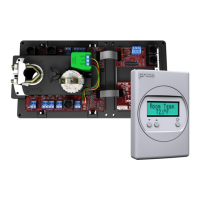
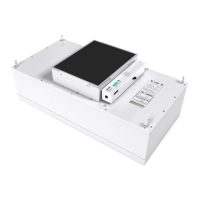
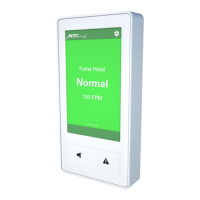
The Price Pressure Control Valve (PCV) is a device designed to control duct static pressure in HVAC systems. It can be configured for either bypass control or downstream throttling control, offering flexibility for various system designs.
In bypass control, the PCV maintains a constant supply duct pressure by redirecting excess air from the supply duct to the return duct. This is particularly useful in "open return" systems where the return side of the PCV is open to the plenum, allowing bypassed air to enter the ceiling plenum. For ducted return systems, the PCV directs bypassed air back to the air handling unit. When using ducted returns, it's important to consider potential coil freezing if too much low-temperature air is returned, or tripping of heat high-temp limits if too much warm air is returned in heating mode. Air handlers should be equipped with a low-temp cutout to prevent freezing.
Downstream throttling control is employed to isolate low-pressure branches of ductwork from a higher-pressure main system. This is common for VAV diffusers that require lower inlet static pressure to prevent noise. In this mode, the PCV holds back excess pressure from the main system, closing its damper as static pressure rises due to VAV diffusers modulating closed. Conversely, as VAV diffusers open, the PCV damper opens to maintain constant duct pressure. This method requires a system bypass PCV or VFD to control the overall system static.
Key Technical Specifications:
- Power Requirements: 24VAC, 47-63 Hz 6VA (excluding output loading), NEC Class II.
- Ambient Ratings: 32° to 131°F (0° to 55°C), 10 to 90% RH (non-condensing).
- Outputs:
- 24VAC Binary Output: Max 0.5Amps each, MAX 1.85A total. Switched HOT or Switched COMMON for Fan, Stages of heat or heat open/close (x3), Cooling, Damper CW, Damper CCW.
- Analog 0-10VDC (x4): Max 10mA each for Fan (ECM), Heat, Cool, Aux.
- Inputs:
- Thermistor Sensor (10k Type J thermistor).
- Analog 0-10V inputs (x2), 20k ohm input impedance.
- Thermostat Inputs, Room Setpoint Dial.
- Temperature Sensor (10K Type J Thermistor) with an accuracy of +/- 0.5°F from 55°F to 85°F (+/ 0.25°C from 13°C to 25°C).
- Pressure Transducer (Kavlico Differential transducer) with a pressure range of 0-2".
- Communication Ports: BACnet MS/TP Connection (optional) with communication speeds of 9,600, 19,200, 38,400, 76,800 (default). Maximum recommended devices per MS/TP segment: 30 devices. Also includes a port for local setup using Price USB LINKER service tool.
- Size: 11" x 5.75" x 2.75".
- Weight: 1.8lb. (816g).
Usage Features:
- PCV Sizing: For correct sizing, PCVs should be capable of bypassing 2/3 of the system design airflow at 1000-1500 FPM. The damper area can be calculated using the formula:
PCV Damper Area in² = (2/3 * (Airflow CFM) / Velocity FPM) * 144. It's recommended to calculate damper size with lower velocity first, increasing it up to 1500 FPM if physical constraints require.
- Installation: The PCV consists of a damper (often a Price model RDV) and a PIC controller. It should be installed on the supply duct, either between supply and return for bypass or directly in the supply duct before the first VAV box for throttling. A static pressure probe, included with the PCV, needs to be installed about 2/3 of the way down the main supply duct run and connected to the HI side port of the transducer on the PIC board with 1/4" pneumatic tubing. The LO side port should be open to the atmosphere.
- Power-up: The PCV controller requires 24VAC power. If a transformer is supplied, apply the appropriate line voltage. If a Price Power Module (PPM) is used, plug the RJ12 cable into the power jack. The secondary of any transformer must be earth grounded.
- LCD Set-up Tool: An LCD-SETUP tool is required to set the static pressure setpoint and other parameters. It connects to the PIC controller's Service Port. An existing LCD stat from a zone controller can also be used with a CAT-5E (NETC35) cable.
- Mounting: The actuator U-bolt slides over the damper shaft, and a white plastic keeper secures the back end to prevent movement while allowing "float" to avoid binding. The damper shaft and actuator should be rotated through their full 90° range of motion before tightening. The PCV calibrates on power-up.
- Display Navigation: The LCD display provides access to various menus for configuration and monitoring.
- Info Menu: Shows current pressure reading, supply air temperature (if probe present), damper position (0-100%), air handler status, BACnet MAC address, and Device Instance.
- Service Menu: Accessed by holding the 'Enter/Menu' button for 5 seconds and entering a passcode (DOWN, UP, UP, DOWN). This menu allows changes to application type, setpoint limits, discharge air temperature settings, input configurations, output settings (FAN, HEAT, COOL), BACnet addresses, stat setup (backlighting, sounds, motion sensor), and P/C setup (pressure setpoint, deadband, damper adjustment).
- Application Menu: Pre-set for "Pressure Controller" but offers other options like Air Terminal, Fancoil (2 or 4 pipe), Dual Duct, Exhaust Box, Flow Follower, Mixing Box DAT, and CO2 Tracking.
- Setpoint Menu: (Not applicable to pressure controller applications) Allows setting low/high limits, temperature units, night heat/cool setpoints, proportional band, and day differential.
- Discharge Air Temperature Menu: (Requires thermostat connection) Configures DAT control mode (HEAT/COOL recommended), cooling/heating setpoints, service time, step division, step maximum, and differential.
- Input Menu: Configures contact closure for various functions like output halt, binary cool/heat/fan disable, analog idle settings, damper full close/open, and occupied/unoccupied states.
- Output Menu – Heat: Configures reheat type (Binary, Hot Water, Binary/PWM), drive time, heat stage trip points, AF interlock, reheat fail safe, and analog heat min/max/idle voltages.
- BACnet Menu: Configures MAC address, Device Instance, and Baud Rate. MAC address can be set via hardware DIP switch or software (STAT). Device Instance must be unique on the building site.
- Stat Setup Menu: Configures motion sensor settings (enable/sensitivity), HVAC and lights timeout, LCD backlight (always on/off/button push), backlight color, sound options, and controller name.
- P/C Setup Menu: Allows adjustment of pressure setpoint, deadband, damper runtime, max step, Airflow Fail NSB (Night Setback) enable, and unoccupied damper position.
Maintenance Features:
- Troubleshooting:
- No Power/Not Responding: Check thermostat indication light/LCD, then PIC controller green blinking light. Verify 24VAC power with a multimeter. Cycle power.
- Damper Acts Erratically: Check actuator mounting, ensuring damper is fully closed when actuator is in closed position. Verify set screw on damper shaft is tight and no slipping. Confirm actuator wiring (green to COM, red to CW, yellow to CCW). Ensure static pressure probe is connected to HI (RED) port and LO (Green) port is open to atmosphere.
- BACnet Communication Errors:
- Wiring: MS/TP networks require specific wire (1 balanced twisted pair, low capacitance, plenum rated, 100-120 ohm, balanced). CAT5/5E/6 cables are suitable. Price recommends Orange Compliment for (+), Orange for (-), and Brown/Brown Compliment for NET COM. NET COM must be wired.
- Termination: Networks must be terminated twice (beginning and end) with a 100 ohm resistor across the + and - lines to reduce reflections and noise. Price BACnet MS/TP to IP Router has built-in termination.
- Network Configuration: MS/TP must be wired in a daisy chain configuration. Star, Bus, or "T" configurations lead to unreliable networks.
- Polarity: Correct polarity is critical. Positive terminals must have the same color wire throughout the network, and similarly for negative terminals.
- Binary Address: Each device needs a unique MAC address (1-99) set via DIP switches or LCD thermostat.
- Grounding and 24VAC Polarity: Proper grounding is essential for MS/TP network reliability and to prevent voltage spikes. Ground every 24VAC transformer common/neutral to earth ground. Flipping 24VAC HOT and COMMON will stop BACnet MS/TP communication, even if the controller powers up.
- Baud Rate: All devices on the network must run at the same speed. Price controllers default to 76800 baud but can be changed to 38400, 19200, or 9600. Lower baud rates are only recommended when integrating with devices from other manufacturers with lower maximum speeds.
- Device Instance: A unique number identifying a device within a building, set via LCD Thermostat or LCD-SETUP tool. The final Device Instance is calculated based on MAC Address, Tier1 (x100), Tier2 (x10,000), and Tier3 (x1,000,000) multipliers.
- Controller Restart: After changing BACnet settings, the controller will restart automatically (if set via software) or manually (by cycling 24VAC power if set via hardware DIP switches).



 To Next Page
 General