Jet 2 HD www.pridemobility.com 23
VI. DISASSEMBLY
Seat Removal
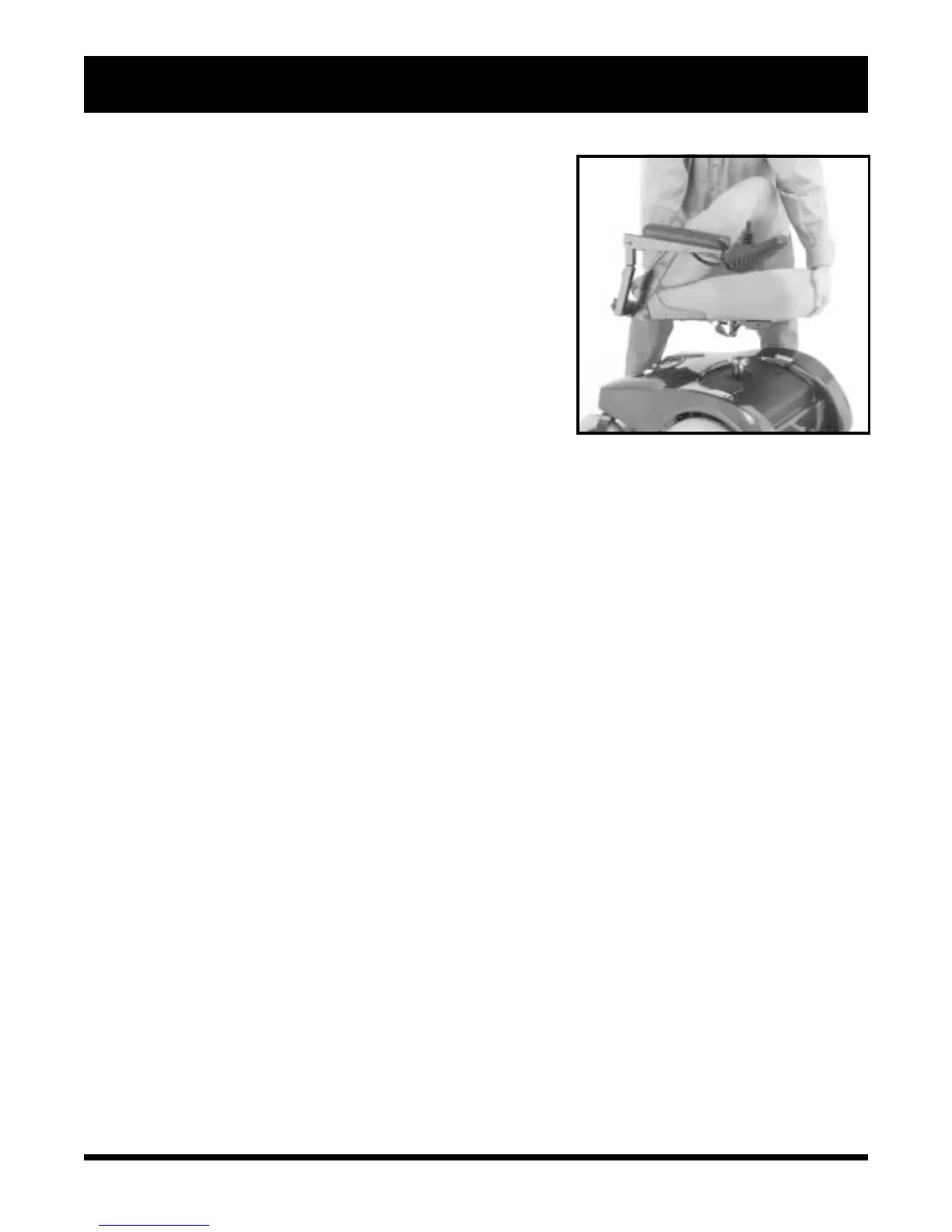
You may wish to remove the seat for transportation. See figure 20.
To remove the seat:
1. Turn off the power to the controller.
2. Make sure your power chair is not in freewheel mode. See III.
“Your Power Chair.”
3. Unplug the connectors from the electronics tray.
4. Push the lever located underneath the seat toward the front of the
seat. If the controller is on the right, swivel the seat clockwise
and then pull the seat upward. If the controller is on the left,
swivel the seat counterclockwise and then pull the seat upward.
Body Shroud Removal
The body shroud is a one-piece, molded plastic body that covers the
power base frame. It helps protect the power chair components from
the environment. You must remove the body shroud in order to change
the batteries and check the cable connections.
Figure 20. Seat Removal
To remove the body shroud:
1. Turn off the power to the controller.
2. Make sure your power chair is not in freewheel mode. See III. “Your Power Chair.”
3. Unplug the connectors from the electronics tray.
4. Remove the seat.
5. Lift the body shroud straight up. The body shroud is attached to the metal frame by a reusable fastener. The
body shroud should lift up easily.



 To Next Page