28 www.quantumrehab.com Quantum 6000
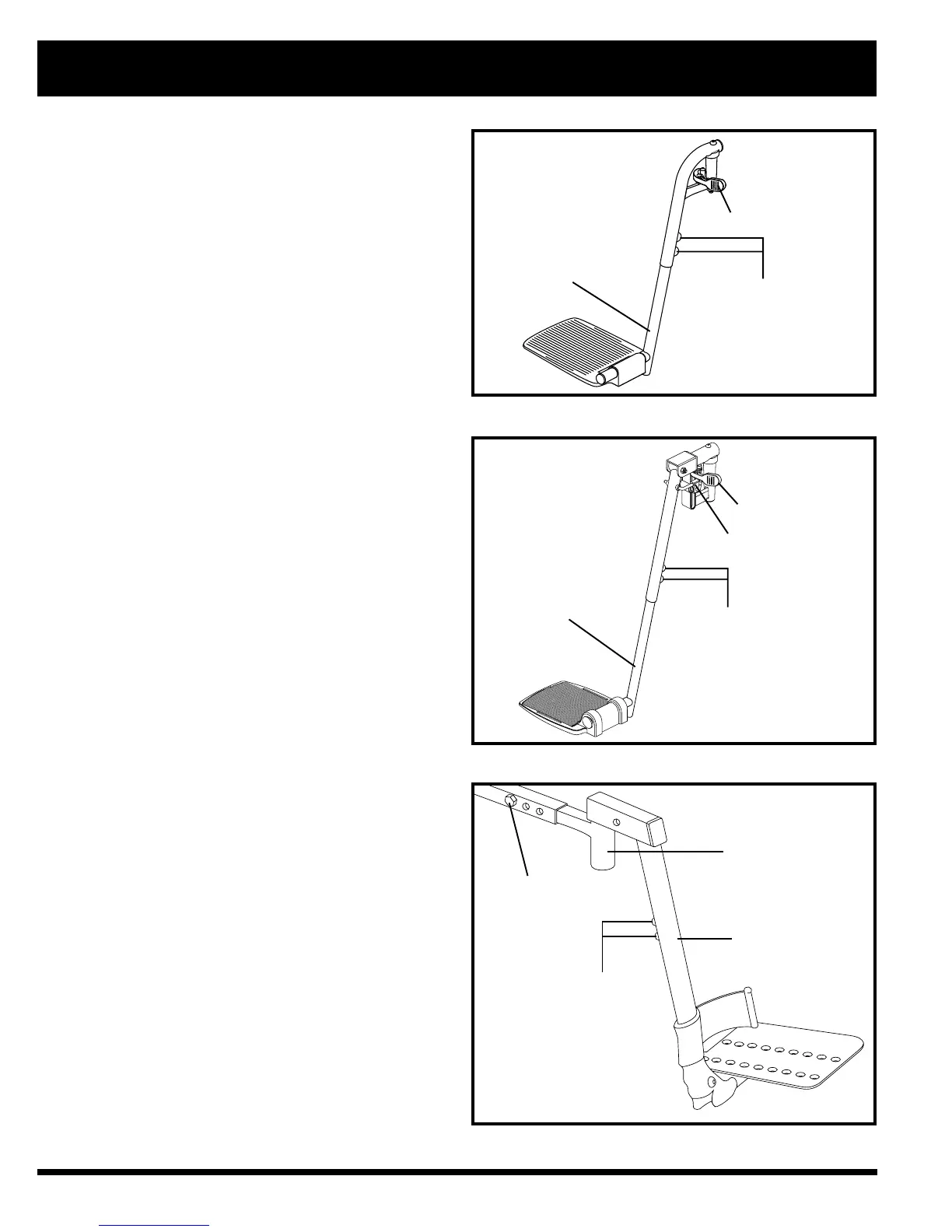
Figure 23. Swing-Away Footrests
ADJUSTMENT
SCREWS
FOOTREST
EXTENSION
SFR RELEASE LEVER
ADJUSTMENT
SCREWS
RELEASE LEVER B
Figure 24. Elevating Leg Rests
RELEASE LEVER A
LEG REST
EXTENSION
Swing-away Footrests
Swing-away Footrests (SFRs) enable you to rotate the foot-
rests to the side before you transfer onto or off or your power
chair. See figure 23.
To rotate the SFRs:
1. Push in the release lever.
2. Rotate the SFRs.
To adjust the SFR length:
1. Remove the two adjustment screws from the side of
each footrest extension.
2. Slide the footrest up or down to the desired length.
3. Reinstall the two adjustment screws.
Elevating Leg Rests
Elevating Leg Rests (ELRs) offer an infinite range of ad-
justment for the leg angle and a footrest adjustment range
of 30-48 cm. See figure 24.
To rotate the ELRs:
1. Push in release lever A.
2. Rotate the ELRs.
To adjust the ELR angle:
1. Push down release lever B.
2. Move the leg rest to the desired angle.
To adjust the ELR length:
1. Remove the two adjustment screws from the side of
each leg rest extension.
2. Slide the leg rest up or down to the desired length.
3. Reinstall the two adjustment screws.
Heavy Duty Drop-in Leg Rests
You can adjust the forward/back position, as well as the
length of the heavy duty drop-in leg rests. See figure 25.
To adjust the forward/back position:
1. Remove the adjustment bolt from each side rail.
2. Move the leg rest hanger in or out to the desired position.
3. Align the adjustment holes in the leg rest hanger with
those in the side rail.
4. Reinstall the adjustment bolts to secure the leg rest
hangers.
V. COMFORT ADJUSTMENTS
ADJUSTMENT BOLT
ADJUSTMENT SCREWS
Figure 25. Heavy Duty Drop-In Leg Rests
LEG REST
HANGER
LEG REST
EXTENSION



 To Next Page